
Participant
July 10, 2023
Answered

Can't transcribe audio track in new version?

  • July 10, 2023
  • 2 replies
  • 569 views

In recent premiere updates, the Text panel has been revised and honestly I can't say its for the better. 


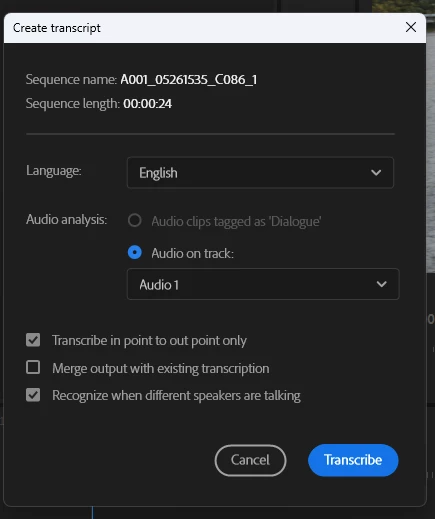
I used to be able to select an In/Out point, solo an audio track, and transcribe that into the captions tab. Now it requires me to select a source to transcribe. Please for the love of god how do I go back without reverting versions?

Old method (preferred): 
 

New updates (bad): 
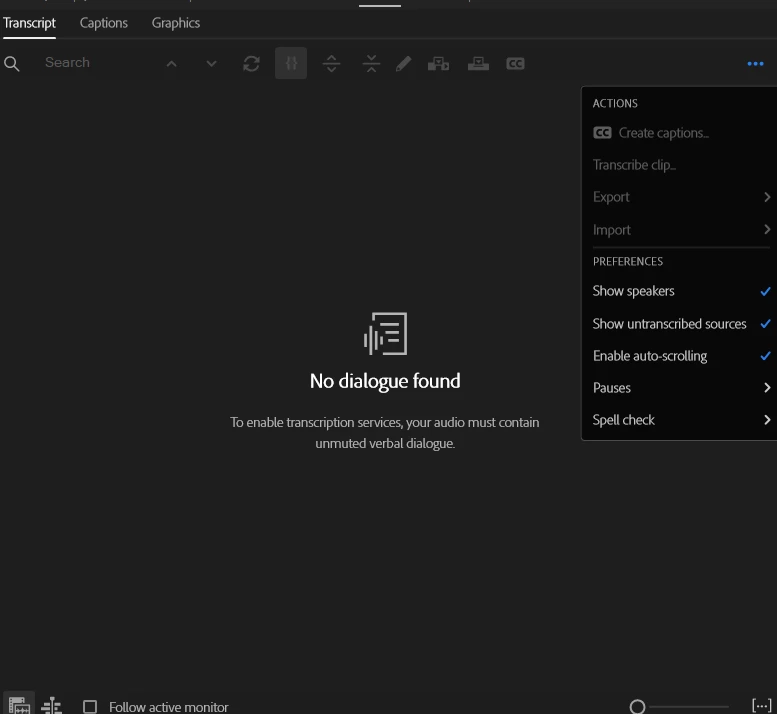
I cannot "create transcription" like I used to be able to. It's requiring a dialogue to be found or a source clip to use. 

This topic has been closed for replies.
Correct answer Stan Jones

@ramiiii,


Sorry I missed this post.


You do not have to use the new source media transcription. See my post here on how to just use the "old" process.

https://community.adobe.com/t5/premiere-pro-discussions/the-updated-transcription-tool-is-massive-overkill/m-p/13825750#M465182


In your second screenshot, lower left, you can see that you have "follow active monitor" unchecked and that the "Source Monitor" is active. Just leave that selection off, but pick "Program Monitor." Then with a timeline active, switch to the Transcription tab, 3 dot menu, and pick "static transcription."


Stan


2 replies

Stan Jones
Community Expert
Stan JonesCommunity ExpertCorrect answer
Community Expert
August 3, 2023

@ramiiii,


Sorry I missed this post.


You do not have to use the new source media transcription. See my post here on how to just use the "old" process.

https://community.adobe.com/t5/premiere-pro-discussions/the-updated-transcription-tool-is-massive-overkill/m-p/13825750#M465182


In your second screenshot, lower left, you can see that you have "follow active monitor" unchecked and that the "Source Monitor" is active. Just leave that selection off, but pick "Program Monitor." Then with a timeline active, switch to the Transcription tab, 3 dot menu, and pick "static transcription."


Stan


ramiiiiAuthor
Participant
August 28, 2023

Thank you. Seems like a lot of workaround to use a simple feature. 

A3user
Inspiring
July 19, 2023

I would also like to have the option to just transcribe a section of the audio

ramiiiiAuthor
Participant
August 2, 2023

bump?