
Cannot export video
I am having an issue exporting video from my premiere pro. (the error message screenshot is attached)
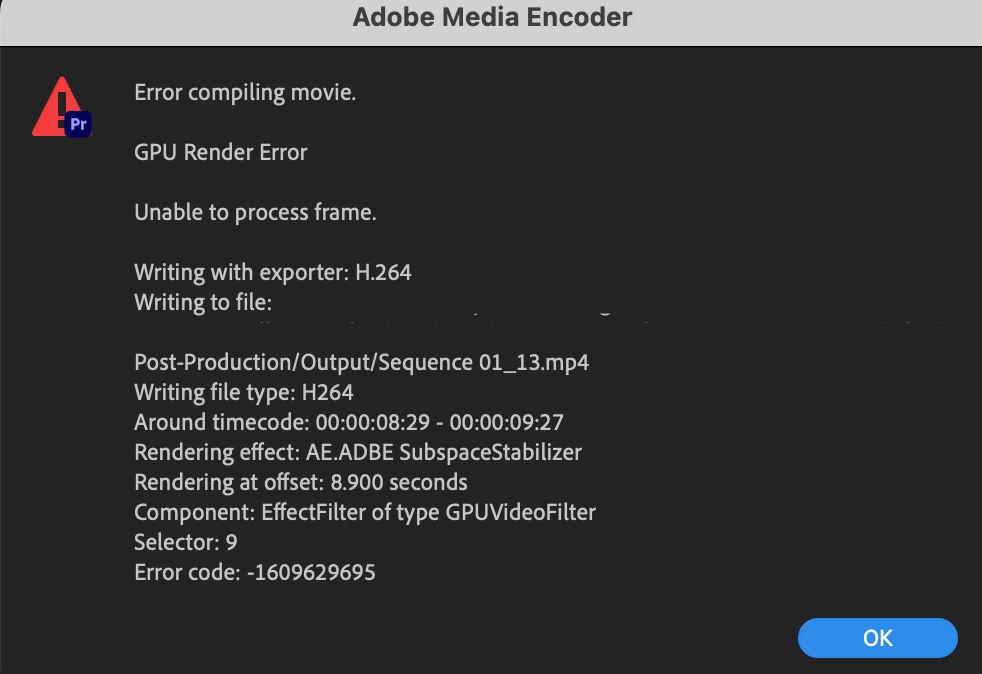
I've searched online and a lot of them are saying if I change my project setting from GPU to software render then it can solve most of the cases. However, my GPU render section is greyed out and I cannot choose either using GPU or software setting. So I have been trying other methods that are mentioned online (ex: restarting the software/laptop, checking the timecode of the clips, save as another project file).
Even though I have deleted the clips that are in the error timecode I still cannot export my video. In the error timecode, I have a video clip, text, a PNG image (made by Adobe Illustrator, later I tried to convert it to an illustrator file and still not working), and an adjustment layer for colour correction.
I'm not sure what other tricks I can try to solve the issue. If anyone has encountered a similar situation please let me know how to solve it.
I'm using Macbook Pro 2021 with Premiere Pro 2023.
 AdChoices