
Participant
January 28, 2025
Question

Cannot export video from PP on M1 mackbook air when the video is long form

  • January 28, 2025
  • 8 replies
  • 307 views
  1. Using the current beta PP but was having issues before on regular PP and older version. Had to export it on my windows desktop at home untlimately. 
  2. M1 Macbook air on Seq 15.1.1
  3. Just can't export, when I export short videos its fine, but when I do long form, usually 1hr long videos it takes over 60hrs to export. I've tried lowering the quality and it still takes forever. 
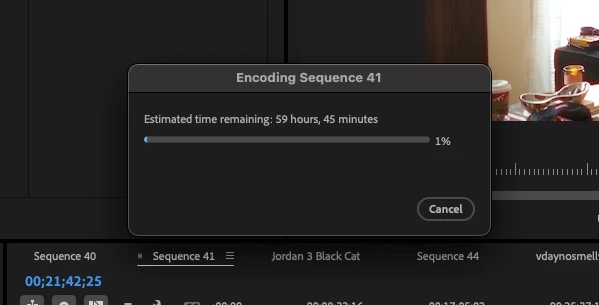
Does anyone have and answer to what is happening or a solution to this problem? 

8 replies

MyerPj
Community Expert
Community Expert
January 28, 2025

Maybe try a different format also, like export to ProRes. LT or even Proxy format, just to get an idea. You can export from in to out points, so you can just select a spot on your sequence. Make sure to have an original copy of your project, before you hack away! 🙂

Participant
January 28, 2025

Great idea! I just tried to cut it down to about 5mins and it was still giving me 4hrs and it kept climbing but I didnt wait too long to cancel the export. Maybe it has sopmething to do with it being multicam that is causing issues. 

MyerPj
Community Expert
Community Expert
January 28, 2025

BTW: Can you export a small bit (maybe 10mins) and it's normal speed, or is the problem with any part of this project?

MyerPj
Community Expert
Community Expert
January 28, 2025

Good post. Yeah, I wouldn't go forward with a 60 hour export. I see @IanB_360 has replied, from Adobe, so that's a good thing. The thread title is a bit misleading, as you can export, but who would! But I hope you'll find some solution.

Participant
January 28, 2025
  • Issue - I can't export, when I export short videos its fine, but when I do long form, usually 1hr long videos it takes over 60hrs to export. I've tried lowering the quality and it still takes forever. I have left it running for a few hours and it ever hardly makes any progress. 
  • Adobe Premiere Pro version number: Version 25.10 beta build 63 I have tried older version and they seem to have the same issue however.
  • Operating system - Apple M1 Sequoia 15.1.1
  • System Info: CPU, GPU, RAM, HD:
    • CPU - M1

    • GPU none

    • RAM - 8 gb

    • Hard Drive project files running on external SSD connected via usb-c

  • Video format: Video shot as 10-bit 4:2:2 H.265 N-Log
  • Workflow details: Multicam sequences. 
  • Steps to reproduce -  When video is around 1hr long, and you just go to export it will not export and sit at the progress screen and go up to 60+ hrs until expoot finish
  • Expected result - Video should export, maybe take an hr at most but it seemingly says 60hrs but time keeps climbing. 
  • Actual result -  you just go to export it will not export and sit at the progress screen and go up to 60+ hrs until expoot finish


IanB_360
Community Manager
Community Manager
January 28, 2025

Hi @Asif36257889o0bk  and welcome to the Premiere Pro Forum community.  Thank you for taking your time to file a bug report. We would like to help figure this out with you. The team just needs a little more information to begin troubleshooting. If you could just jump to the link here  How do I write a bug report and follow the steps to providing more information about your bug, we will gladly take a look.

Thank you

Ian

Participant
January 28, 2025

Yea im not waiting 60 hours, it also keeps climbing time wise and ive let it sit for 2 hrs and it never went down from 60hrs. I can just take my HDD home and get it done in 20 mins but I'd like to get my work done at the office. 


Here is more info: 


MyerPj
Community Expert
Community Expert
January 28, 2025

When you say 'cannot' do you mean, you don't want to try a 60 hour export or it fails every time?

You'll need to supply more info also, including some info on your media formats, and a screenshot of your export screen and sequence settings: Info needed for a bug report