


Participant
November 23, 2022
Answered

Colour Grade Changing while playing or scrubbing footage

  • November 23, 2022
  • 5 replies
  • 1441 views

Hi all,


I've got a weird problem hapening in Premiere version 23.0.0 (Build 63)

Computer is a PC


Processor 12th Gen Intel(R) Core(TM) i9-12900KS 3.40 GHz
Installed RAM 64.0 GB
Nvidia 3080 Card


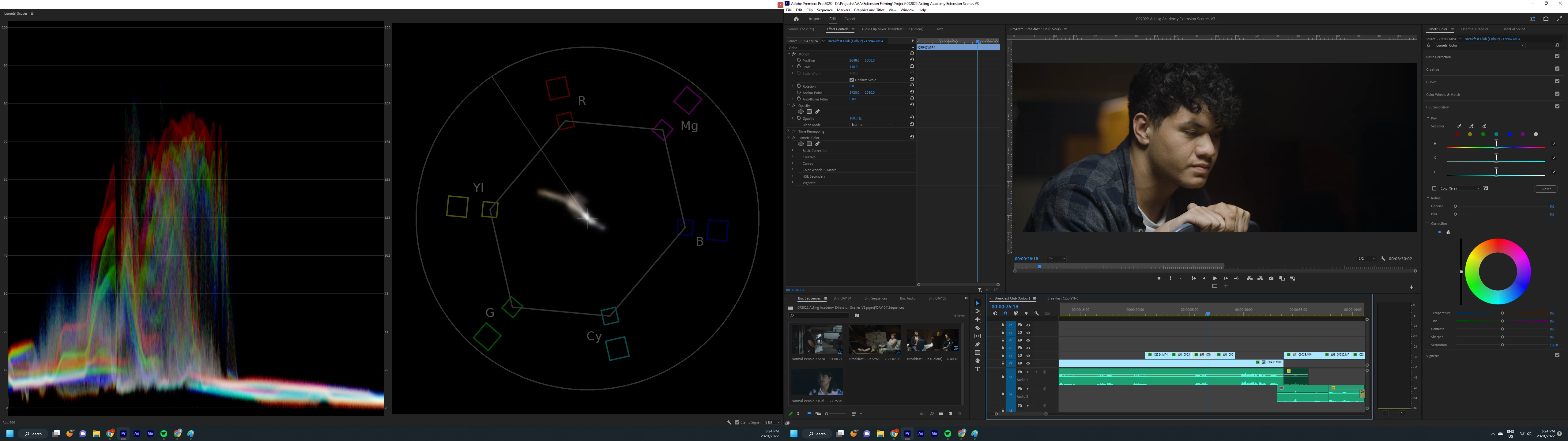
Colour grading SLog 3 footage, whenever I scrub the timeline or press play, the grade changes. Scopes shift and everything gains contrast and saturation.


I've tried removing media cache files, restarting, using a different grade (tried with and without a LUT) but no fix as of yet. Some files have proxies which are turned off, others don't and both seem to be having the issue.


First frame is the playhead not moving.


Second shot is the playhead scrubbing  
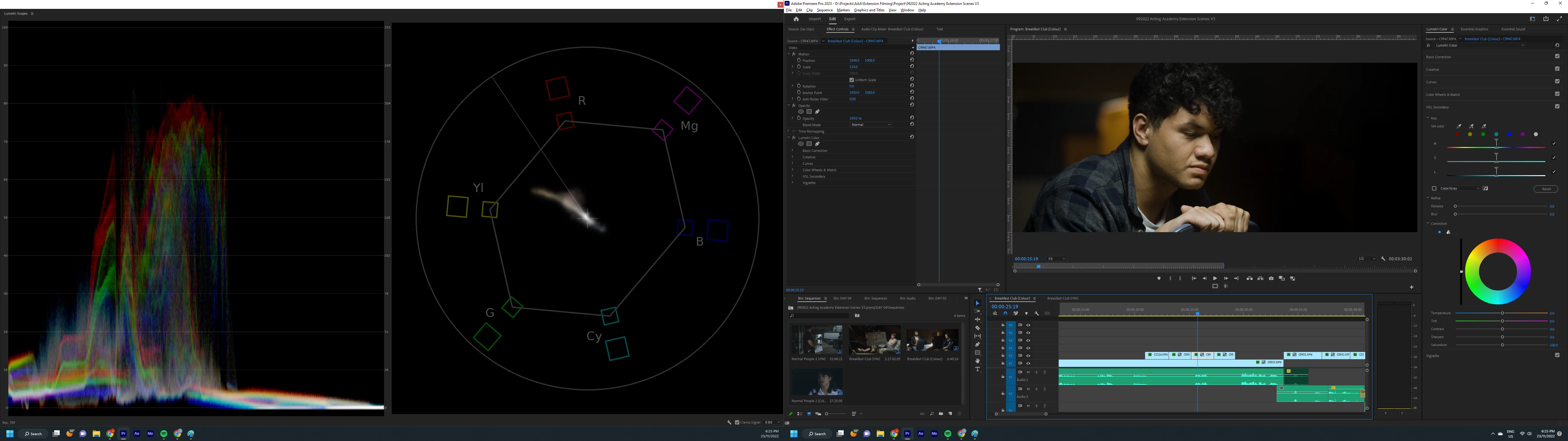
 

The IRE vlaues shift as does the playback image leading to one very confused grade.


Any fixes or advice would be appreciated.


JK


Correct answer FHF_account

I can't see the actual reply here on the forum but the drama seems to be in the playback resolution scaling. Some helpful soul solved it.

It was scaled to half and the adaptive resolution was causing colour shift and exposure drop.


A bit more information about the project:
Video codec: Video Codec Type: MP4/MOV H.264 10 bit 4:2:2

Single cam seqence REC.709 4096x1716


Issue seems to start after turning the playback resolution scale on and playing the clips had the same issue.

No difference if the clip had a lumetri effect or  not.


Turning the scaling back to full resolved the issue.

JK

5 replies

Inspiring
January 7, 2025

In the sequence settings, turning off 'Auto Tone Map Media' fixed a magenta shift that occurred when scrubbing through a timeline. That shift would remain when paused, causing issues when tweaking colours. FYI.

R Neil Haugen
Legend
January 7, 2025

bobbih,


Please post full specs ... OS/CPU/RAM/GPU/GPU driver version number, and media used, any other effects in use. 


I would love to see a screen grab of that happening! As that would be a real problem. Turning off auto-tonemapping is a huge issue for any log-based media. I've not heard anyone else with this issue, and "we" would want to know full details on how it comes about.

Everyone's mileage always varies ...
R Neil Haugen
Legend
August 13, 2024

Yea, that's the answer ... making sure the Program monitor is set to High Quality Playback. It does complete image processing of everything with that setting. Lower settings are there for when you need to cut back on computer resource demands to get smoother playback. But don't need the full image Q.


Stringing selects, doing trims, that sort of thing don't need full on high IQ.

Everyone's mileage always varies ...
malbutnotbad
Inspiring
August 13, 2024

Solution is to right click the program monitor and check "High Quality Playback." This problem agrravated me for months before I found someone recommend it on Reddit. 

prod1200
Participant
August 20, 2024

This solved the issue for me. Thanks.

FHF_accountAuthorCorrect answer
Participant
November 23, 2022

I can't see the actual reply here on the forum but the drama seems to be in the playback resolution scaling. Some helpful soul solved it.

It was scaled to half and the adaptive resolution was causing colour shift and exposure drop.


A bit more information about the project:
Video codec: Video Codec Type: MP4/MOV H.264 10 bit 4:2:2

Single cam seqence REC.709 4096x1716


Issue seems to start after turning the playback resolution scale on and playing the clips had the same issue.

No difference if the clip had a lumetri effect or  not.


Turning the scaling back to full resolved the issue.

JK

Fergus H
Community Manager
Community Manager
November 23, 2022

Hi JK, 

Getting more information about this would be helpful. Please take a look at the How do I write a bug report? post and follow the suggestions there. (In this case, particularly regarding the video format you're using.)

Thanks,

Fergus