


Participating Frequently
April 14, 2026
Question

COMPLAINT: Tools toolbar buttons conceal useful features

  • April 14, 2026
  • 4 replies
  • 58 views

I am complaining because Tools toolbar navigation feels like Mortal Kombat games on consoles- if you don’t know the right combination (for Fatality, Brutality, etc), then you mash buttons until you successfully dial the correct combination, and then hope you remember what you pushed. 

The cheat sheets and books that show the lists for those finishers in the game are very valuable. And likewise here, I discovered by accident, upon chatting with AI that holding on those buttons bring up more features.

Object mask tool - very useful. But sometimes I need to draw my own shape. And I knew that beta version has that tool, and non beta version doesn’t. I thought it is abysmally ridiculous to get rid of Pen Mask tool in order to bring up the Object mask tool. 
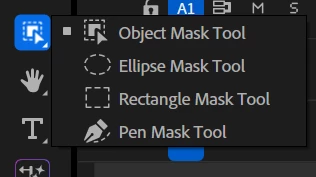
 

Only by accident, during an unrelated AI chat, I learned that if you hold onto the button, more buttons are revealed. What the hell?


Does Adobe ASSUME everyone is THAT intelligent to figure out by looking?
I need my 6 months back, please!

I should have known this 6 months ago. That would have saved me a lot of time. Hours of pain. 

I’m not the brightest - I did not figure this out. Does Adobe thinks that I’m an outlier, and that the rest of the world’s population will not fall into the same trap I had fallen into, and will just somehow “miraculously” figure this out?

I honestly try to do my work, and log all the bugs I encounter. The UI is very unfriendly. And people responding in this forum are very unfriendly, borderline arrogant and hypocritic. The atmosphere is just not there - there is no incentive to keep reposting those bugs.

TLDR:
If the interface had been more user friendly, I would have figure out that the Pen Mask tool still exists, and isn’t dead, that would’ve saved me hours of pain.

    4 replies

    Ann Bens
    Community Expert
    Community Expert
    April 15, 2026

    Wait until you see the new Color Mode……..

    Community Expert
    April 15, 2026

    How is Adobe supposed to introduce new tools and features? Create a toolbar that is so long that it scrolls off your screen? Grouping like tools together is the smart way to go. As is taking time to research the feature changes in a new update. That hour of time could have potentially saved the 6 months. 

    R Neil Haugen
    Legend
    April 14, 2026

    As a user of both this and Resolve, I totally get frustrated myself when either app makes some change that forces me to relearn or rething something. It’s a pain, it slows you down for awhile, yea. And this change was way up in the initial frustration quotient.


    But as a long-time user of both apps, I’ve noted that each has its own pattterns of madness. Ways things are grouped or nearly hidden. So I’ve got a couple questions for you.


    First …

    Basically, ALL the tool icons on the Premiere timeline Toolbar are groups of similar or related tasks ... so I wonder ... were you assuming the Masks icon was different somehow ... ? So you didn’t check to see if it had sub-things?

    Second …

    When you hover over the Mask icon, there’s a big popup that appears with a link to their online help, which fully explains the new system. Did you ever go check that?

    Everyone's mileage always varies ...
    Participating Frequently
    April 14, 2026


    Before Object Mask Tool was introduced, I was playing with Pen Mask Tool. With the Stopwatch icon enabled, it is possible to change the shape size and location. Guess what - not anymore.

    Pen mask tool is dead. Object mask tool is great, but not always. I want to have a custom shape that moves. Impossible to achieve. 
    If I move a few frames forward/backward, and then make a change (relocate the shape, change the shape), it should auto update. It doesn’t anymore. 
    Regardless if it sits in Unassigned Masks, or paired with some feature, such as Camera Blur, it doesn’t work. Tried on Beta and non beta versions. Same problem. 

    So now I am left with an impossible task: Object Mask tool is REFUSING to highlight an object. Pen Mask tool can highlight the object manually, but then it refuses to cooperate.

    Am I the only one discovering this bug? Is Adobe aware that this exists? I’m trying to be helpful, and get the feature working properly again. Now it is not properly or improperly - it is not working at all. 


    Workaroud - many short duration masks. Like it was 2012 once again. What sick prank is this joke? 
    Seriously, am I really now discovering a global (all premiere beta and non-beta versions wide) bug? 

    Computer:
    New Alienware desktop (lots of RAM, strong RTX card).


    Update:
    Fortunately the forum server had a meltdown, and the post did not post before I discovered an important element:


    Clip and Frame buttons.

    Those were among the things I don’t pay attention, because I cannot afford to pay attention to every single button. Priorities must be prioritised. And here, sometime, after probably some update, this is where it began to matter.

    In the past, when Object Mask tool did not exist, the mask path and shape would automatically update after change. Now it doesn’t. And I discovered that this “clip” becomes selected by default. It must be “frame” selected - then it will work like it used to.


    Whoever thought that selection on “clip” must go by default- deserves to go back to school. Because this has caused a lot of confusion, frustration. if “frame” had been selected by default, I would be blissfully unaware that here is something that can totally break the functionality of this feature. 

    Participating Frequently
    April 15, 2026

    I am observing that this reply (that is being quoted) - I posted it as a separate topic.

    The first message in this thread is a quasi-rant about difficult user experience. 
    The quoted message - is a genuine bug.


    FACT: the quoted message stopped being a thread of its own and made it as a reply here. A genuine bug was added as a reply to a UI feedback thread.  
    I am not claiming that a not-caring forum moderator did it. I am not claiming that a forum infrastructure is so buggy that it did it. And I am not claiming that the forum AI made such choice. It doesn’t matter how that happened or why that happened, it matters that it happened nonetheless.

    If the bug had chances of being noticed - it would’ve happened if a bug had a separate forum thread on its own, at best, if viewed by technical engineers.

    Now, the feedback post will probably not be visited by engineers, but by a junior product manager, the attention will be paid to the first message, and not the third reply which is a genuine bug.

    Ann Bens
    Community Expert
    Community Expert
    April 15, 2026

    Only staff moderators can operate this forum.

    Non staff moderators hands are tied. Can do nearly zero.

    If you want to report a bug you need to do so in a separate post.

    How to Report a Problem