



Create Proxies for 2 channel mono RED footage does not work when migrating proxies to another drive
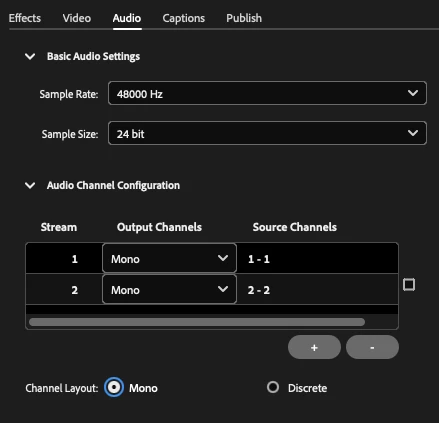
We have RED footage that was shot 2 channel mono. When I import the footage into Premiere using Media Browser, then right-click and Create Proxies, Media Encoder creates proxies with 2 channels of audio and connects them to the source clips. However, when we migrated the proxies to another drive and tried to relink, Premiere saw the proxies as being stereo rather than 2 channel mono. I tried creating an Ingest Preset in Media Encoder that had two mono channels (see below); but when I test the proxies by importing them temporarily into Premiere, Premiere is still seeing them as Stereo. I tried creating the proxies in Redcine-X and DaVinci Resolve, and Premiere saw those proxies as stereo. The only way I could get Premiere to recognize proxies as dual mono was to bring a shot from the RED camera into Media Encoder, use an Encoding Preset that was set for dual mono (ironically, it's the same encoding preset that the Ingest Preset in Premiere is using), and bring the rest of the RED shots into Media Encoder one by one so they would use the same encoding preset (I couldn't find a way to bring in a bunch of RED shots into Media Encoder all at once). To put it simply, the "Create Proxies" in Premiere workflow does not work in this instance.
 AdChoices