Participant
July 14, 2022
Question

DNxHR 444 10 and 12 bit Support

  • July 14, 2022
  • 3 replies
  • 7783 views

Premiere Pro has major issues with DNxHR 444. Regardless, if it's the 10 bit or the 12 bit flavor and if it's wrapped in MOV or MXF. I won't even get into the whole Full/Legal debate, as that is another topic, but you can take a look at this thread, it lays out very detailed explanations of that issue: 

https://community.adobe.com/t5/premiere-pro-discussions/dnxhr-444-doesn-t-work-properly-in-premiere-shame/m-p/8906263#M64908


As a colorist, this presents a challenge, since for a lot of us who do not work on a Mac, exporting ProRes from Resolve is not an option and not every production has the capacity of handling uncompressed files. Be they DPX/TIFF sequences or even uncompressed MOV wrapped codecs.


To give you an example, I just had a project shot on the Sony Venice in 6k, client wanted to do a roundtrip workflow where I send them the graded shots in 6k for them to online and deliver. I'm sure you can see the problem of trying to render and playback 6k uncompressed media, especially in an image sequence format, for most it's unmanageable.


Presently, Premire Pro just straight up is not reading DNxHR 4444, but it used to. I relied on it to substitute ProRes 4444 and now I cannot. I am that it is not officially supported as it's not listed on the supported file formats page - https://helpx.adobe.com/premiere-pro/using/supported-file-formats.html ;however, I find it unacceptable that such a major and established codec is incompatible with your software.


I urge the Premiere Pro development team to take a look at this issue and fix it as soon as possible, as there is a massive need from countless people who rely on it every day to be able to deliver to premiere users.


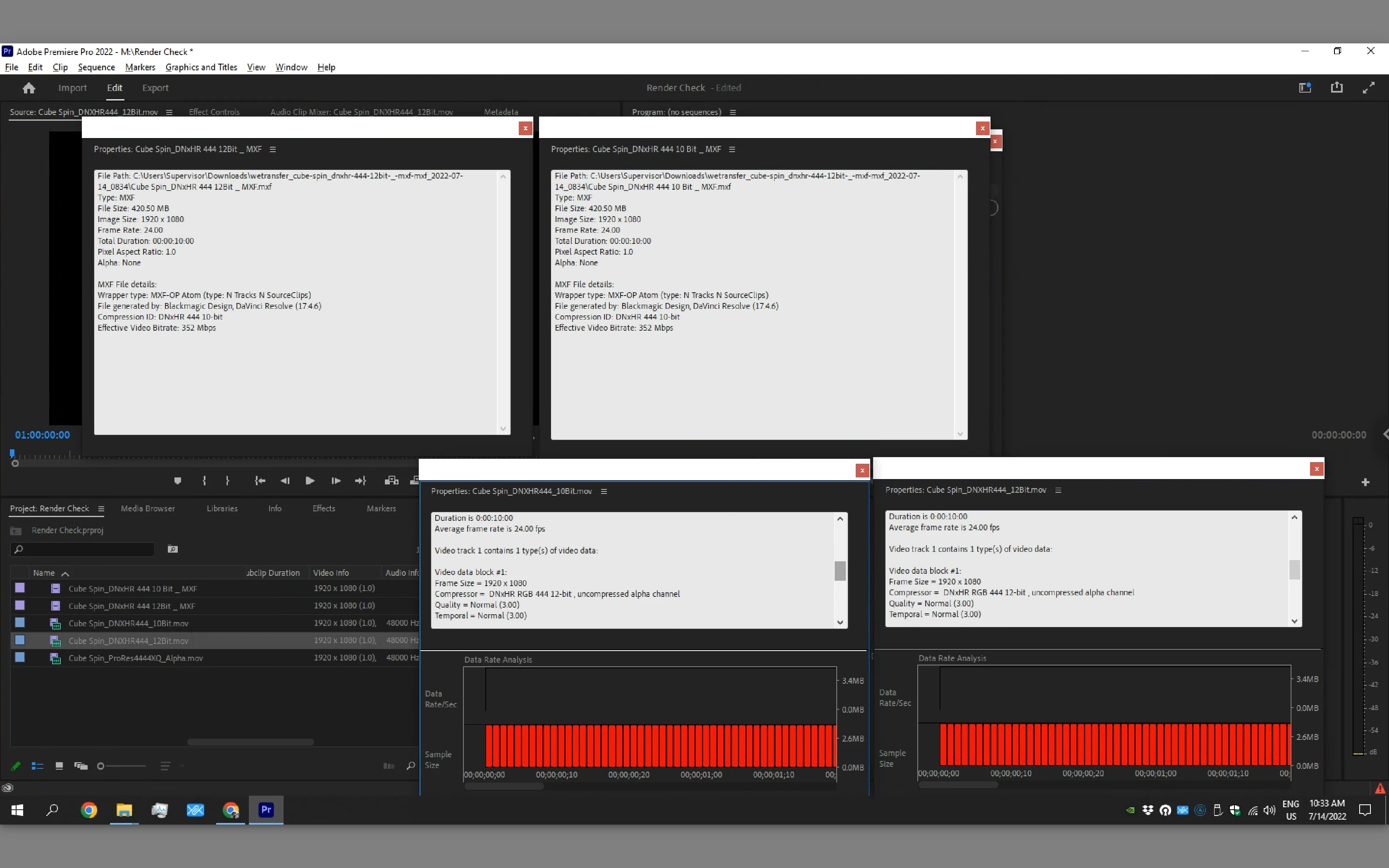
The image below showcases that even the properties' interpretation of different DNxHR 4444 favors is incorrect:

  • MXF wrapped 10 & 12 bit files are both seen as 10bit
  • MOV wrapped 10 & 12 bit files ar both seen as 12 bit.
 

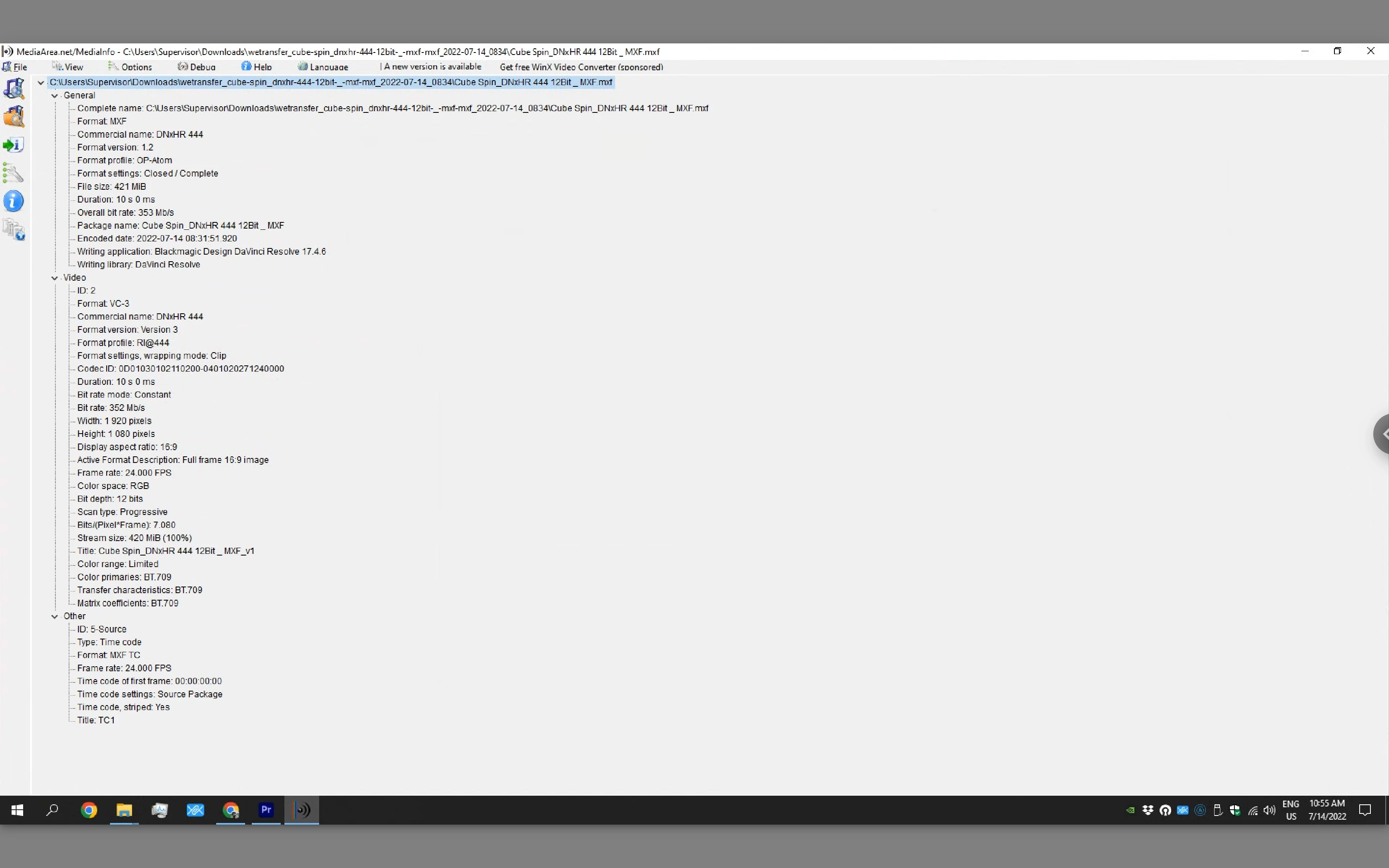
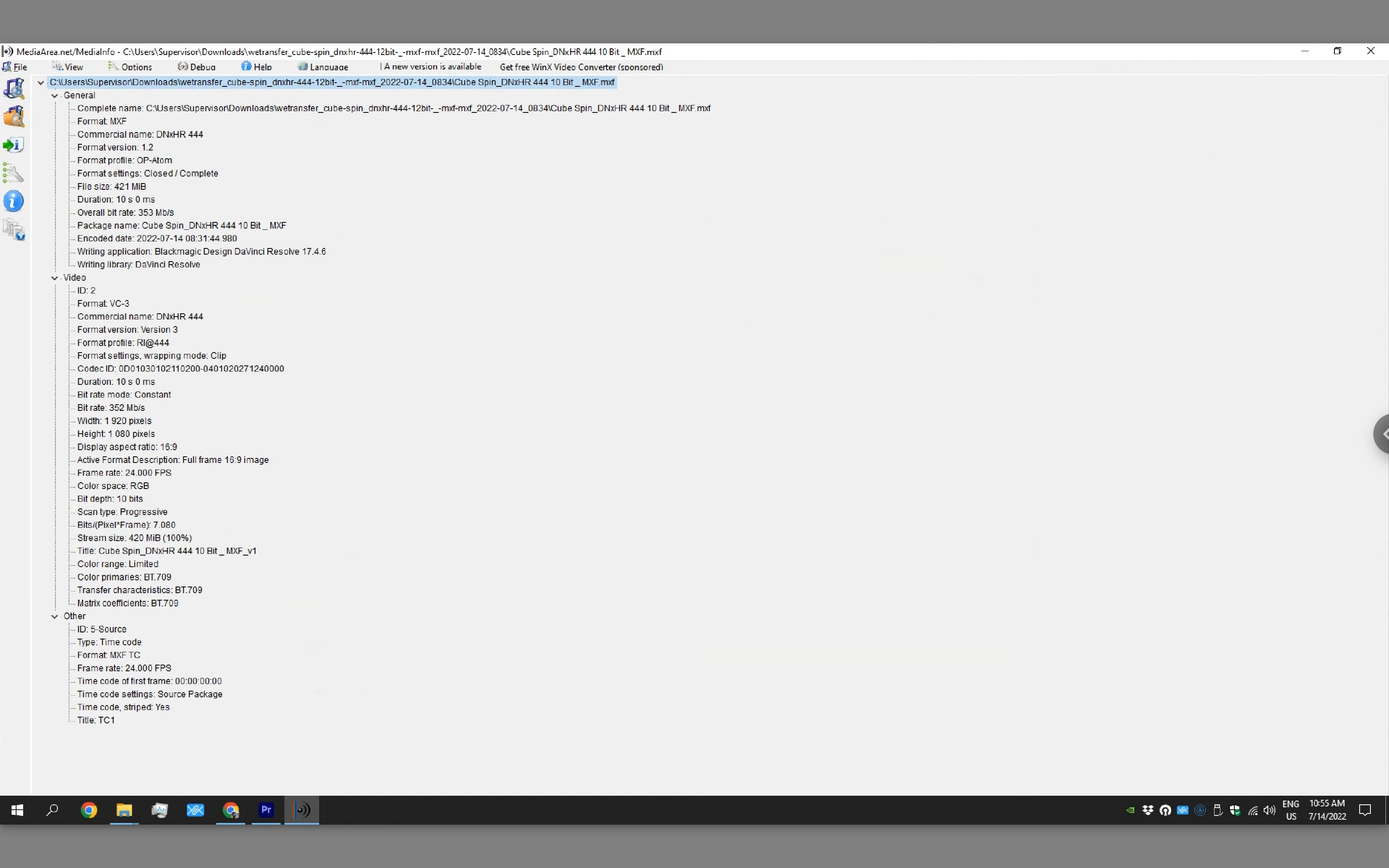
Below are the correct interpretations by the software Media Info:


This Problem only compounds when trying to deliver files with Alpha to premiere from Resolve on Windows. Again, most productions can't handle 6k DPX/TIFF sequences and DNxHR with Alpha is not supported and does not open in Premiere Pro.


This topic has been closed for replies.

3 replies

JackWheelhouse
Participant
March 6, 2023

I second that this is  huge issue as my team and I just ran into this issue with a big client.  DNxHR looked correct in Premiere when viewing the source files in the viewer, but in the Program viewer it looked washed out and completly not as creatily intended. Checked sequence settings and even made a new sequence with the colored DNxHR footage and the same problem persisted.  On export, it looked yet another way and we needed to so a patch job to try and get it close but I resent the fact we even had to do that considering Premiere Pro considers itself a professional software.

R Neil Haugen
Legend
March 6, 2023

@Fergus Kousha  ... another post on this issue, and please advise?


Neil

Everyone's mileage always varies ...
R Neil Haugen
Legend
July 14, 2022

Yea, this is still an issue. Unfortunately ... and maybe time for @Francis-Crossman17221443 to pop in about this.


Although I've got a slug of DNxHR presets, RGB, HQX and such available here on my PC ...


But it's not accepting the 4444 on yours? I guess I need to test that on my rig later today.


Neil

Everyone's mileage always varies ...
R Neil Haugen
Legend
July 14, 2022

Well....


Premiere seems fine with Resolve 12- bit RGB files, unless you have an alpha channel attached ... then you get the dreaded frame-excursion warning and a black/void screen for the clip.


Neil

Everyone's mileage always varies ...
Participant
July 14, 2022

Are you wrapping them in MOV or MFX? 


For me, it's erratic at best:


I had to render 6k Source Res Files for a roundtrip workflow, and those weren't being read no matter the combination I tried. I get the same error you get with alpha; however, I don't have alpha.


But 1080p MOV wrapped 444 was working.

Jeff Bellune
Legend
July 14, 2022

@josemariaabreusantos wrote:

I urge the Premiere Pro development team to take a look at this issue and fix it as soon as possible, as there is a massive need from countless people who rely on it every day to be able to deliver to premiere users.


Premiere Pro User Voice