

Participant
May 17, 2023 3:02 AM UTC
Question

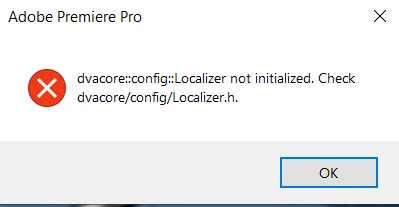
DVA Core Error. Premiere will not even open. Please Help!

DVA Core Error. Premiere will not even open. Error Message reads "dvacore::config::Localizer not initialized. Check dvacore/config/Localizer.h." Any idea how I fix this?

20 replies

Participant
Nov 30, 2024 9:36 AM UTC

我参考了这个帖子中的更改默认文件夹的方法,并且成功了,和大家分享一下。

我的系统是windows 10,Premiere 版本为23.5,问题发生的原因可能是因为我从原来的硬盘中将软件拷贝到新硬盘,导致默认文件夹路径错误。

解决方案:

点击开始-运行-输入“regedit”,进入注册表编辑器

修改的关键注册表项(两个项中的相同值应同时修改)
1.HKEY CURRENT USERlSoftwarelMicrosoftWindows p. \CurrentVersionlExplorerUser Shell Folders

2.HKEY CURRENT USERlSoftwarelMicrosoftWindows\CurrentVersionExploreriShell Folders

在里面找到“我的文档”及“我的收藏”等默认文件夹的路径,将上面两个注册表项中的字符串改为同一路径,即可解决报错,顺利进入Premiere

Translate
Participant
Aug 3, 2023 5:20 PM UTC

Thanks guy! I had to go back to 23.0, but it definitely helped. Thanks!

Translate
Participant
Jul 19, 2023 9:10 AM UTC

Thank you so much!

So what I did to fix this problem:

1. Go to Creative Cloud - click your profile - choose Preferences - Apps - and there change Install location to your local C disk location - Click Done.

2. Go to your Creative Cloud Apps - Find the app what did not working for you example for me it was Adobe Premiere - Uninstall it.

3. After you unintsalled, go ahead and install the same app but older verison. (it can't be the version what you have had installed before into your computer, because it will not save into your new location but into the old one. That because you need to install the older version. After install click open.


Your welocome! 🙂

Translate
Participant
Jul 14, 2023 10:25 AM UTC

I had this exact problem.  Turns out it was because I had changed my Documents location to point to a share on my NAS drive instead of the default C:\Users\UserName\Documents folder.  It was unavailable because I was working away from home, and it seems Premiere needs the Documents folder to run properly.

Translate
Participant
Jul 14, 2023 4:13 AM UTC

Thanks for the help

Translate
Participant
Jul 14, 2023 3:57 AM UTC

Down graded to 23.3 and it works again.  It told me I had to update my Intel Graphcis board and I dont even have one.


Try uninstall, clean nothing

Translate
Participant
Jul 4, 2023 5:39 AM UTC

Decided! Simultaneously with the error, a message pops up from Windows Security. Windows 11. I went into this warning, got into Manage Ransomware Protection -> Allow an app through Controlled folder access -> Add an allowed app. I opened the permission for all adobe programs and it all worked. It took 1 minute, better than reinstalling the whole adobe))

Translate
Participant
Jun 29, 2023 8:05 PM UTC

I was experiencing the exact same issue.  Everything had been working fine for months and then all of the sudden this error message would pop up and the app would crash upon launch.  I tried everything, and then noticed that after getting rid of the error message, the app would crash at a "QuickTimeImporter" prompt.  So, I tried installing Quicktime Player and now all of the sudden my Premiere Pro works again.


TLDR:  Try installing Quicktime Player and this issue should be resolved.  Worked for me at least!

Translate
Participant
Jun 1, 2023 1:38 PM UTC

I had the same error and was unable to open Premiere. I uninstalled Premiere from the Creative Cloud app (click 'keep' to hold on to your settings), then installed the previous version of Premiere. Next to the 'Install' button, click the three dots and you'll be able to install previous versions. I went back to 23.3 and it opened for me just fine.

Translate
Participant
May 21, 2023 7:24 AM UTC

Yes, running just english and windows 10.

Translate