
Dynamic Link broken
Hello !
I feel like I need to ask for some serious help here because I don't know what to do...
I recently cleaned up my computer and deleted a lot of Premiere Pro and After Effects cache files that were taking too much space on my Finder. Then I uninstalled both software, and reinstalled them in 25.5, in order to completely reset it so that it took up less space.
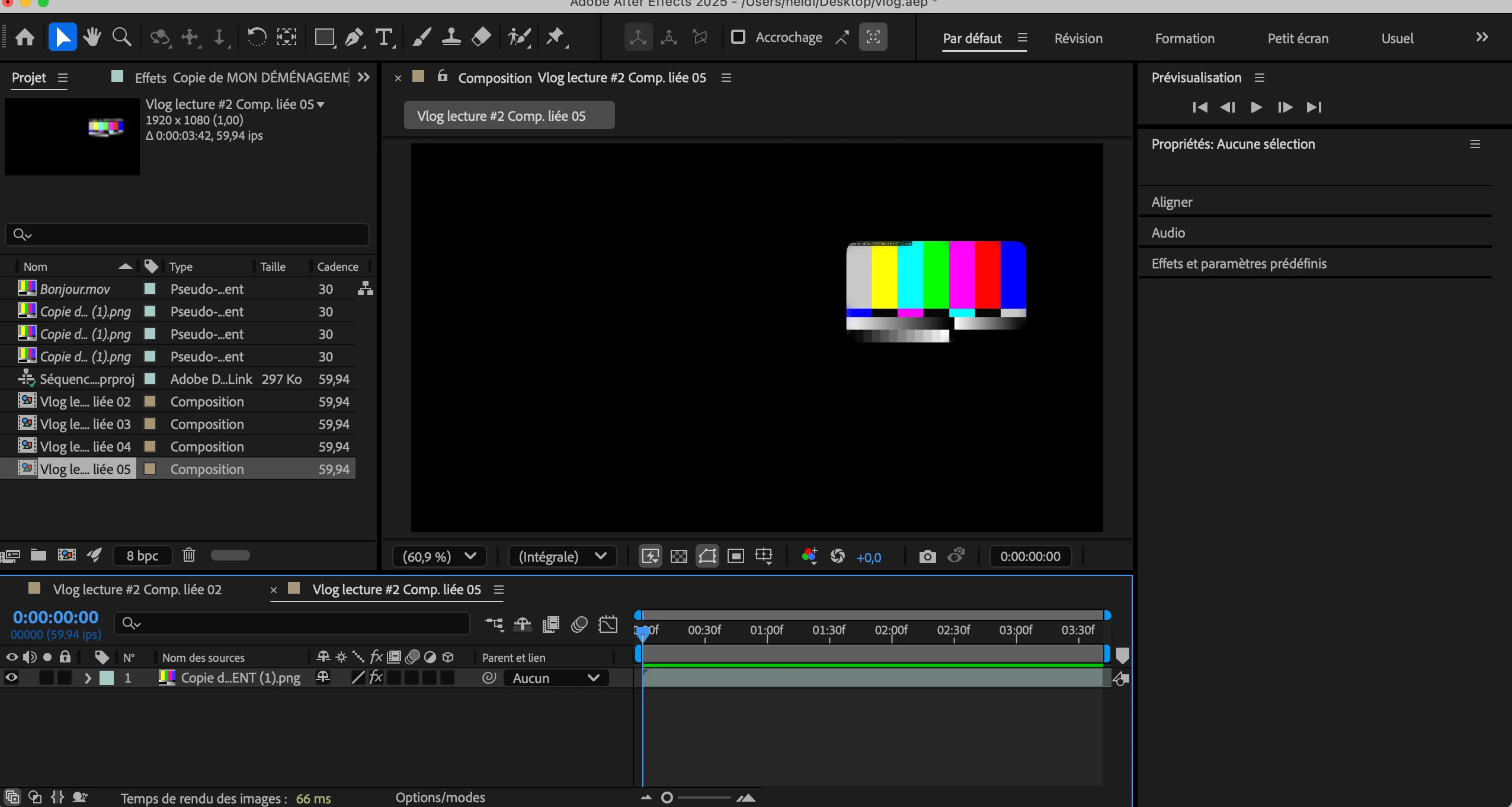
Since then I feel like the Dynamic Link is broken between the two software. Everytime I use the "Replace with an After Effects composition" function, my file is replaced each time by a glitch which I attach to this message.
I tried several things:
- First check that the two software programs were exactly the same version (they were)
- Use the Creative Cloud Cleaner Tool
- Install older versions of both software
- Check the version of my computer and if the new update is not restrictive for Adobe and Dynamic Link (I have a MacBook Air with macOS Tahoe 26.1)
- Save a prproj file from Premiere Pro, launch it on After Effects, then relaunch it on Premiere Pro
Nothing works. I even deleted all Adobe software from my computer + Creative Cloud to reset everything, and reinstalled them afterwards, this glitch won't go away. I never had this problem before, whenever I used the "Replace with After Effects composition" function, it always worked.
Do you have a solution please?


 AdChoices