

Participant
February 12, 2025
Question

Effects on source clip issue

  • February 12, 2025
  • 7 replies
  • 455 views

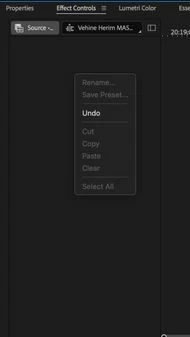
I am trying to apply a lumetri color effect to a the source of a clip.

After cuting it from the effect controls panel, the option to paste in the sorce is greyed out.

Is this a bug? 

How can I fix this?


7 replies

Participant
February 24, 2025

Thank you for answering.

I realised I am working in a production that has a duplicate ID issue, and so I think thats what causing me the problem.

Community Expert
February 12, 2025

Please let us know if Reset Preferences works as Ann suggested.

You should be properly selecting the Lumetri Effect and copying it to work..

Reproduced your issue on a Macbook Pro late 2016

Participant
February 12, 2025

I am using a macbook pro M3 max

Community Manager
February 12, 2025

Hi @Eyal22139925h9i4,


Welcome to the Premiere Pro forums!  We’re happy you’ve reached out.  Can you send a screen recording of what's happening/ not happening?  Which version of Premiere are you in? We’ll need a bit more info to try to help with your issue. Please see: How do I write a bug report?


I hope we can help you soon.

*duplicate post removed.  thanks Ann

Ann Bens
Community Expert
Community Expert
February 12, 2025

How to use Source Clip Effect

Apply Source Clip effects in Premiere Pro

Participant
February 12, 2025

Thank you for your answer, but when I add an effect to the sorce clip the controls are greyed out so I can't use it!

Do you have any idea why would that happen?

Ann Bens
Community Expert
Community Expert
February 12, 2025

Works as expected on windows 11

Reset Preferences.
