jemaiy
Participant
June 24, 2016
Question

Error compiling movie - Import error - Importer returned bad result

  • June 24, 2016
  • 36 replies
  • 81564 views

I am trying to export a sequence (H.264 with youtube HD 1080 preset) where some of the clips have speed increase of 1200% applied to to them. I am trying to emulate a timelapse... I know there is something I am not considering here.

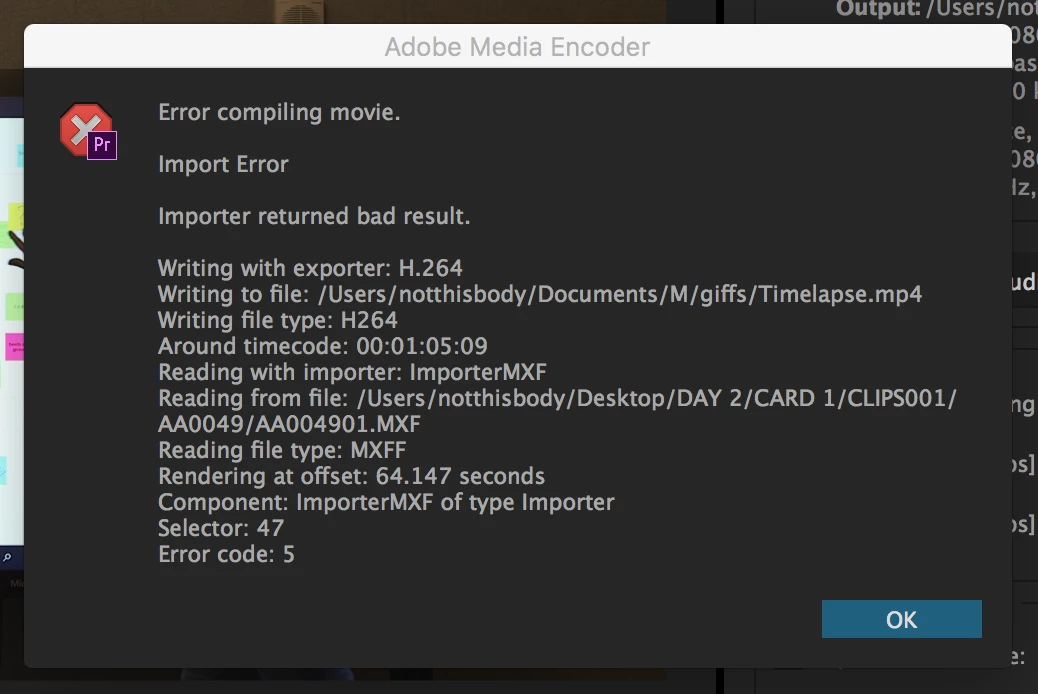
what i get as a message is : Error compiling movie - Import error - Importer returned bad result

see image bellow
36 replies

dannieleigh
Participating Frequently
March 10, 2019

Did you find a solution? It's 2019 and Adobe is still having this problem... I haven't sped up the clip, haven't done anything noticeably weird, and only started having this problem when I switched to Windows.

Ann Bens
Community Expert
Community Expert
March 10, 2019

You need to fix whatever is on the timeline at the give time of the error.

Can be anything; clip, audio, effect, 3rd party software, you name it.

Delete section.

reboot and do it again.

See how that goes.

If still problematic export that section to an intermediate file and put that on the timeline.

dannieleigh
Participating Frequently
March 11, 2019

After reading through comments and implementing suggested changes I ended up exporting the video through Encoder. Though I'm certain I've had a similar error when exporting through Encoder as well, maybe I got lucky this time.

I have deleted the section before, rebooted, tried again. That does work, but it can get tedious if Premiere doesn't like more than one clip. And especially if you have a lot of effects on it.

For anyone else who wants all the different troubleshoots in a list -

1. Export through Encoder

2. Delete section and reboot

3. Switch to Mac, if you have one

Participant
July 17, 2018

One of the reasons this error occurs is if the drive you are rendering your previews to does not have enough space left on it. I would check that and try deleting some files on that drive to see if that solves the issue.

Participant
May 31, 2018

I want to fix this everything didn't work im using adobe premiere cc 2017 v11.0.1

MariusRusu
Participating Frequently
May 29, 2018

I had the same problem with Premiere Pro. Import Error and Importer returned bad result.

I rendered clip by clip till i found the one with the problem. Right click on it, replaced with After Effects composition. In AE when i hit play at the 4th frame, it gave me 1 white frame. Basically it was a problem with one frame from the video, maybe when it was originally exported or recorded, usually bad storage media. I just cut that one frame and everything is ok now. AE is always better to diagnostic footage than PP.

Usually when Premiere acts weird with any type of media, I just send it to After Effects and export from there. This saved me a lot of times.

michaelvenzor
Participant
May 21, 2018

Had this same issue today, tried everything. I was trying to export without sound, video only. I had to export with sound and then it finally worked. Very strange.

BenS91
Participant
April 30, 2018

Had the same problem, Ran the sequence through Media Encoder and it exported fine.

jeffn75315796
Participant
March 24, 2018

No solutions? I've basically wasted a day trying to export our program for our captioning folks.

Participant
March 24, 2018

One thing that I've done to circumvent the problem is to go to Adobe Media Encoder, and then open the Project File there.

nateab
Participant
March 13, 2018

The following workaround resolved this error for me:

In my situation, I knew exactly which video file was causing the problem as my premiere project only used one (old) .mp4 file.

My work around: In After Effects, create a composition containing only the offending file. Composition > Add to Render Que. Render the file as a lossless MOV. Make sure you render in the native After Effects renderer and not in Adobe Media Encoder.

This will create an enormous file...but afterwards, I compressed the .mov to an .mp4 with media encoder, no problem. Back in premiere, I relinked the media to this new 'converted' .mp4 file... Premiere could then render my project without an error.

TL;DR -- Render the file in After Effects as a lossless MOV

Participant
March 7, 2018

So I'm getting the same problem, and I've tried pretty much every solution listed in this thread, including copying the file that the exporter gets stuck on and renaming it. I have no effects on any of the footage, it's just R3D files in their entirety. I worked around the issue by deleting the file it got stuck on in the export, which worked, but it's hardly a workaround at all: it's unacceptable. It's not like the file is corrupted, it's playable in Premiere and REDCineX Pro. This problem needs a fix in the next update, because by the looks of this thread, I am not the only one with this problem.

Error compiling movie.

Import Error

Importer returned bad result.

Writing with exporter: H.264

Writing to file: \\?\H:\Under the Weather\Premiere Projects\SequenceTest_1.mp4

Writing file type: H264

Around timecode: 00:08:43:15

Reading with importer: ImporterRED

Reading from file: H:\Under the Weather\Video\Day 1\A3 - Copy\A010_020227FIX.RDM\ESAD.RDC\esad002.R3D

Reading file type: R3D

Rendering at offset: 522.856 seconds

Component: ImporterRED of type Importer

Selector: 47

Error code: 5

trashcaneron
Inspiring
March 7, 2018

I got this error when I received a new version of a file from a client. They had speed-ramped it, but otherwise a clean asset. Plays clean in quick time.

Tried all the solutions in this thread: punctuation, copying the file, nesting the sequence, cleaning cache, manually wiping cache. Changing codec sequence settings didn't work either.

Any new known bugs, adobe?

thanks