


Participant
January 16, 2026
Question

Export fails due to Warp Stabilizer.

  • January 16, 2026
  • 3 replies
  • 151 views

Hi Kevin & Sumeet
Issue:
Export fails due to Warp Stabilizer.
I would apply a Warp Stabilizer to a clip, I would Analyze it, and everything would be perfect.
Only one other effect on the clip is Lumetri.

Playback 100%, no black frames added...

I would then complete the edit and attempt to export the project. After the initialisation, the export would start. Depending on where the "error" clip is, the export would fail with an error like this, stating where the clip is. Upon review of this clip, there is now a black frame at the end of the clip.
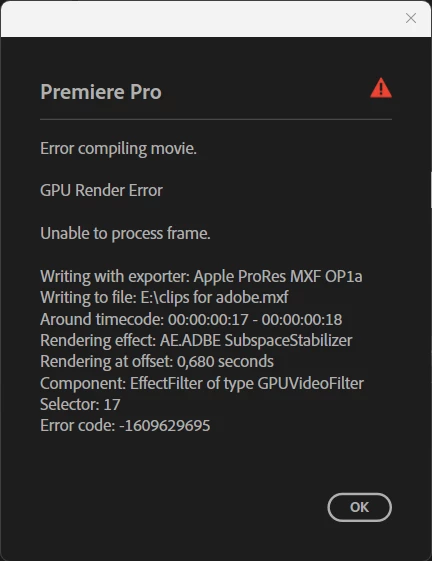
874840i83974A244CEBB810.png
I would fix it using various methods and attempt to export the project. After the initialisation, the export would start. Depending on where the next "error" clip is, the export would fail again, and I would need to repeat this till the timeline is "error" free. It took me almost 3hours to export a 20min timeline.

Steps to reproduce:
Please see a download link where I have provided some files and a project file.
(I can also upload the files to any other platform if you can't access this)

https://www.transfernow.net/dl/20260115j1da0CfP

4 files
_forADOBE.prproj     1. 27 MB
202595 16-49 ELMA....mp4     623 MB
202599 8-24 NELIS....mp4     152 MB
202599 8-30 NELIS....mp4     94.2 MB


Expected result: The export must just work.
Present the problem when I Analyze. At least provide me with a full list of all the clips that need to be "fixed".
Comparative information:
This does not affect all the footage filmed on the same day, with the same camera. I have no way of knowing what clips are "affected".

Adobe Premiere Pro version: 25.6.4 (Build5)
Operating system:
Windows 11 Pro 25H2 V10.0.26200
Intel(R) Core(TM) i9-10900 CPU @ 2.80GHz
128GB RAM
GPU driver version:

NVIDIA GeForce RTX 3090
Studio Driver - 591.74 (5-Jan-2026)

Some other posts suggest:
"Render and Replace" - I cannot do that every time I add the Warp Stabilizer effect.
"Switch to Software Only" and not GPU - This takes longer, and there is a reason why we spend so much money on GPU.
"Cut the black frame" - I know it's only one frame, but having to alter an edit just because of an export error.

3 replies

Peru Bob
Community Expert
Community Expert
January 16, 2026

Apply warp and nest. Then apply Lumetri (or vice versa).

R Neil Haugen
Legend
January 16, 2026

Warp is by far the heaviest computational load in the entire program. If you can't understand why that matters, well ... don't know what to say.


If you apply Warp and any other heavy effect like color or time changes, then you are running the risk of computational errors in the processing. Period.


So you can choose your options to have no problems ... apply Warp or Lumetri or time changes, then Nest, then apply the other. Or select all the Warp clips, R&R. Either way works. The second of course speeds the final export dramatically.


Everyone's mileage always varies ...
Participant
January 16, 2026

I do have a solution (it seems like a little less work, but it seems to be working).

I nest the clip, extend it by 1sec, and Analyze it.
On the master timeline, everything is then fixed.
My latest project had +-70 clips with Warp Stabilizer and 18 of them needed to be fixed.

Just frustrated to have to do this, and the fact that it's so random and there is no way for me to identify the clips with "errors"
Also, by the amount of treads I found, this is not a new thing, it's been going on for years.


I got this project from another editor, don't get me started on the fact that I have to identify each clip with Warp Stabilizer and need to press the Analyze on each clip.


I need the software to work and allow me to be more creative and not worry about what order I placed effects, or is this one going to be one of the clips with "errors".

jamieclarke
Community Manager
Community Manager
January 16, 2026

Hi @MiasSteenberg -  Thanks for submitting your bug report. We need a few more details to try to help with the issue.


This error indicates that there is an issue with an effect applied at timecode 00:00:00:17. It is usually caused by the order in which effects are applied. You can resolve this by placing the effects in the correct order typically by nesting the clip and then applying the effect. For more details, please see this article:  Order of Effects 


In your case, you will need to:


1. Nest the clip.
2. Apply Warp Stabilizer to the nested clip.
3. Remove Warp Stabilizer from the original clip (if it is already applied there).
4. Since Warp Stabilizer cannot run while Lumetri is applied, first copy the Lumetri effect, then remove it from the original clip.
5. Let Warp Stabilizer analyze and complete on the nest.
6. Paste the Lumetri effect back onto the clip inside the nest.


The final result should be Warp Stabilizer on the nested clip, and Lumetri applied to the clip inside the nest, which should resolve the issue.


Let us know if you have any trouble.  Sorry for the frustration