

hurodal
Known Participant
January 10, 2023
Question

Exporting 10bit DPX & TIFF ends up with 8bit files.

  • January 10, 2023
  • 2 replies
  • 1138 views

Hi,

I need to do some image analysis over extracted frames and I need to extract 10bits stills from 10bit footage.

I've shot the footage with a GH5 and recorded into the SD card (1080p, 4:2:2) and also on an Atomos Ninja V with ProRes.

I've loaded the .MOVs into Premiere, activated "maximum bith depth" and maximum processing quality" into the sequence settings (I'm using the spanish version of premiere, so no sure of the exact names of this options in english) and I canot get more than 8 bit neither if I load .MOVs from the GH5 nor ProRes from Ninja V.

To check this I've extracted a frame in TIFF and opened in Photoshop with no luck, it's just 8 bits. Then I extracted a DPX and its 16 bit but after saving in 16bit TIFF and analyzing it with a special software (called Histogrammar) it shows it's filled with just 8 bit image. 


I guess this is a bug, or is there any way to extract real 10-bit stills?

This topic has been closed for replies.

2 replies

Kevin-Monahan
Community Manager
Community Manager
March 26, 2024

Hello @hurodal,

Thanks for the message. I apologize for the lack of response to this bug report. Are you still having this issue? The team will need more info from you to reproduce the bug. Can you provide the information required here? How do I write a bug report?


I'll move your post to the Discussions board while we await your information.


Thanks,


Kevin

Kevin Monahan - Sr. Community and Engagement Strategist – Adobe Pro Video and Audio
hurodal
hurodalAuthor
Known Participant
March 27, 2024

Hi Kevin,

good to see your response even that it's a bit late.


I think I've already described the issue clearly, but I'll summarize:


I need to extract 10bits stills from 10bit footage.

I've shot the footage with a GH5 and recorded into the SD card (1080p, 4:2:2) and also on an Atomos Ninja V with ProRes HQ.

I've loaded the .MOVs into Premiere, activated "maximum bith depth" and 'maximum processing quality' into the sequence settings (I'm using the spanish version of premiere, so no sure of the exact names of this options in english) and I canot get more than 8 bit neither if I load .MOVs from the GH5 nor ProRes from Ninja V.


To check this I've extracted a frame in TIFF and opened in Photoshop with no luck, it's just 8 bits. Then I extracted a DPX and its 16 bit but after saving in 16bit TIFF and analyzing it with a special software (called Histogrammar) it shows it's filled with just 8 bit image.
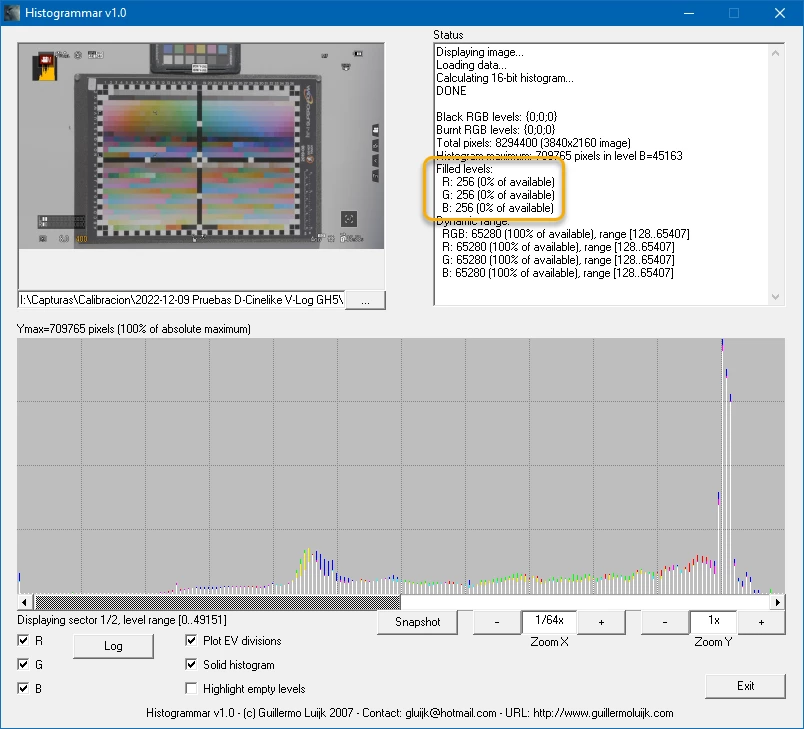
 

- Premiere version v22.6.2 (same issue with almost all versions I've tested). Some users say it's a behaviour from legacy versions.

- Windows 10 Pro 64

- Intel i7, nVidia RTX3060 driver v536.23, but this is software related, not GPU.

- 32GB RAM, NVMe internal.


The project is very simple: just a single timeline with the footage.


Steps: load the .MOV, select a frame and clic on the camera icon button just below the program window (or hit Ctrl + Shift + E), select TIFF or DPX.

The result is a 8 bit file instead of a 10-bit as expected.


Regards,

Hugo
R Neil Haugen
Legend
March 27, 2024

As @Jarle Leirpoll has pointed out by some awesome sleuthing on his MAJOR Premiere Pro blog PremierePro.Net ... there are bit depth issues with things in Premiere unless you do every righteously.


And if I get something incorrect, I hope Jarle will correct me!


Preview format for the sequence must be set to Max Bit Depth. Even though you aren't actually making a preview, which is weird ... but apparently, from Jarles extensive testing, required to get more than 8 bit outputs. So set the Preview for that sequence to Max Bit Depth, and see if that improves your still output.


That's apparently for any output from a sequence.


For all exports, any export dialog must have Max bit depth and 16bpc selected. No matter the codec/format.

Everyone's mileage always varies ...
hurodal
hurodalAuthor
Known Participant
January 18, 2023

No one from Adobe can confirm this BUG?

Hugo