

Community Manager
January 23, 2020
Answered

FAQ: How to solve Encoding/Export stuck at 0% with Premiere Pro/Adobe Media Encoder 14.0.1?

  • January 23, 2020
  • 27 replies
  • 51974 views

We are investigating an issue with Premiere Pro/Adobe Media Encoder (v 14.0.1) where the export gets stuck at 0%. This issue seems to be related to markers. Here are the steps that can be followed to address this issue.


Note: This procedure is only applicable if you are using makers in the sequence.


The easy way:

Select all the markers from the timeline that you are trying to export and delete them (https://helpx.adobe.com/in/premiere-pro/using/markers.html#find_move_and_delete_markers). Once the markers are deleted try to export (you may want to create a backup of the project with the markers before deleting them, just in case if you need those markers later).


If you wish to drill down to the specific issue:

  • Open the project file.
  • Navigate to the Markers panel (Windows > Markers).
  • Double-click on the marker thumbnail in the Markers panel to load its properties window or select the marker thumbnail and go to Markers (in the menu bar) > Edit Marker.
  • Check if you see any parameter named marker_guid listed in the Flash Cue Point section.
    (If you don’t find this parameter listed, check the next marker)
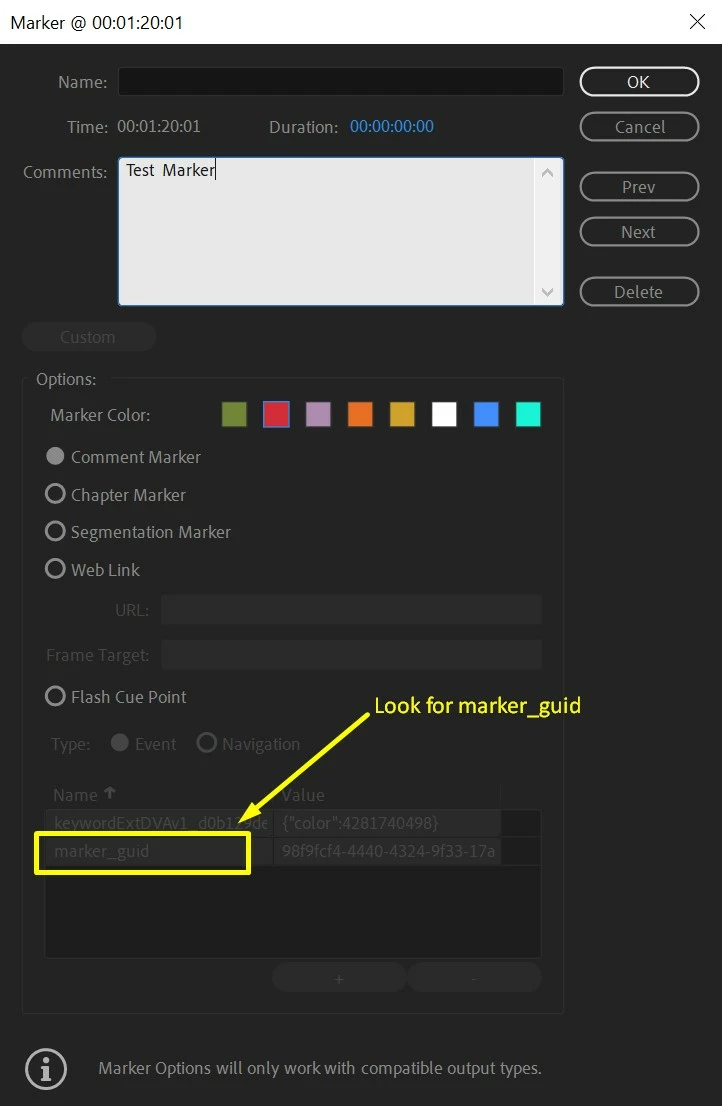


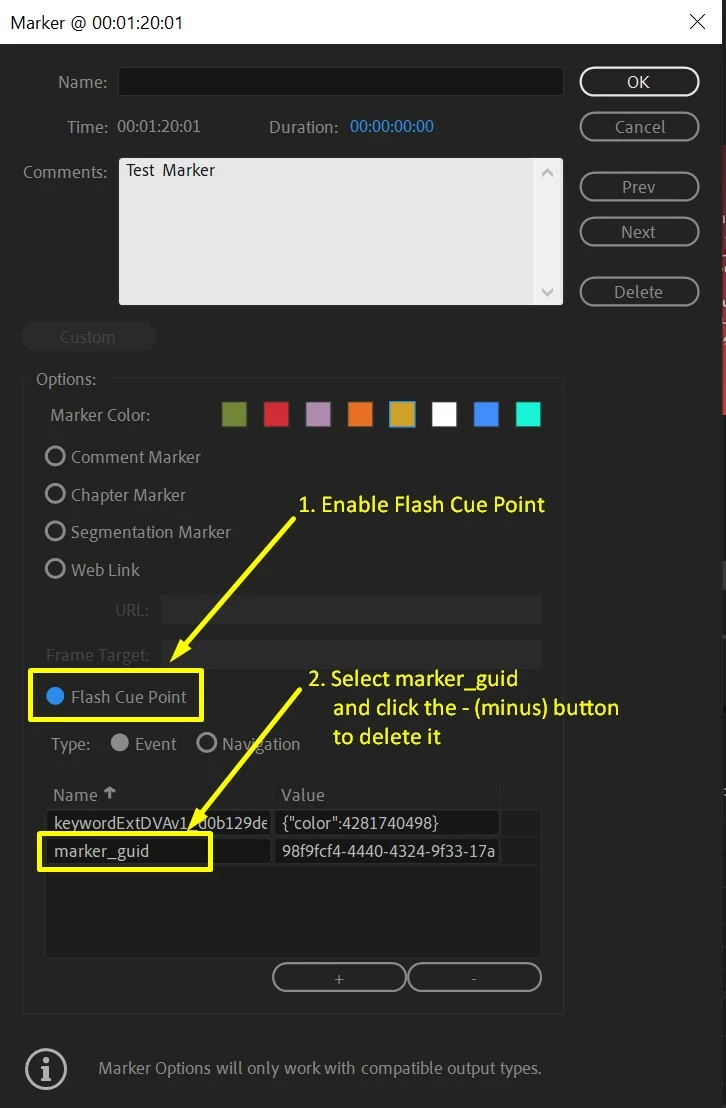
  • Once you find a marker that has marker_guid listed in the Flash Cue Point section, delete that entry.

    To do this enable the option for Flash Cue Point.

    Select marker_guid and click the - (minus) button.


  • Click OK and try to export.

Hope this helps in solving the issue. Let us know if you have any questions.


Thanks,

Sumeet

This topic has been closed for replies.
Correct answer Sumeet Kumar Choubey

Hi donika,


Yes, we are working on getting it sorted as soon as possible.

Thanks for your patience.


Sumeet

27 replies

Participant
February 17, 2020

Thanks! This tip worked, at least in the video I tried. I will try in another project that I had the same issue. 


jasontcox
Inspiring
February 14, 2020

Oof, glad to see this. I had this problem as well very recently!

margof27443542
Participant
February 14, 2020

I can vouch that this workaround fixed the problem. I deleted the markers in my timeline to export, and it exported in the normal time that it typically does. 

Hold off on updating if you can....


Participant
February 11, 2020

Desde México, te mando muchisimas gracias 😄
From Mexico, a lot thanks!

Convergnt
Inspiring
February 10, 2020

Adobe, please unmark this as 'solved' so we can continue to track its status. 

Participating Frequently
February 10, 2020
Yes, we do still need to track this. I don't know about others, but the
workaround didn't actually work for me (probably because I have lots of
clip markers, which I will definitely not be removing).
So, I cannot update Premiere and Media Encoder to the next version until
this is fixed.
Participant
February 7, 2020

This saved my butt! Thanks a bunch for this workaround. This whole week I couldn't figure out for the life of me why I couldn't export my project. Thankfully I had manually typed out timecodes into a document for my client so I can do without the markers for now. Looking forward to that update.

jond66445284
Participating Frequently
February 4, 2020

Alas, I altered all the markers only to find they had reverted to containing the 'marker_guid' entries upon re-opening them. Have deleted all markers and STILL it will not encode. Is a fix out yet or do I have to re-assemble the entire project?

Participant
February 4, 2020

Until the bug is fixed, my team has found it better to revert your Premiere back to version 14.0.0, this hasn't caused any compatibility issues, and that bug isn't present in this version.

jond66445284
Participating Frequently
February 5, 2020

Trying that now. No dice. Fails in a different fashion though. Oh well.

Matt Peter Waltt
Participating Frequently
January 31, 2020

Same problem on 14.0.1 on a Mac (10.15.3), but when I erased all markers, it's even more stuck on export, before I had a neverending progress, and now I have nothing… Another bug ? 

Participant
January 28, 2020

We figured this out at my company. It occurred when opening to export projects that had been converted from a previous version. The markers that had the marker_guid entry were markers that had had their color changed. Our work around has been to delete the markers for export, but not save the project with them deleted.  

Matt Peter Waltt
Participating Frequently
January 31, 2020

Yes you are right, the funny part is that when you delete the markers, you musn't save the project otherwise it's stuck again on export eventhough you deleted them… Even more strange…

Convergnt
Inspiring
January 28, 2020

Thank you, this workaround got my project moving again.


I assumed these show-stopping bugs would be worked out by now.