

Community Manager
January 23, 2020
Answered

FAQ: How to solve Encoding/Export stuck at 0% with Premiere Pro/Adobe Media Encoder 14.0.1?

  • January 23, 2020
  • 27 replies
  • 51974 views

We are investigating an issue with Premiere Pro/Adobe Media Encoder (v 14.0.1) where the export gets stuck at 0%. This issue seems to be related to markers. Here are the steps that can be followed to address this issue.


Note: This procedure is only applicable if you are using makers in the sequence.


The easy way:

Select all the markers from the timeline that you are trying to export and delete them (https://helpx.adobe.com/in/premiere-pro/using/markers.html#find_move_and_delete_markers). Once the markers are deleted try to export (you may want to create a backup of the project with the markers before deleting them, just in case if you need those markers later).


If you wish to drill down to the specific issue:

  • Open the project file.
  • Navigate to the Markers panel (Windows > Markers).
  • Double-click on the marker thumbnail in the Markers panel to load its properties window or select the marker thumbnail and go to Markers (in the menu bar) > Edit Marker.
  • Check if you see any parameter named marker_guid listed in the Flash Cue Point section.
    (If you don’t find this parameter listed, check the next marker)
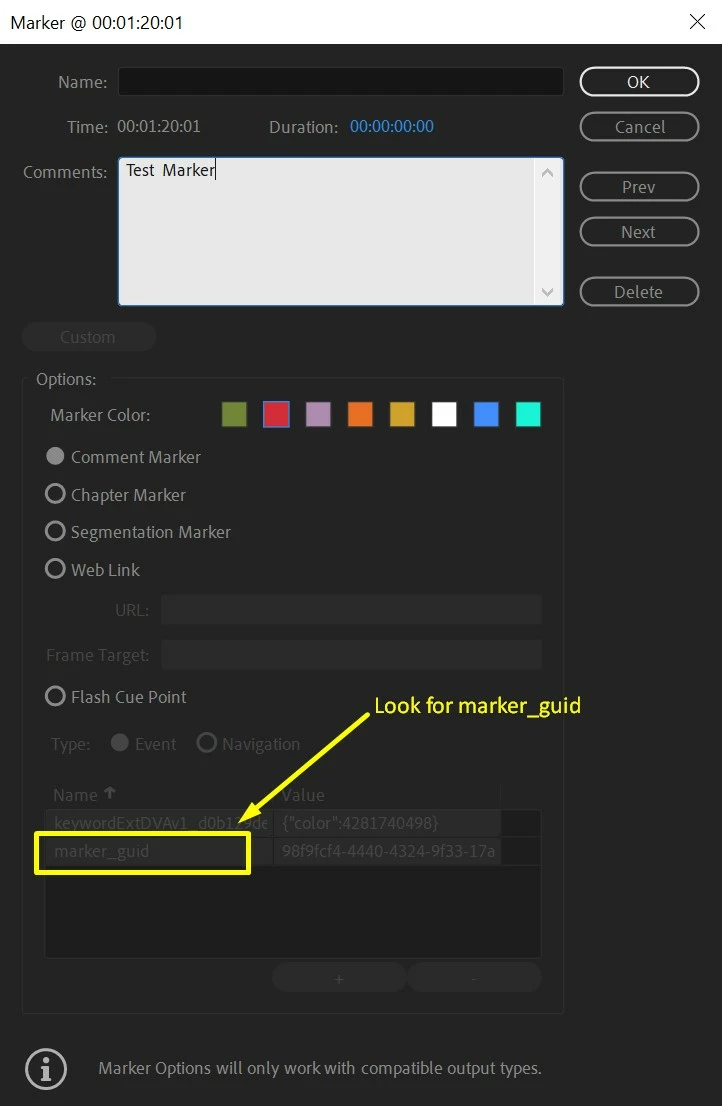


  • Once you find a marker that has marker_guid listed in the Flash Cue Point section, delete that entry.

    To do this enable the option for Flash Cue Point.

    Select marker_guid and click the - (minus) button.
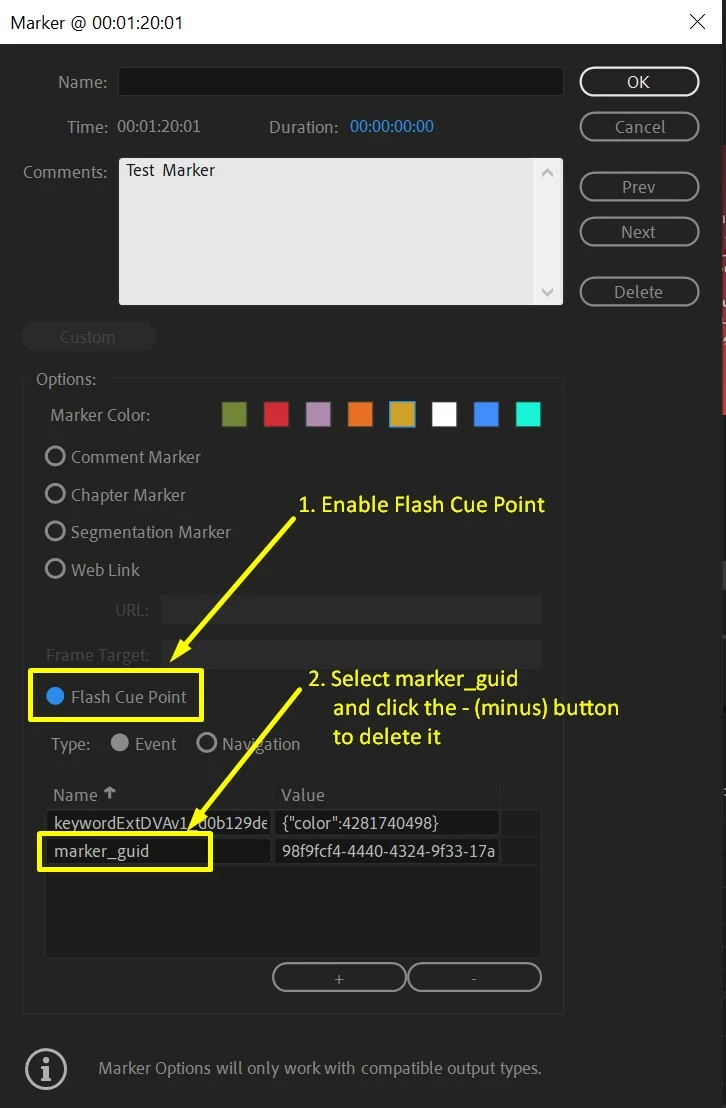


  • Click OK and try to export.

Hope this helps in solving the issue. Let us know if you have any questions.


Thanks,

Sumeet

This topic has been closed for replies.
Correct answer Sumeet Kumar Choubey

Hi donika,


Yes, we are working on getting it sorted as soon as possible.

Thanks for your patience.


Sumeet

27 replies

Participant
January 27, 2020

WHEW! Thank you so much for this work around. Had a deadline to meet and was able to because of this. Fingers crossed the team can find a fix in the next update. I appreciate the hard work you all put into your products - THANK YOU!!

Inspiring
January 24, 2020

Confirming this worked for me. Whew, glad this workaround was posted. I had just three markers and both Encoder and Export from Premiere (ctrl-M) had otherwise been locked up at 0% without deletion of the markers in the main sequence and dependent sequences from a multicam shoot.

francis-crossman10980533
Adobe Employee
Adobe Employee
January 24, 2020

The Premiere Pro / Media Encoder team have identified the cause of this issue and we are working on a fix to be released as soon as possible.

Participant
January 26, 2020

Is there an estimation for when an update to fix the issue will be released?


Thanks Josh

Participant
January 24, 2020

I can confirm that this "workaround" worked for my team. We've only had this particular issue with a computer running Premiere 14.0.1 - the issue does not occur with version 14.0.0

ZenGeekDad
Inspiring
January 26, 2020

I can confirm that.  Encorder non-starts have always been an occasional thing (~10-15% of the time?) over the last ~5 years I've used it.  But immediately after updating to 14.0.1, my marker-containing exports fail to start in Encoder 100% of the time.  And immediately upon reverting to 14.0, Encoder starts just fine.

Removing markers is a terrible work-around for me, compared to simply reverting to perfectly functional 14.0. 

Legend
January 24, 2020

Glad to hear the cause of this nasty bug has been discovered. Unfortunately I have too many markers logging interviews, so a roll-back to AME 14.0 was my route of choice, but looking forward to a fix on this issue. Cheers!

jneydew14040192
Participating Frequently
March 27, 2020

I am trying to download the AME 14, I have the 2020 version. How do I do this? Im dealing with the same problem.

Participating Frequently
January 23, 2020

Thank you for this workaround solution. I do hope Adobe is working on fixing this in a way that does not involve deleting markers.

Amy_KLG
Inspiring
January 23, 2020

Agree. Thanks for the workaround. This helped get my project at least to a point where it will encode. It's so unfortunate that the Adobe team can't figure some of this stuff out before they release updates. Every single time I update AME something happens and I'm out 2+ days just trying to research a solution. Very uncool. But, hey, at least my 6min video is now encoding and should be done in...hmmm.... maybe 2+ hours?! Gah.

Amy_KLG
Inspiring
January 24, 2020

-- Update --

Once I removed the markers in Pr from the main sequence, the render worked. It also didn't take as long to render as it originally said. On another note: When I added markers in the source panel window that didn't seem to have any effect on the rendering snag. It's just when the markers are applied in the main sequence window. At least that's what happened for me.

Averdahl
Community Expert
Community Expert
January 23, 2020

I can reproduce this. I added a marker, enabled Flash Cue Point and clicked OK. I then double click the marker and added "marker_guid" manually and clicked OK. By doing this the export never started.


Once removed, everything worked as expected.