



Community Manager
April 15, 2020
Question

FAQ: How to solve low-level exception error after updating to Premiere Pro 14.1?

  • April 15, 2020
  • 30 replies
  • 119367 views

Update: Solution: Update to Premiere Pro 14.2


Need to remain on 14.0? You may install Premiere Pro 14.0.4 from Creative Cloud Desktop app to continue using Legacy Titles with GPU Accelerated Renderer. Here is how to download the previous version of Premiere Pro.


We have identified that using GPU Accelerated Renderer might cause a low-level exception error to appear in Premiere Pro 14.1.


These errors might appear:

  1. While using Auto Reframe with the nested clip option. Auto reframe works fine, so you can simply ignore these errors.
  2. While using the Legacy title. To workaround this issue navigate to File > Project Settings > General and set the Renderer to Mercury Playback Engine Software Only.
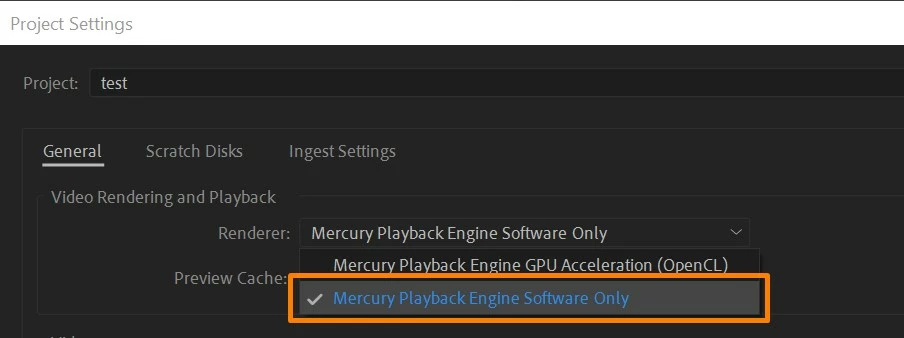
  3. While playing back the media (A low-level exception occurred in: Adobe Player (Player:5)).
    In this case, try clearing the media cache and check if it's working properly. If you are still experiencing the error, switch the Renderer to Mercury Playback Engine Software Only.


Hope this helps in solving the issue. Let us know if you have any questions. To know more about the known issues you may refer to this link.


Thanks,

Sumeet

This topic has been closed for replies.

30 replies

Participant
April 28, 2020

Grazie, installero nuovamente la versione precedente, in attesa della risoluzione del problema

Alfredo

Kevin J. Monahan Jr.
Community Manager
Community Manager
May 13, 2020

Thank you, Alfredo. Sorry for this issue.

Kevin

Kevin Monahan - Sr. Community and Engagement Strategist – Adobe Pro Video and Audio
mikelmags
Participating Frequently
April 24, 2020

yeah i took me a while to discover this thread. "software only" is too slow, had to downgrade to 14.0.4 which is now flawless...
waiting for a stable update

Lorraineprovence0
Participant
April 24, 2020

Bonjour

Je suis repassé a la version 14.0.3

C'est OK

Merci 

pouzadoux
Participant
April 23, 2020

Hello indeed by switching the rendering engine to the mercury playback engine software only the reading of the montage in the program window has become active again thank you for your expertise

jconelea
Participant
April 21, 2020

Can we please fix the rendering engine to use CUDA properly for legacy titles? Having to use Mercury Playback engine dramatically increases render times 

Kevin J. Monahan Jr.
Community Manager
Community Manager
May 13, 2020

JConelea,

Sorry for the issue. You can give the team your bug report here.


Thanks,

Kevin

Kevin Monahan - Sr. Community and Engagement Strategist – Adobe Pro Video and Audio
Participating Frequently
April 21, 2020

Media Encoder also takes forever to encode if you are using a Legacy Title in your squence.

Its very frustrating.

Participating Frequently
April 20, 2020

Just in case anyone is wondering if the Nvidia Studio Driver update (442.92, released 4-16-2020) changed the bad behavior of Premiere Pro 14.1, it did not. I tried it on my main machine (i9-7980XE w/ 2 GTX1080ti cards) and my laptop (Dell XPS 9650 i7-7700HQ w/ GTX1050) and 14.1 was not able to playback footage with legacy titles in them. Downgrading to 14.0.4 restores nominal operation.


This has me wondering: Is Adobe treating this as a bug or program error, or will all my past projects with legacy titles be unplayable until I change all the legacy titles to the newer graphics versions? If it's the latter, that really unacceptable because I'd have to recreate hundreds (perhaps thousands) of titles.


MattLTH

michaelwobbly
Participant
April 21, 2020

Same with me Matt. I use legacy titles big time and this 14.1 uber glitch is a significant worry. Now, there was a premiere pro update this morning (Tues 21st April) but it seems to have done nothing to address this problem. However, yesterday I switched to using the latest beta versions of premiere pro and media encoder - and it's ok. The Mercury Playback engine is back doing the hard graft again. But needs a proper fix Adobe folk 🙂

Participant
April 20, 2020

Check if you have old title graphics and delete them. The old way of making those are not available anymore and after I deleted them the error went away and I am able to work with CUDA.

Participant
April 20, 2020

I had this issue today. "Mercury Playback Engine Software Only" option slowed my Macbook Pro to unusable speeds with extremely long render times compared to the version 14.0.4. I just reinstalled the old version and my workflow is back to normal. Don't reccomend the update it was a nightmare trying to work on Software Only

Participant
April 18, 2020

This worked. Thank you very much lifesaver. 


Thanks mate