



Todd_Kopriva
Inspiring
July 18, 2011
Question

FAQ: Why does audio or video not go to the track where I drop it?
  • July 18, 2011
  • 12 replies
  • 209101 views

Issue
Some users have trouble dragging an audio-video clip into the Timeline. For example, when the clip is dragged in to the Timeline, only the video or audio portion of the clip appears. Very frustrating, but there's a simple fix. It's called Source Patching.


Solution:

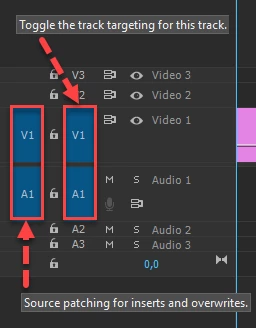
Make sure source audio and video (blue boxes - far left) are patched in the Timeline before dragging or editing the clip to the Timeline.

  1. Patching is indicated when the blue boxes are selected in the V1 and A1 tracks and are viewed as "V1" and "A1"
  2. If selected, boxes indicate that audio and video are patched to specific tracks, which are by default, V1 and A1.
  3. You should now be able to drag the clip (or use the Insert or Overwrite buttons) to edit the clip into the Timeline properly.


Article: Quick Fix: Video Clip Audio Not Appearing in Premiere Pro Timeline

Having trouble importing a file where only audio is present, see this video.


Source Patching Video


Notes: 

  • If an A1 or V1 box is not able to be selected, try double clicking the clip in the Project panel to load the clip into the Source Monitor (see the video above).
    • After the clip is in the Source Monitor, the V1 and A1 Source Patch boxes should appear.
    • You can then drag or use buttons or shortcuts to add the clip to the Timeline.
  • The boxes should appear automatically after selecting the clip in the Project panel. If not, click either box that might be unselected.
  • The other V1 and A1 boxes are for targeting track selection. When editing a clip into the Timeline, it does not matter if these are selected or not. Only the ones at the far-left are important. The other buttons are for editing functions after the clip is edited into the Timeline.
  • You can also run into this problem if the source patching boxes pertaining to the clip you are trying to edit into the Timeline aren't appropriately selected. For example, V1 needs to be selected when editing a video-only clip into the Timeline.


12 replies

Participant
November 2, 2024

Thank you, but no that isn't it. I can't pull anything down to the timeline from anywhere. I thought it was because I'm in a different country, but it works fine on my husband's laptop. I'm  begging to think it may be a setting I may have hit some how. 

R Neil Haugen
Legend
November 2, 2024

Drop a screengrab of your Timeline panel showing the entire header control block onto your text reply area please.

Everyone's mileage always varies ...
Harold Silva
Community Expert
Community Expert
May 30, 2023

Aunque parezca mentira, es un problema bastante común en el que caen los principiantes.
Una manera muy fácil y didactica de aprenderlo y no olvidarlo nunca más


Harold Silva B.
Carl_Fink
Participant
May 30, 2023

So, I used to design user interfaces. Adobe: if something does not work, tell the customer why it doesn't work. Don't just say, essentially, "No, I won't do that." This is not a puzzle game where we get joy from figuring out enigmatic clues. It's supposed to be a tool we use to do work.

Kevin-Monahan
Community Manager
Community Manager
May 30, 2023

Hi @Carl_Fink,

I read your post. Thanks for the feedback, but "Discussions" is a user-to-user forum. If you'd like to give feedback to developers, feel free to file a request or complaint on the Ideas forum here. I'm sure they wouldn't mind reading your take on Source Patching UI design there. I hope that info is helpful.


Thanks,
Kevin

Kevin Monahan - Sr. Community & Engagement Strategist – Pro Video and Audio
Participant
November 18, 2022

thank you so much !!

John Hepworth
Inspiring
September 10, 2022

Is there a way for the selected tracks in the timeline to override the source tracks patching?


i.e to just be able to select where you want the video and not have to line up the patching?


Kevin-Monahan
Community Manager
Community Manager
September 12, 2022

No, John. Sorry. Source patching is for editing clips into the Timeline. The Toggle Tracks function is for everything except editing clips into the Timeline. It would be a notable feature request, however. Make that here: https://adobe-video.uservoice.com/forums/911233-premiere-pro


Thank You,
Kevin

Kevin Monahan - Sr. Community & Engagement Strategist – Pro Video and Audio
Participant
August 9, 2022

THANK YOU XXXXXX

Participant
January 1, 2022

Agreed with all the comments here. So simple, yet so helpful. Thank you so much!!

Participant
October 11, 2021

Thank you so much man! you just saved me from being frustrated all the time when i try to edit! Thank you so very much for explaining it in simple words and solve my long time problem! 

Participant
October 21, 2020

Super clear and helpful explanation.  Thanks so much.  I just started teaching myself Premier 2 weeks ago to edit a music video, it went very well.  HUGE learning curve haha.  But starting project #2, I ran into this issue.  And your video is the only one I found that hit it so directly and simply.  Thank you!!

Participating Frequently
October 8, 2020

Wow I feel like an idiot. Glad it was an easy fix!!