



s-gansx
Participating Frequently
April 23, 2026
Question

frame.io v4 doesn't work with premiere 26.2.0

  • April 23, 2026
  • 11 replies
  • 193 views

 Until yesterday I used frame.io V4 in Premiere 26.2.0 with no problem. Today opening the window frame.io in premiere there is a message “something went wrong”.
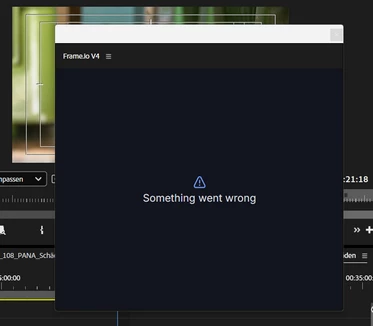
Even if I reload the window this message appears.
The Login in my frame.io V4 account via the Browser  https://accounts.frame.io/welcome?legacy_auth=false&auth_callback=adobe%2Bppro://frameio works well: “Authentication complete. Please return to Premiere Pro.” But in premiere it doesn’t work (“something went wrong”).

Opening frame.io via the application-page in creative cloud let me work with my frame.io-account within the browser - but not with premiere (“something went wrong”). The same if I sign in at the frame.io-page.

I deleted all cache-files, most recently I reinstalled Premiere 26.2.0. No success.

Win11, no system-changes since yesterday… No problem with internet-connection.

Thanks for help!

    11 replies

    Stan Jones
    Community Expert
    Community Expert
    April 30, 2026

    @Patrick Southern said “Please try reloading the panel now “ to get the latest frame.io panel version. I see that there is a Reload option in the frame.io panel header menu (3 line/hamburger drop down). Click it and it updates the panel version to the latest.


    Very convenient.


    Stan


    Patrick Southern
    Community Manager
    Community Manager
    April 30, 2026

    You can also right-click in the blank space of the panel and reload from there.

    s-gansx
    s-gansxAuthor
    Participating Frequently
    April 30, 2026

    OK,  the error seems to be fixed, the frame.io tool works again. Greetings to your engineer.

    Patrick Southern
    Community Manager
    Community Manager
    April 29, 2026

    Last night, one of our engineers tracked down a bug that causes this screen to appear for anyone in a locale other than EN (english) or JP (Japanese). He pushed a fix today. Please try reloading the panel now, and let us know if you’re still seeing this bug.
    cc: ​@s-gansx ​@Gutu96 ​@guiocassiano ​@alejandrosanchezmora ​@Stan Jones ​@Kevin-Monahan 

    s-gansx
    s-gansxAuthor
    Participating Frequently
    April 29, 2026

    Hi, I am still working at this problem. And in any case I will inform you, if I found the solution!
    I have contakt to someone from frame.io, he suggested installing an earlier version of Premiere.

    I'm working on a project right now, but if I find the time, I'll probably have to give it a try... Or can one of you try it out soon and report whether Frame.io works?

    s-gansx
    s-gansxAuthor
    Participating Frequently
    April 29, 2026

    Hi, as I had written, I deleted the cache files (in the same way had had descibed). Unfortunately, that didn't solve the problem in my case.

    Gutu96
    Participant
    April 28, 2026

    Hi everybody! I’ve asking ChatGPT for help and I could solve the problem. At least temporary. As a Mac user, I have to open Premiere Pro using Option + click on the Premiere Icon on my desk (Keep Option button pressed while clicking). After that, you’ll see a panel with 4 options.

    Click on “Reset app preferences”. I did it and I could work with Frame.io but keep in mind that every time you close Premiere Pro and log in again Frame.io will stop working.

    Using “Reset app preferences” doesn’t obey you to reinstall plugins or something like that, but you may lose shortcuts. So try to save your shortcuts before “Reset app Preferences”.

    Sorry for my english, I’m not bilingual 😅 Hope I help you guys 🤗

    Patrick Southern
    Community Manager
    Community Manager
    April 28, 2026

    Oh! Interesting lead. Thanks for the heads up.

    guiocassiano
    Participant
    April 28, 2026

    Hey,
    I’m having the same error. I've already restarted Frame.io, cleared the cache, and reinstalled it, but it’s still the same. I keep getting the 'Something went wrong' message. What can I do? I’ve been dealing with this issue for 2 days now

    Tks,
    Guilherme


    Patrick Southern
    Community Manager
    Community Manager
    April 28, 2026

    @guiocassiano DM me and we can set up a time to chat.

    Patrick Southern
    Community Manager
    Community Manager
    April 24, 2026

    Hey ​@s-gansx, I’m the Product Manager for the Frame.io panel in Premiere. Can I set up time with you and my team to look at your issue?

    @Stan Jones, as always, thanks for looping me in.

    alejandrosanchezmora
    Participant
    April 25, 2026

    Hey ​@Patrick Southern I have the same problem, yesterday I change my creative cloud password and since then frame.io is not working. I hope you can help me. 

    Patrick Southern
    Community Manager
    Community Manager
    April 27, 2026

    Hey ​@alejandrosanchezmora, we would love to help you. Direct message me, and we’ll find a time to chat.

    Stan Jones
    Community Expert
    Community Expert
    April 24, 2026

    One other user reports this in the other thread:

    Stan


    s-gansx
    s-gansxAuthor
    Participating Frequently
    April 24, 2026

    That was me, sorry. I choosed the wrong thread (bug) and copied the report to “questions”

    Stan Jones
    Community Expert
    Community Expert
    April 24, 2026

    @s-gansx,


    No problem. Another user added a “me too”! I just wanted to be sure they were on the record here. A moderator can move it here.


    Stan


    Stan Jones
    Community Expert
    Community Expert
    April 24, 2026

    @s-gansx,


    I don’t see that: PR 26.2.0 on Win 11. I see that the Frame.io version is v20260423, uxp-plugin_v1.0.18, schema_v0.0.138. And it for the first time asked for permission to establish a link. I wonder if there was an update?


    @Patrick Southern 


    Stan