
Glitch with Multicam View 23.4 and 23.5
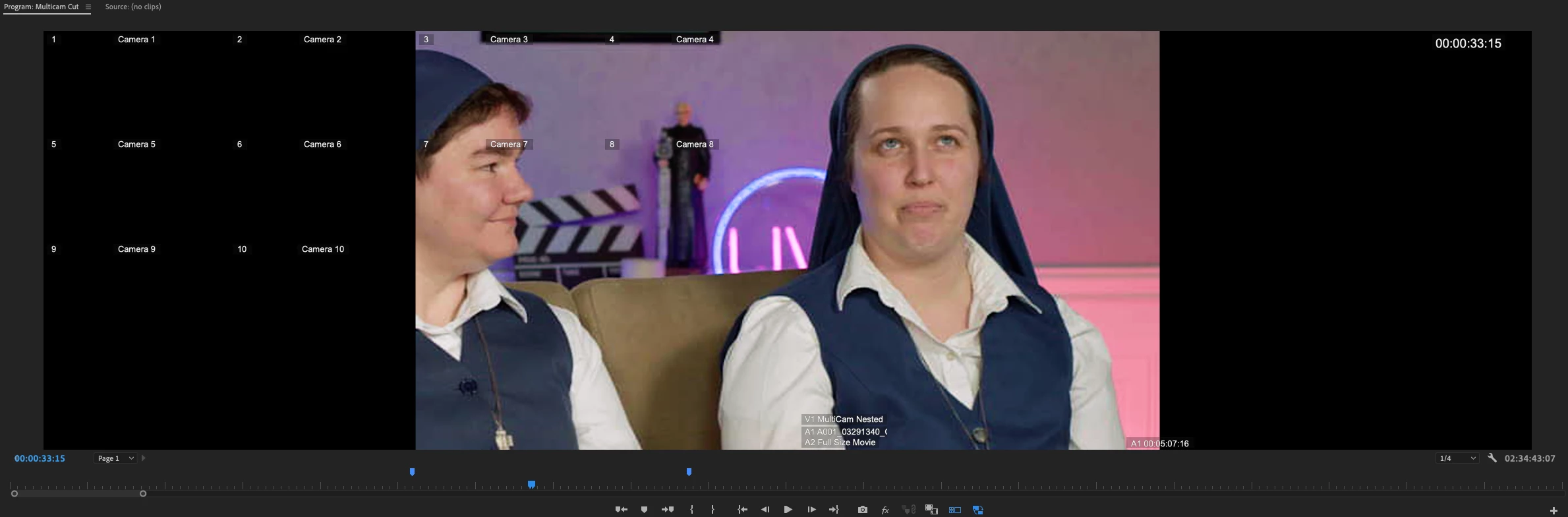
As you can see in the image, the multicam view grid is doing something strange. I'll be going along, editing as usual, and all of a sudden (sometimes after a click on the timeline, sometimes after toggling proxies, and sometimes, just because it feels like it) the multicam view will pop to this strange layout. The main view moves from the right side of the panel to the center, and the angles all turn black and overlap the main view. With the camera name overlay applied, you can see that Premiere still *thinks* they are visible. Clicking on them also affects the timeline.
Premiere 23.4 through 23.6 are all giving this behavior in several different projects on MacBook Pro 2023 M2Max, 96 GB RAM and Mac OS 13.4.1 (and several previous versions).


 AdChoices