
Participating Frequently
June 17, 2024
Question

GPU rendering turning on and off

  • June 17, 2024
  • 9 replies
  • 1013 views

Lately, I have been experiencing playback and rendering issues with Premiere. When I start rendering, it processes a few frames with the GPU and then stops. By monitoring through the Windows Task Manager, we can see that exactly during the moments it is rendering, there are spikes in GPU usage.
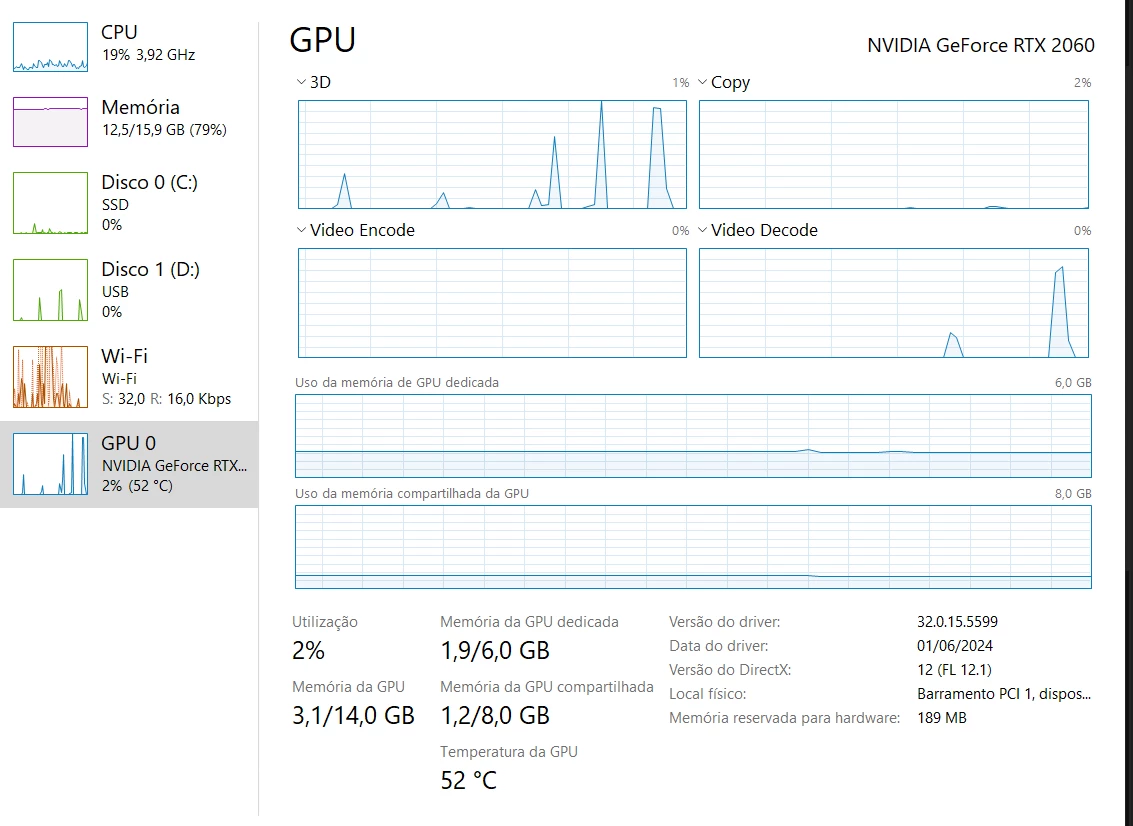
I have a NVIDIA GeForce RTX 2060. I have already updated the graphics card drivers, changed the settings in the NVIDIA Control Panel, and even installed the CUDA toolkit. I have tried all possible solutions, but none seem to work.


This topic has been closed for replies.

9 replies

Kevin-Monahan
Community Manager
Community Manager
September 3, 2024

Moving to the "Discussions" forum for further troubleshooting. Please try the 25.0 Beta version for a possible fix. Let the community know how it's going.


Thanks,
Kevin


Kevin Monahan - Sr. Community & Engagement Strategist – Pro Video and Audio
Kevin-Monahan
Community Manager
Community Manager
August 16, 2024

Hi @pedrop45338571,

Thanks for the added info. I apologize that a developer has not yet responded. Are you still having this issue? Let the team know.


Thanks,
Kevin

Kevin Monahan - Sr. Community & Engagement Strategist – Pro Video and Audio
Participating Frequently
June 17, 2024

@Kevin-Monahan here's the media file properties:

Type: MXF
File Size: 87.90 MB
Image Size: 3840 x 2160
Frame Rate: 29.97
Original Audio Format: 48000 Hz - 24 bits - 4 channels
Project Audio Format: 48000 Hz - 32-bit Floating Point - 4 channels
Total Duration: 00:00:12:15
Pixel Aspect Ratio: 1.0
Alpha: None
Color Space: Rec. 709
Color Space Conversion: Off
Input LUT: None

MXF File Details:
Wrapper Type: MXF OP1a (Type: SingleItem SinglePackage MultiTrack Stream Internal)
File Created by: Sony, Mem (2.00)
Bitstream Format: Sony
Profile: 4:2:0 AVC Long GOP High H.264/MPEG-4 with unrestricted encoding
Bitstream Format: Sony
Class 60


Participating Frequently
June 17, 2024

Thank you for the feedback, I tried to follow the step-by-step process you gave me, but the same thing is still happening: the GPU works for milliseconds and then drops back to 0%.


Kevin-Monahan
Community Manager
Community Manager
June 17, 2024

Hi @pedrop45338571,

I appreciate you filing your bug report and providing the system information. The team may need more information. See: How do I write a bug report?


Information about your media and workflow is also needed.


Thanks,
Kevin

Kevin Monahan - Sr. Community & Engagement Strategist – Pro Video and Audio
Ann Bens
Community Expert
Community Expert
June 17, 2024

Change editing mode to Custom and change the Preview codec to Prores LT

And turn of Max Render.

Set nvidia settings to default and uninstall the Toolkit (you dont need this)

Participating Frequently
June 17, 2024

No plugins/effects being used

Participating Frequently
June 17, 2024


  • OS: Windows 10, version 22H2
  • CPU: Intel(R) Core(TM) i7-10750H CPU @ 2.60GHz
  • RAM: 16GB
  • vRAM: 5955MB
  • Premiere Pro: 24.4.1 (Build 2)

  • Sequence settings:


  • Footage:

    Format: MXF
    Format version: 1.3
    Format profile: OP-1a
    Overall bit rate mode: Variable
    Overall bit rate: 58.9 Mb/s
    Frame rate: 29.970 FPS
    Writing application: Sony Mem 2.00

    Video
    Format: AVC
    Format/Info: Advanced Video Codec
    Format profile: High@L5.1
    Bit rate mode: Variable
    Bit rate: 54.3 Mb/s
    Maximum bit rate: 60.0 Mb/s
    Width: 3 840 pixels
    Height: 2 160 pixels
    Display aspect ratio: 16:9
    Frame rate: 29.970 (30000/1001) FPS
    Color space: YUV
    Chroma subsampling: 4:2:0
    Bit depth: 8 bits
    Scan type: Progressive
    Bits/(Pixel*Frame): 0.219
    Stream size: 81.0 MiB (92%)


Joost van der Hoeven
Community Expert
Community Expert
June 17, 2024

Can you please share more system info? Like OS version, CPU, RAM, vRAM, Pr version? Thanks. Also your sequence settings, type of footage and any effects/plugins in use?

FAQ: What information should I provide when asking a question on this forum?
https://community.adobe.com/t5/premiere-pro-discussions/faq-what-information-should-i-provide-when-asking-a-question-on-this-forum/td-p/3929027