
Mxch
Known Participant
December 18, 2022
Question

HELP: PREMIERE PRO IS NOT SHOWING SHORTCUTS IN BRACKETS WHILE HOVERING MOUSE OVER T O O L S

  • December 18, 2022
  • 4 replies
  • 1317 views

This software is so expensive and comes with so many broken features.

IF I open Premiere directly everything seems to be working fine but if I open Premiere through project file then shortcuts aren't shown in brackets
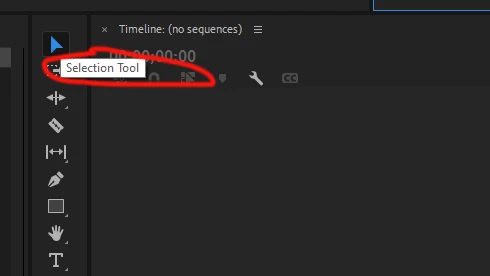
It should be saying

Selection Tool (V)

Also some clips don't have pink sign on FX icon even though those clips have effects applied 

This topic has been closed for replies.

4 replies

CREATOR JOSEPH
Participant
June 11, 2024

In my case, the graphics card was the cause. The problem was resolved by replacing the GTS650 in use with the GTS 750Ti or using the Intel CPU's built-in graphics.


CREATOR JOSEPH
Participant
June 11, 2024

This happened when a graphics card compatibility issue window appeared when running Premiere. Deleting the graphics card driver did not work, so I was able to solve the problem by reinstalling Windows and using the graphics card driver that is installed by default in Windows.

MyerPj
Community Expert
Community Expert
December 19, 2022

I'm wondering if you have a workspace saved in the project file.

Window/Workspaces/Import Workspace from Project

I always leave this unchecked.

Mxch
MxchAuthor
Known Participant
December 20, 2022

Import Workspace from Project is unchecked, but when I open Premiere shortcuts show up, when I open project files shortcuts are gone

Warren Heaton
Community Expert
Community Expert
December 18, 2022

Which version number of Premiere Pro is this and what OS version?

Mxch
MxchAuthor
Known Participant
December 19, 2022

Windows , and it's the lates Premiere pro v 23.1.0 
No issues with FX color, my only problem is that tools aren't showing shortcuts while hovering mouse aon top of them

Warren Heaton
Community Expert
Community Expert
December 19, 2022

Double-check the current setting for Preferences > General > Show Tool Tips.


Ann Bens
Community Expert
Community Expert
December 18, 2022

Make new project and import old one.

Mxch
MxchAuthor
Known Participant
December 18, 2022

I tried that, I tried updating premiere. uninstalling it using creative cloud cleaner tool. nothing works

Ann Bens
Community Expert
Community Expert
December 18, 2022