Known Participant
January 17, 2017
Answered

Help with Proxies

  • January 17, 2017
  • 3 replies
  • 1399 views

Im having a hard time smoothly scrubbing/jogging and even playing H264 100mbit 4k60 media on my machine. Obviously. So the solutions seems to be proxy editing, but even then when i  do h264 720 or GoPro CineForm 720 it still is very choppy when scrubbing.

What am I missing?

System specs are:

OS: Microsoft Windows 10 Enterprise (x64) • CPU: Intel(R) Xeon(R) CPU E3-1505M v5 @ 2.80GHz (2.81GHz) • Memory: 63.8 GiB Total (45.6 GiB Free) • Storage: 873.0 GiB / 1.1 TiB (295.7 GiB Free) • VGA: Intel(R) HD Graphics P530, NVIDIA Quadro M3000M

I think the bottle neck of the laptop is the cpu, but i still feel like it should edit fairly decently?

    This topic has been closed for replies.
    Correct answer R Neil Haugen

    This is what it looks like when I do that and try scrubbing:

    Here are my injest settings

    http://i.imgur.com/BkYgaEU.png

    BkYgaEU.png

    Ingest / Proxy working:

    http://i.imgur.com/aWIYNX8.png

    aWIYNX8.png

    Proxy Attached:

    BwjbMgn.png

    Video of scrubbing:

    Seems like anyhting bast 1x playback speed it just starts the skip and jump around...


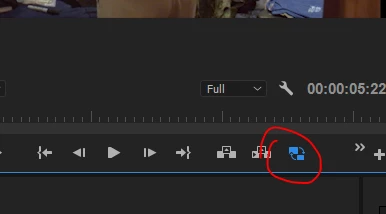
    First, that looks like either the Source or Reference monitor ... and to use the proxies, you need to switch to them with the icon for that in the Program monitor as shown here:

    To get that circled icon you need to click the " + " button on the right of the screen as shown there, and grab that icon and move it onto your control settings with your other icons.

    If it's blue, you're using the proxy media. If it's gray, you're using original media.

    Neil

    3 replies

    Known Participant
    January 17, 2017

    Never knew that! Will check! Thanks

    Bill Gehrke
    Inspiring
    January 17, 2017

    My suggestion is to test your system with my Premiere Pro BenchMark (PPBM) and see if we can see any bottlenecks.  Just post the data from the Output.csv file here.

    Known Participant
    January 17, 2017

    Will do. Im using cc2017 i assume i use the cc2015 project in the zip?

    Bill Gehrke
    Inspiring
    January 17, 2017

    No, if you have an old download you need to do it again and use the CC 2017 version

    R Neil Haugen
    Legend
    January 17, 2017

    You're right to think of going to proxies, but as H.264 is highly compressed it runs the CPU pretty hard. Therefore, a lower-compressed proxy codec is "advised" ... ruling out H.264 as the codec.

    Cineform typically "edits like butter" as another user says. So looking for a bottleneck is good. I'm wondering if you have more than one disc on the laptop, and if so what connections.

    Might be more of a query for the Hardware forum. But does involve PrPro workflow processes so it works here. But bringing Bill Gehrke​ into the discussion can only help.

    Neil

    Everyone's mileage always varies ...
    Known Participant
    January 17, 2017

    I have two drives.

    1tb ssd (Samsung 850 pro)

    256 ssd nvme m2 (Samsung 950 pro)

    os is on nvme with adobe files are on the 850

    ive out the media on the Nvme and it improved but will still studder and choppy job/scrub (without proxy)

    Legend
    January 17, 2017

    Use only the included Cineform presets for proxy media and store them on the larger drive.