Known Participant
August 7, 2019
Answered

High pitch tone when importing footage

  • August 7, 2019
  • 6 replies
  • 7762 views

Hi all,

Filmed using Rode rifle Mic on Sony A7iii. The footage sounds fine outside Premiere but when I link to through my Prem project it has a high pitch tone running behind almost all the clips. I can still hear the dialogue but there's also tone.

I've tried Ingesting, instead of linking to the footage but that didn't help.

Never had this before, can anyone help?

Thanks,

Nigel

This topic has been closed for replies.
Correct answer Averdahl

As you said you didn't have a problem I went home to try it from a different drive on a different Mac, same footage, new everything else, same problem!

My mac is up to date so latest QT and Adobe suite.

Just tried a Handbrake encode and same thing, as Final Cut exports, the tone remains! This is unbelievable.

Interestingly, when I export the footage back out of Premiere, the tone isn't there! It's just in Prem.

Anyone got anything else I can try before I spend two days editing with tone in my ear?

Thanks so much for the help so far.

Nige


I see/hear this outside Premiere Pro as well. I hear it in PotPlayer, VLC, Adobe Audition, Premiere Pro. The microphone used to record or the eletrical circuits in the camera (or both) did pick up some nasty electrical "noise" from some source in the room, probably the lightning. There are some very high pitched signals/tones there and they can be removed by using a Notch Filter.

If i in the Audio Track Mixer use the Lowpass filter and set it to 18000 Hz and then use the Notch Filter using the settings below and then wrap it up with a Highpass filter set to 160 Hz i get a decent result that you can download here: C0003.zip
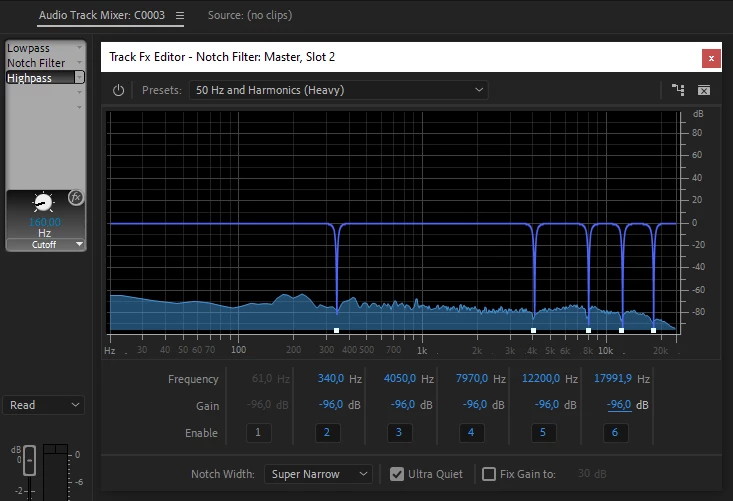

6 replies

Inspiring
April 5, 2022

Just FYI for any reading in 2022. I'm in Premiere Pro CS6. Same issue.


The issue was caused by a mismatch in my sample rate. The audio sample rate of my video did not match my sequence. I was putting 44.1KHZ audio into a 48KHZ sequence. Rookie mistake.


I viewed the original footage in Windows Media Player and it did not have the audible noise sound, and after converting the audio to MP3 separately it still did not have the noise. But importing the original or converted audio into Premiere with the wrong sample rate introduced the noise.


The noise in my case was a kind of high frequency distortion, a metallic reverberation... like silverware being rattled in an earthquake, or feedback on a guitar. There was not micing or anything in the recording to produce feedback.


I used an EQ externally to see what frequency area was problematic and it seemed like the bass frequencies were causing the noise... When I cut the bass, the noise disappeared. So if you import footage that has little to no bass, you may not experience this issue at all.


Moral of the story: make sure your sequence and footage have the same audio sample rate.

Participant
October 22, 2021

Hi all,


Using Zoom H4nPro, Sony Lavs and sync'd video (Fuji GFX100s) using Plural Eyes - I too came across this high pitch frequency in both my sync'd sequence and sync'd sequence replaced. I took some of the advice below and went into the preferecnces to change the audio output to 48000K, to no avail. What seemed to work for me was highlighting all the clips then right clicking to open all in Audition. Once you do this all the clips Fx buttons grey out and then no longer any hiss. I prob have some import fx on audio clicked (?) but have no idea how that happened. 

Known Participant
August 7, 2019

OK guys, thanks so much for your help so far.

I've tried, rendering & replacing, importing to FCX and exporting in multiple formats, exporting from Encoder, I've wasted a whole day now and can't find the solution.

I'm on deadline and I'd really, really, really appreciate your help.

Here's one of the files:

Audio Problem - Google Drive

If anyone can work out whats going on or can find a work around I'll buy you several pints!

Thanks in advance,

Nigel

August 7, 2019

When seconds matter, help is always minutes away...

If you want to get the project done and do root cause analysis later, try transcoding the footage with Handbrake or FFMPEG.

I don't have the same issue when I import it. Do you possibly have Quicktime 7 installed? What version of Premiere by the way?

Known Participant
August 7, 2019

As you said you didn't have a problem I went home to try it from a different drive on a different Mac, same footage, new everything else, same problem!

My mac is up to date so latest QT and Adobe suite.

Just tried a Handbrake encode and same thing, as Final Cut exports, the tone remains! This is unbelievable.

Interestingly, when I export the footage back out of Premiere, the tone isn't there! It's just in Prem.

Anyone got anything else I can try before I spend two days editing with tone in my ear?

Thanks so much for the help so far.

Nige

Known Participant
August 7, 2019

When I import into Final Cut (at this point it sounds as it should), export from there as an H.264 then reimport to Prem the tone is still there! Just not as prominent.

August 7, 2019

Wow, that's weird. Could you share one of the source files with a dropbox, wetransfer, or Google Drive link? I'll try it on my machines

Known Participant
August 7, 2019

I've just tried importing the footage into Final Cut X and it works fine so it's definitely a Premiere problem, one I haven't had before.

Ann Bens
Community Expert
Community Expert
August 7, 2019

Make sure your audio hardware input in the preferences is set to none.

Known Participant
August 7, 2019

Thanks, I just tried that, turned it off & on, re-imported but didn't help sadly

August 7, 2019

What does the audio waveform look like when you choose it in the Wrench menu of the Source Monitor?

