


Inspiring
October 19, 2021
해결됨

How to configure Audio ducking fades like this?

  • October 19, 2021
  • 3 답변들
  • 707 조회

Everytime i set audio ducking for music verse dialog, the fade curve always like this :
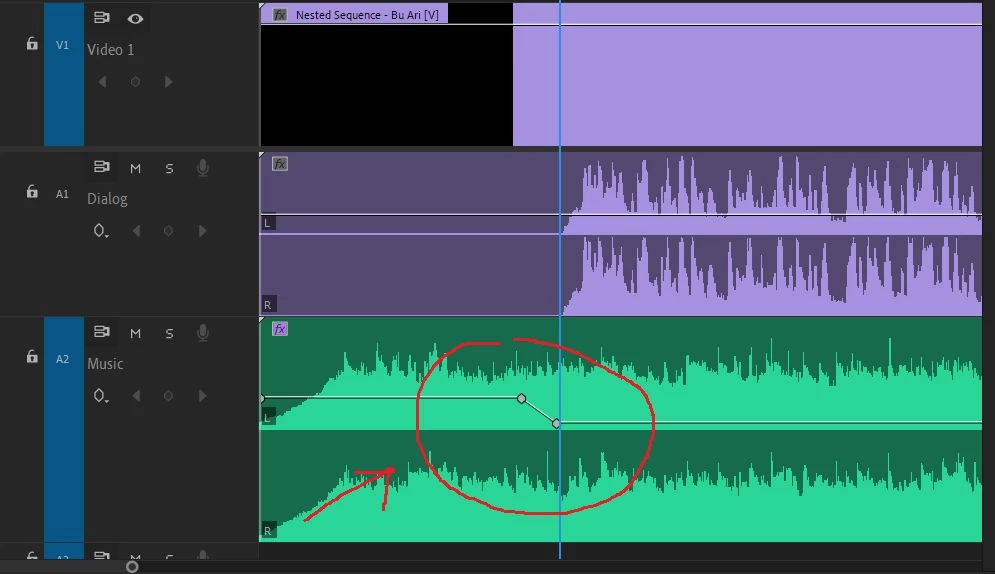
Look, the audio ducking placed before dialog.

To make smooth fade between music and dialog the audio ducking must be like this :
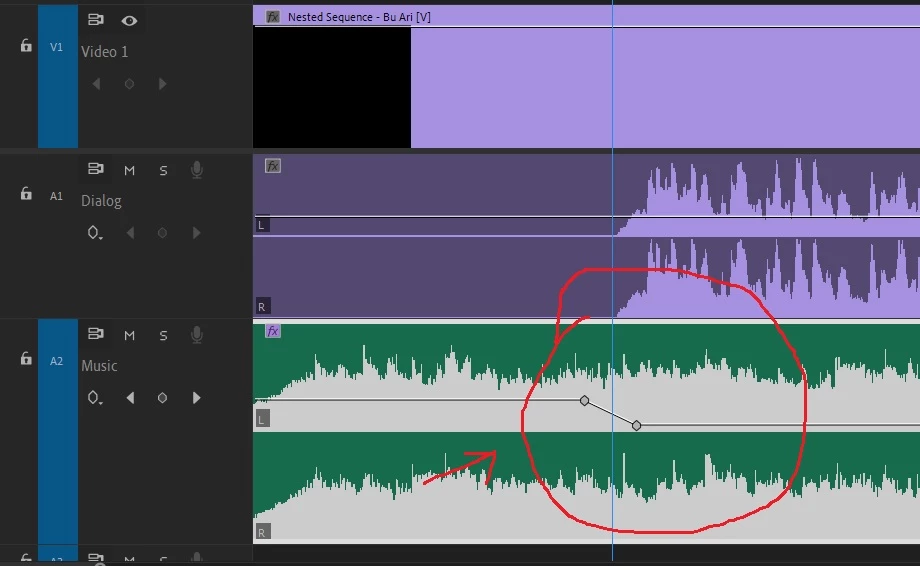
How to do like that? should i do it manually one by one?

thanks

이 주제는 답변이 닫혔습니다.
최고의 답변: Eko Wardoyo

I have found it, adjust the sensitivy slider,

thanks

3 답변

Eko Wardoyo작성자답변
Inspiring
October 19, 2021

I have found it, adjust the sensitivy slider,

thanks

######Raizen 7, 40Gb Ram, RTX 3060, Win 11 -- All of Software in the world are just tools. Buy it if it works for you :)
Roland Kahlenberg
Legend
October 20, 2021

The Fades slider allows you to define the length/duration of the attack/falloff too and this is useful if you want precise, manual control. Otherwise, the Smooth Vocal Ducking works well as a Preset for slower-paced videos with VO.

Very Advanced After Effects Training | Adaptive & Responsive Toolkits | Intelligent Design Assets (IDAs) | MoGraph Design System DEV
Roland Kahlenberg
Legend
October 19, 2021

Auto Ducking comes with Presets as well as the ability to customize the sensitivity of the Audio Levels. It looks like you've applied the Hard Vocal Ducking Preset. Instead, use the Smooth Vocal Ducking Preset. You can switch Presets and hit the Generate Keyframes button to create new audot-ducking keyframes. HTH 

Very Advanced After Effects Training | Adaptive & Responsive Toolkits | Intelligent Design Assets (IDAs) | MoGraph Design System DEV
Eko Wardoyo작성자
Inspiring
October 19, 2021

Thanks roland, i will try it

######Raizen 7, 40Gb Ram, RTX 3060, Win 11 -- All of Software in the world are just tools. Buy it if it works for you :)
Eko Wardoyo작성자
Inspiring
October 19, 2021

Anyone please?

######Raizen 7, 40Gb Ram, RTX 3060, Win 11 -- All of Software in the world are just tools. Buy it if it works for you :)