


Inspiring
January 29, 2024
Question

How to save transitions in timeline as an effect or custom transition

  • January 29, 2024
  • 2 replies
  • 409 views

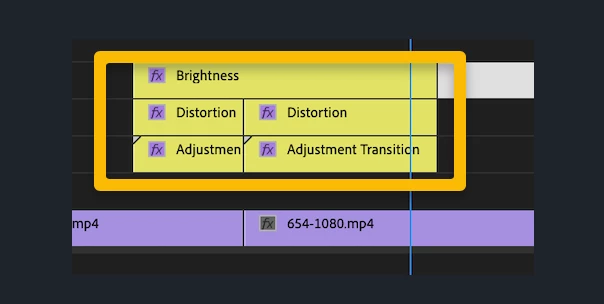
I have the following custom transition in my time line.  I would like to save this as an "effect" or "transition" I don't know the exact terminology.  But I'd like to save it so that I can just drag it into other timelines.  
 

This topic has been closed for replies.

2 replies

R Neil Haugen
Legend
January 29, 2024

Kevin's got a solid suggestion.


Working in a Production means you can have separate folder trees and projects for different clients, and jobs for those clients under their folder tree.


And the really cool part is you can have folders with your overall "assets" such as general b-roll, sound libraries, sequence setups like this one, and grab assets to drag/drop into other projects without muss or fuss.


Sweet ... 

Everyone's mileage always varies ...
Kevin-Monahan
Community Manager
Community Manager
January 29, 2024

HI @OhmsG,

Thanks for writing in. I appreciate the screen shot.

quote

I have the following custom transition in my time line.  I would like to save this as an "effect" or "transition" I don't know the exact terminology.  But I'd like to save it so that I can just drag it into other timelines.  


What you are showing is more of a group off effects that act as transitions.  This is a group of adjustment layers and/or nests which contain effects and act as transitional effects. However, the company selling you these preset effects calls them "transitions." I wish they would not do that because they are not standard Premiere Pro transitions, as you might see.


There is no official way to save these preset groups of effects like this within the application. Sorry about that. Feel free to create a feature request in the Ideas forum.


What you might do is set up a "Production" where you can create a project to store these "groups of effects" inside sequences. Add this project to any Production you set up so that you can have these effects at your fingertips for importing into a working project.


I hope the advice makes sense to you. If not, feel free to ask questions about that.


Thanks,
Kevin

Kevin Monahan - Sr. Community & Engagement Strategist – Pro Video and Audio
Ann Bens
Community Expert
Community Expert
January 29, 2024
quote

 the company selling you these preset effects calls them "transitions." I wish they would not do that because they are not standard Premiere Pro transitions,


By @Kevin-Monahan


Transition-effects would be more appropriate.