
Vylaern
Inspiring
August 27, 2018
Answered

How to toggle panel into Full Screen - UK keyboard

  • August 27, 2018
  • 5 replies
  • 3877 views

Hi,

I was trying to use  'Toggle Full Screen' shortcut, but I did not work on my UK keyboard. So in keyboard shortcuts setting I added a F12 button, but when I press it, I got only full-screen for Program panel, does't matter in which panel I am actually in.

What should I do?
This topic has been closed for replies.
Correct answer MarekMularczyk

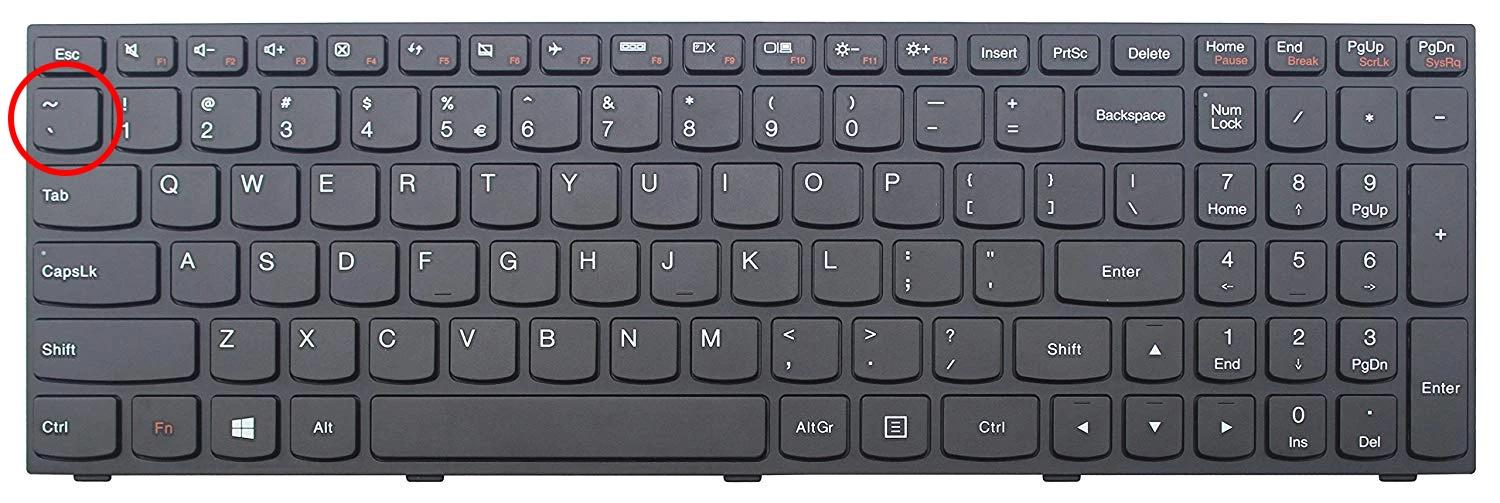
This one:

5 replies

Ann Bens
Community Expert
Community Expert
August 29, 2018

Might need to set your keyboard to International as I have.

Ann Bens
Community Expert
Community Expert
August 27, 2018

Full screen without controls: ctrl+` (ctrl+grave)

Vylaern
VylaernAuthor
Inspiring
August 29, 2018

https://forums.adobe.com/people/Ann+Bens  wrote

Full screen without controls: ctrl+` (ctrl+grave)

This doesn't work for on my keyboard, so I had to add my extra shortcut F12.

Vylaern
VylaernAuthor
Inspiring
August 29, 2018

And one more thing I just discover, so it might be useful for other people. Those key next to 1, maximise the panel, ctrl+` (F12 in my case) do the full-screen, so looks like 2 different functions.

MarekMularczyk
Community Expert
MarekMularczykCommunity ExpertCorrect answer
Community Expert
August 27, 2018

This one:

Adobe Community ExpertAdobe Certified Professional
MarekMularczyk
Community Expert
Community Expert
August 27, 2018

What maximises an active panel is the key in the top-left corner of your keeboard (next to 1) (I'm on UK keyboard, too)

Adobe Community ExpertAdobe Certified Professional
Vylaern
VylaernAuthor
Inspiring
August 29, 2018

marer1976  wrote

What maximises an active panel is the key in the top-left corner of your keeboard (next to 1) (I'm on UK keyboard, too)

This did the trick, thank you.

MarekMularczyk
Community Expert
Community Expert
August 29, 2018

Always pleasure to help

Adobe Community ExpertAdobe Certified Professional
Averdahl
Community Expert
Community Expert
August 27, 2018

Map "Maximize or Restore Active Frame" or "Maximize or Restore Active Frame Under Cursor" instead.

Vylaern
VylaernAuthor
Inspiring
August 29, 2018

  wrote

Map "Maximize or Restore Active Frame" or "Maximize or Restore Active Frame Under Cursor" instead.

Where to find those settings?

Averdahl
Community Expert
Community Expert
August 29, 2018

Where to find those settings?

Go to Edit > Keyboard Shortcuts and type the word Maximize in the search dialog.