
Danko_Cimbri_Photography
Known Participant
August 11, 2019
Answered

Imported .mogrt files doesn’t appear in Essential Graphics Tab

  • August 11, 2019
  • 11 replies
  • 34549 views

Hi,

today my problem is:

when I import an Essential Graphics made with AE (Graphics/Install Motion Graphic Template.../myfile.mogrt and Open) this doesn’t appears in the Essential Graphics Tab (Windows/Essential Graphics).

In my Tab, I only see the old .mogrt files that I have imported in the past. The new “my file.mogrt” template isn’t in this list.

How I make it visible? When I charge an another time the template, a warning window appears and tell me “Are you sure you want to overwrite the myfile.mogrt template?”

This means that the file is already in the folder but even if I look for it, it doesn’t appear.

Let me know!

Thanks
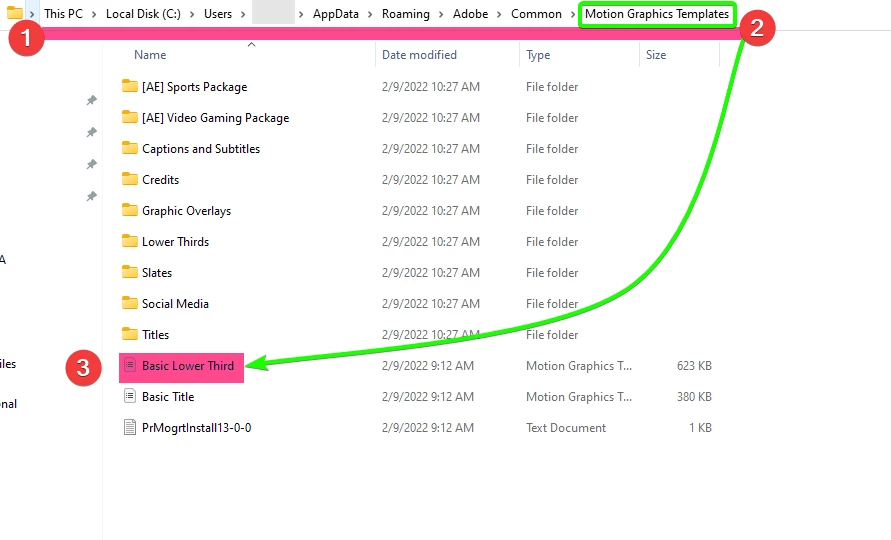
    Correct answer Baffy19

    Delete yours .MOGRT from the folder and install it yourself using the following path in the screenshot:

    11 replies

    Participant
    June 17, 2024

    If anybody stumbles on this, I just restarted Premiere Pro and poof! There was the file.

    Participant
    November 11, 2022

    I have a mac too. 

    Participant
    July 26, 2022

    2022 and this is still an issue i just cant believe i'm spending so many hours on this nonsense this is unbelievable really, I really considering moving to Devinci, so many issues so much hassle

    R Neil Haugen
    Legend
    July 26, 2022

    There has to  be something odd on your system, permissions issues or mis-naming, perhaps even MS OneDrive is interfering, something. That is NOT normal behavior.


    The various problems users have had in this thread are all of the above. So first thing I'll ask, do you have MS OneDrive or any other auto-cloud-backup system setup for your computer?


    And what of the many different problems mentioned in this thread do you have specifically happening on yours?


    Neil

    Everyone's mileage always varies ...
    Participant
    July 26, 2022

    Hi ,

    Nothing is odd with my System, I just received a new MacBook , new installation , clean machine with nothing else installed and this is happening also with my previous  machine so this is not the case, I'm not using any cloud backup all my file stored on my local SSDs so I shouldn't have any issue at all .


    1. when im installing Motion Graphics templates, im getting error messages when trying to install them , sometimes “The Motion Graphics template could not be installed” and sometimes "This motion graphics template is not compatible with this version of Premiere Pro. You must update to the latest version of Premiere Pro in order to use this template." and i'm using the most updated version for sure.


    2. and sometimes i'm getting "The motion Graphics template couldn't be installed" and when i'm trying to install the same mograt im getting this message "This file already exists. confirm overwrite"so it looks like the file is already there .


    3. when im going to the library of my mograt i can see that the specific mogrts i just tried to install greyed out.

    and when im trying to move the mogrts to new libraray just to troubblshoot the issue im getting a mesage that this files used by other softwrae what not make any sense speacually after i did restart and nothing runing or using this files.


    also when im deleting all the mogrt folder and restart premiere the default mogrts not showing up in the essential graphics window.


    Let's say that for this level of software I expect at list to a correct error message that will direct the users to the issue .


    Randune23
    Inspiring
    March 13, 2022

    Mine is almost as ANNOYING!  I'll be working on a project and then all of a sudden, ALL of my MOGRTs disappear.  I have tried many of the ideas here and none of them have worked.  I type in simple searches like "logo", "glitch", or "title" and Adobe just keeps saying, "Searching..."  But it NEVER finds any of them.  I go to the bottom of the EG panel and click on the add button, select a MOGRT and it gives me the same error, "This file already exists.  Confirm overwrite?"  I say "Yes" but none of them show up.


    Then without any warning, the EG full panel just pops back up.  What the heck?  I have rebooted, restarted PP, and still, no MOGRTs listed.  Why does this always happen at the point in a project when I need to do all my text overlays???  Thanks, Adobe!


    Randy

    Baffy19Correct answer
    Legend
    March 13, 2022

    Delete yours .MOGRT from the folder and install it yourself using the following path in the screenshot:

    Participant
    September 15, 2022

    Thanks so much. This was an easy fix for me.

    Participant
    December 25, 2020

    I don't know if your problem continues but I think I have finally found th solution. As there is the notification saying: “Are you sure you want to overwrite the myfile.mogrt template?” I thought it was lurking somewhere around there 😄 In the Essential Graphics panel under the Browse with Local Templates Folder ticked, I changed the List order to "Recent" and all the mogrt files shoewed up! I hope it works with your computer too. Please let me know if it works, so I can feel much better 🙂

    Participant
    April 29, 2021

    It works! Thank you.

    LM_Agency
    Participant
    October 8, 2020

    I had the same problem and then I realized a little star near the search bar saying "Refine search....". I deactivated it and viola all of my mogrt files are visible now. 
    That can also be your case.

    FlameBeast25
    Participant
    April 28, 2023

    YES, this was the case, Adobe automatically UNFAVORITED my MOGRTS. Thanks a lot!

    Participant
    February 10, 2020

    Hey i think i found the solution, at least for me.I had the same problem and the solution is this: 

     You have to go to your Motion Graphic Templates, delete everything or copy it somewhere else, you can delete it because when you open Pr, it will re-install the basic graphics and you'll start to see the graphics in your sidebar again.

    I think the problem is this: when you add new folders in yout Motion Graphic Templates and if you have 2 mogrt files with the same name, even in different folders, that makes crash your Essential Graphics. I'm not sure that is the problem, but cleaning out everything from there and adding just the first folder with my new templates worked. Hope it'll help. Cheers!

    R Neil Haugen
    Legend
    February 5, 2020

    The "manage additional folders" function is something one needs to learn how to use. It's rather simple thankfully (compared to so many durn things in Premiere).


    And naturally, it's not where you assume to look ... it's an option in the three-bar "hamburger" menu of the Essential Graphics Panel. So click the three bars, then click the "Manage additional ..." option, and add folders. After doing so, Premiere then adds those into the Local list, and you can show from as many or few local folders as you wish.


    Neil

    Everyone's mileage always varies ...
    Participant
    September 30, 2021

    R Neil Haugen's sugggestion fixed it for me. Thanks!

    R Neil Haugen
    Legend
    September 30, 2019

    Bunita,


    The OP didn't have any folder or location checked in his examples so of course the already installed mogrt wasn't showing.


    When exporting mogrts from Ae, I prefer to export to one of my Libraries so it would be available whether I'm on my desktop or laptop. And I access my mogrts of course through the Libraries in Premiere.


    Neil

    Everyone's mileage always varies ...
    Inspiring
    February 5, 2020

    A lot of templates that people are importing into Premiere Pro aren't ones that we created so we are pulling them in from a location in a folder.

    Danko_Cimbri_Photography
    Known Participant
    August 11, 2019

    First I open the Essential Graphics Window and I search my file, in this case "LOGO DCPC EN" (LOGO DCPC EN.mogrt).

    Second I go on that button and I try to Install the Motion Graphic Template

    Third I insert again my Template

    Fourth Premier Pro warns me that the file already exists in the Essential Graphic Library and ask me if I want to overwrite it.

    Fifth when I search it in the Essential Graphic folder, my file doesn't appear.

    Participant
    September 30, 2019
    Same problem. Ugh I'm getting sick of all these Adobe Premiere problems. I spent 3 hours just trying to get it installed. So annoying.
    Inspiring
    February 4, 2020

    I have the solution to this! Very annoying and it kept happening to me. The problem is that the template's "name" isn't the same as the name of the .MOGRT file. I was importing "textOverVideo.mogrt" and the internal name of the template was actually "ProjectNameAndDescription".


    So you need to know the internal name of the .MOGRT to find it in any of the Libraries after import, you won't find it under the file name, unless they are named the same thing.