



Martinnel
Inspiring
September 18, 2019
Question

In to Out Duration in Metadata Display

  • September 18, 2019
  • 2 replies
  • 1254 views

I've posted this before and replied to it today, but it isn't showing up on the forum home page, at least not in my browsers, so I'm starting over.


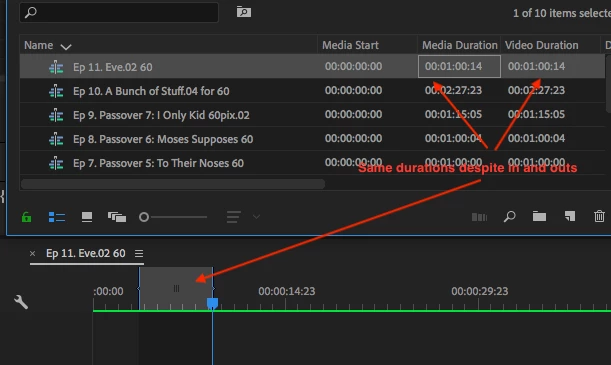
I'd like a heading in my bins that tells me the marked in to out durations of my sequences. I've been told it's Video Duration, but, in my setup at least, I get the same information as Media Duration which is the total duration. Is this a glitch in my system? I've attached image.
Martin

Early 2009 Nehalem MacPro4,1, 2 X 2.6 GHz Quad-Core

OS High Sierra 10.13.6

Samsung 850 EVO 1 TB system drive

32 GB RAM

ATI Radeon HD 4870 GRFX Card

Blackmagic Intensity Pro 4K, Driver: 10.11.4

Avid Media Composer v. 2018.11.0

Adobe Premiere Pro CC 2019 v. 13.1.4 (Build 2)

Adobe Media Encoder CC v. 13.0.2.39

Mocha Pro Plug-in v. 6.0.2 build 217.x

Boris Continuum 2019 v. 12.0.4,,

    This topic has been closed for replies.

    2 replies

    Martinnel
    MartinnelAuthor
    Inspiring
    September 19, 2019

    Bump, because I fear I may have not been clear enough the first (well, sceond) time. This round I will supply the 'why' of what I'm looking for as well as details to what I have thus far tried. Skip the rest at whatever point you understand the question; I do go on.


    The Question: Is there a means of looking at a sequence bin and see, at a glance, the marked In to Out duration of the sequences therein? Video Duration from the Metadata Display pulldown has not worked for me.


    The Issue: I have a bin that holds my various sequences —cut sequences, not simply clips. Many of the sequences have, tacked on to one end or the other, bars and tone or black or just extraneous scenes I'm not ready to tear off yet. But I'd like to know, without putting the sequence in the timeline, how long the good stuff is. 


    How I've done it elsewhere: Typically (in another NLE), I'd have an In-Out heading and would have marked first and last relevant frames last time I worked on the sequence.


    Why I care (I find this a ridiculous heading, but I cannot tell you how many times I and others I've followed, have been asked this before someone —someone who's willing to offer suggestions after poo pooing your need— willingly offers suggestions) One, frequently relevant reason I would like an In - Out bin heading is I may not remember if I've gotten a sequence to time. If I marked the sequence last time I was in it, In - Out would tell me it's duration.


    What I've considered: 

    1. I was told here, Video Duration will display this, but it just gives me the same answer as Media Duration – the overall duration of the sequence and not the marked area as desired (see illustration earlier in thread).
    2. Could this be an issue with my old computer?
    3. I've restarted the computer and app
    4. Am only minor update off up-to-date (v. 13.1.4  vs v. 13.1.5)
    5. Have reviewed carefully all previous suggestions
     

    Desired Solution: I hope this is clear by now, I want to know how long the relevant portion of my sequence is by looking at the bin it's in.


    Martin

    Early 2009 Nehalem MacPro4,1, 2 X 2.6 GHz Quad-Core

    OS High Sierra 10.13.6

    Samsung 850 EVO 1 TB system drive

    32 GB RAM

    ATI Radeon HD 4870 GRFX Card

    Blackmagic Intensity Pro 4K, Driver: 10.11.4

    Adobe Premiere Pro CC 2019 v. 13.1.4 (Build 2)

    Adobe Media Encoder CC 2019 v. 13.1.3

    Mocha Pro Plug-in v. 6.0.2 build 217.x

    Boris Continuum 2019 v. 12.0.4

    Avid Media Composer v. 2018.11.0

    Kevin-Monahan
    Community Manager
    Community Manager
    September 18, 2019

    Hi Martin,

    Durations should be equivalent if you have not yet trimmed your clip. 


    Thanks,
    Kevin

    Kevin Monahan - Sr. Community & Engagement Strategist – Pro Video and Audio
    Martinnel
    MartinnelAuthor
    Inspiring
    September 18, 2019
    I'm looking for a heading that will give me my Sequence in to out, not Clip in to out.
    Kevin-Monahan
    Community Manager
    Community Manager
    September 19, 2019
    Can you create a feature request then? https://adobe-video.uservoice.com/forums/911233-premiere-pro Thx, ^KM
    Kevin Monahan - Sr. Community & Engagement Strategist – Pro Video and Audio