Participant
February 16, 2022
Answered

Inicializando el motor de transcripción local

  • February 16, 2022
  • 5 replies
  • 68646 views

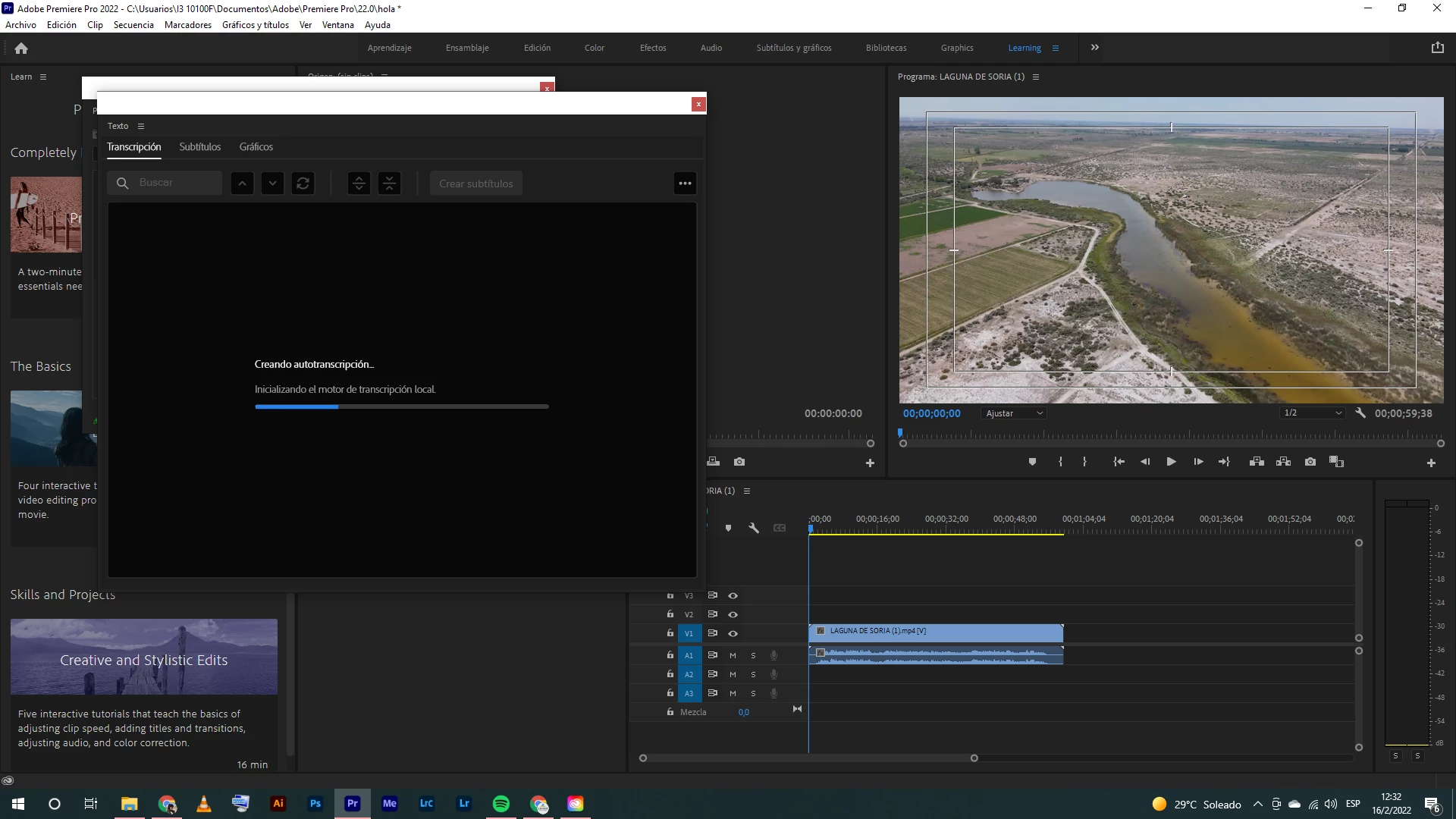
Hola! Premiere pro 2022 se me traba en "Inicializando el motor de transcripción local" cuando quiero generar la transcripción automática de un video.



Correct answer Alexander_DVA

Nino, thanks for reporting your results. Do you have any language packs installed?


@Alexander Riss Any ideas?


Stan


Unfortunately there is no manual way to bypass the download process through CC Desktop for security and data integrity reasons.

That is why the system requirements page lists an internet connection as a requirement for using Creative Cloud and activating the products. The only workaround would be taking you computer to e.g. a public wifi to download the packages. 


Best regards,

 Alexander

5 replies

Participant
November 19, 2023

For me, Creative Cloud is stuck at this stage. It's taking too much time even though I have a pretty decent internet.


Stan Jones
Community Expert
Community Expert
November 19, 2023

I see a percent indication when I do this from the Creative Cloud Desktop/add ons. Is that what you are using?


@Alexander_DVA 


Stan


Participant
September 27, 2022

I'm having the same problem - I can't seem to find add-ons as an option that is available for me.


Stan Jones
Community Expert
Community Expert
September 27, 2022

Manny,


Something has changed. I see the same as you, and I am on Creative Cloud desktop version 5.8.0.592. In your screenshot, you can see that on the left there is only Languages and Versions - Add-ons is no longer there.


Alexander's post above shows the old window:

https://community.adobe.com/t5/premiere-pro-discussions/inicializando-el-motor-de-transcripci%C3%B3n-local/m-p/12756310#M395633

In version 22.6.2 (as I think other recent versions), when you enter the "Create transcript" window and click on the "Language:" drop down, you see a check mark for the language you picked, a cloud if the language is not downloaded, and nothing if the language has been downloaded.


@Alexander_DVA Can you chime in? Is there still a way to check speech to text download status and to download outside the transcription window?


Stan


Alexander_DVA
Adobe Employee
Adobe Employee
September 27, 2022

In theory this should still work the same - i checked on Creative Cloud Desktop 5.9 and it was still available there. Maybe re-installing CC-Desktop might fix this issue? (re-downloading the installer)

It might be different if you are on an enterprise account - in that case an admin can disable installation of addons and instead requires the admin to build an installer with all languages included (>8gb).


Best regards,

 Alexander

Participant
September 15, 2022
I have a similar problem, when I transcribe the automatic subtitles it looks like this

Kevin-Monahan
Community Manager
Community Manager
September 16, 2022

Sorry, José Léo. Can you review the following FAQs to see if they can assist you?


I hope the info helps.


Thanks,
Kevin

Kevin Monahan - Sr. Community and Engagement Strategist – Adobe Pro Video and Audio
Participant
April 23, 2022

Tengo el mismo problema...


Ya tengo descargado el idioma español, aun asi, cuando le doy click a "transcribir secuencia" se queda pegado y no avanza.


¿Cual sería la solución?

Kevin-Monahan
Community Manager
Community Manager
July 29, 2022

Juan,

Did you ever solve this issue? Let me know!

Kevin

Kevin Monahan - Sr. Community and Engagement Strategist – Adobe Pro Video and Audio
Stan Jones
Community Expert
Community Expert
February 16, 2022

Can you also post a screenshot of the "Create transcript" dialogue. I am looking for the language selection and whether it is downloaded already.


@Kartika Rawat @Alexander Riss 


Stan


Alexander Riss
Adobe Employee
Adobe Employee
February 16, 2022

Thank you for reporting this issue!


When a language pack is not available on your system - the first transcription will trigger the download of the >500MB language pack. Depending on your internet connection this might take a while to complete the installation.


You can also manually trigger the installation via the Creative Cloud Desktop App:
- In the "All Apps" View - click on the "..." icon next to Premiere Pro

- Choose "Addons"

- This will show the list of already installed language packs

- click the "add" button next to the language pack  / this will trigger the download process and show you the progress made so far


Best regards,

 Alexander

Stan Jones
Community Expert
Community Expert
February 16, 2022

Thanks, Alexander. Very helpful information. The basics of this is in the revised help file for Speech to Text:

https://helpx.adobe.com/premiere-pro/using/speech-to-text.html


But your information adds much more detail.


Stan