
Participant
November 1, 2021
Answered

iPhone 12 pro max and 13 pro HDR footage blown out in Premiere Pro 2022 (v22.0)

  • November 1, 2021
  • 23 replies
  • 123922 views

After upgrading to Premiere Pro 2022 (v22.0) all my HDR footage from my iPhone 12 ProMax and 13 Pro are blown out (screen shot below)
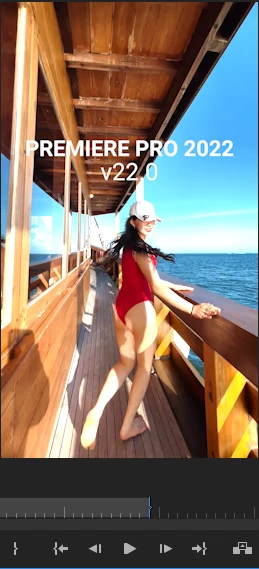
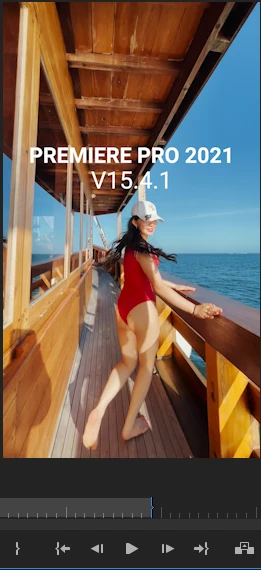


There are actually similar disscussion here that talks about this issue, but i thought i would make new discussion that spesifically talks about this issue on iPhone 12 Promax series and above. So whoever having similar issue hopefully could find this thread when they're googling


There are two solution to fix this issue

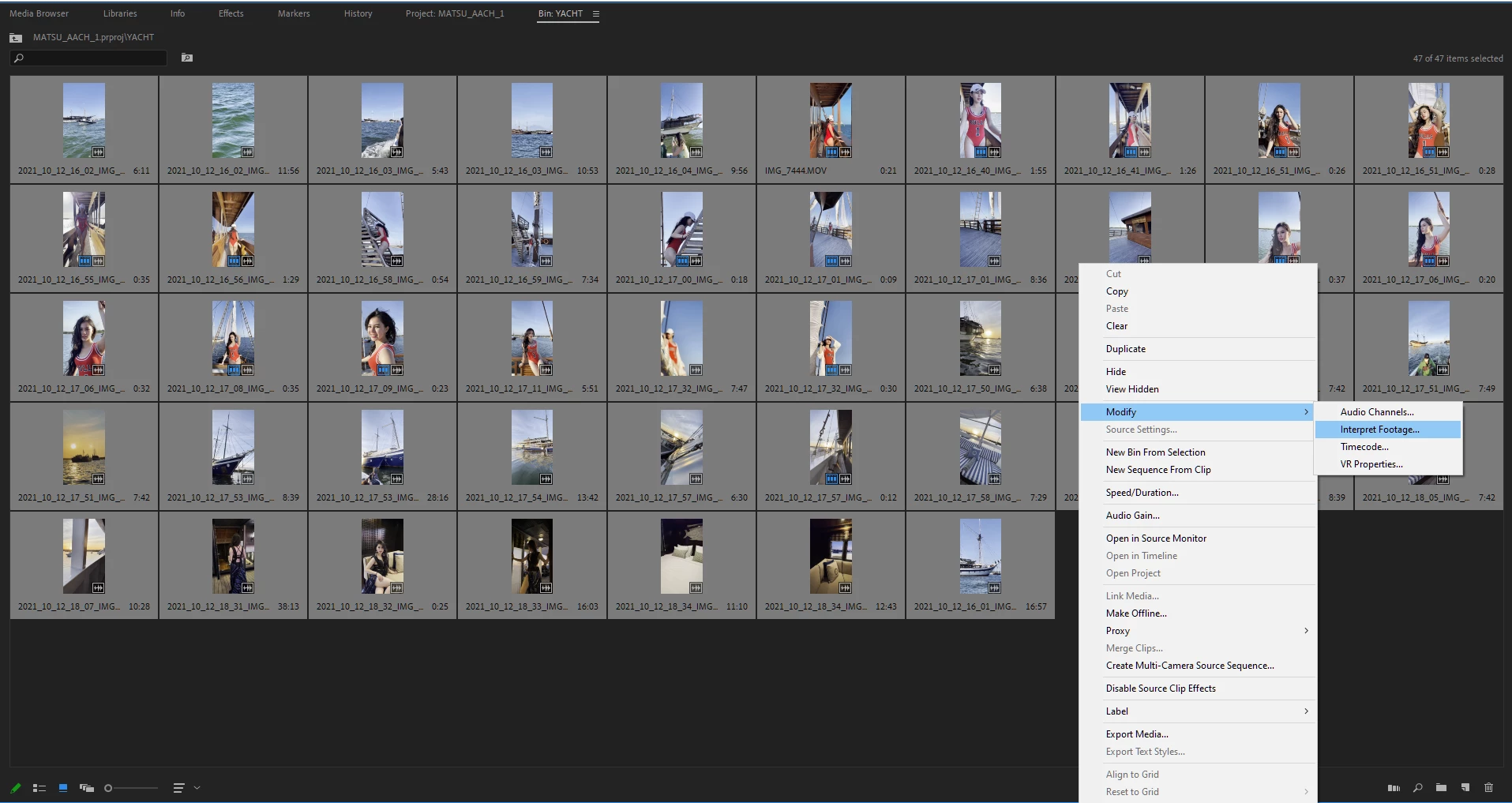
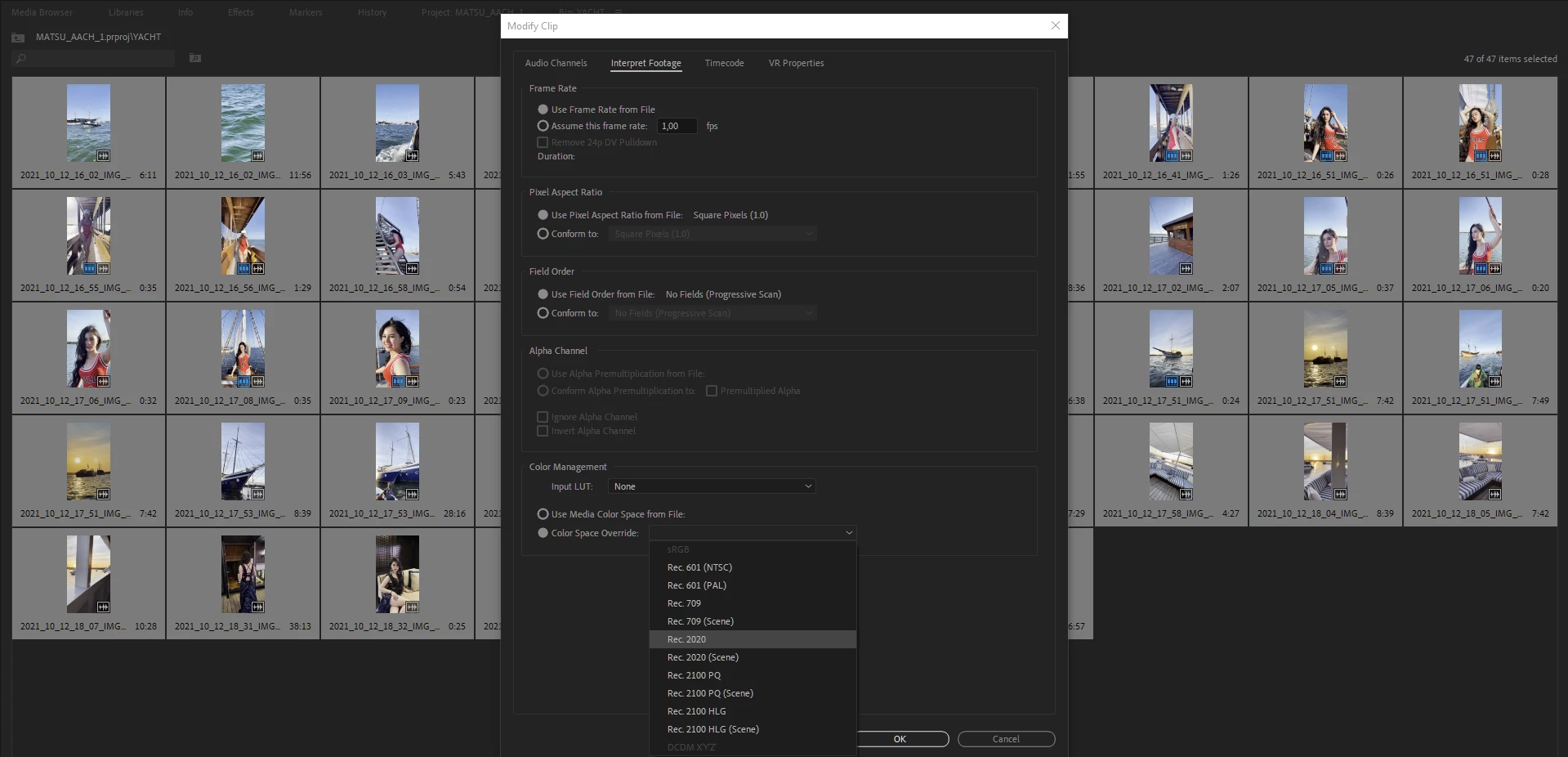
First Solution, go to project panel, select all of your HDR clips > Right Click (windows) > Interpret Footage > Color Space Override > Choose Rec 2020


Second Solution (I do recommend using this), open your creative cloud control panel and just re-install previous version Premiere Pro 2021 v15.4.1 (i'm using both PP 2021 & 2022 at the moment)
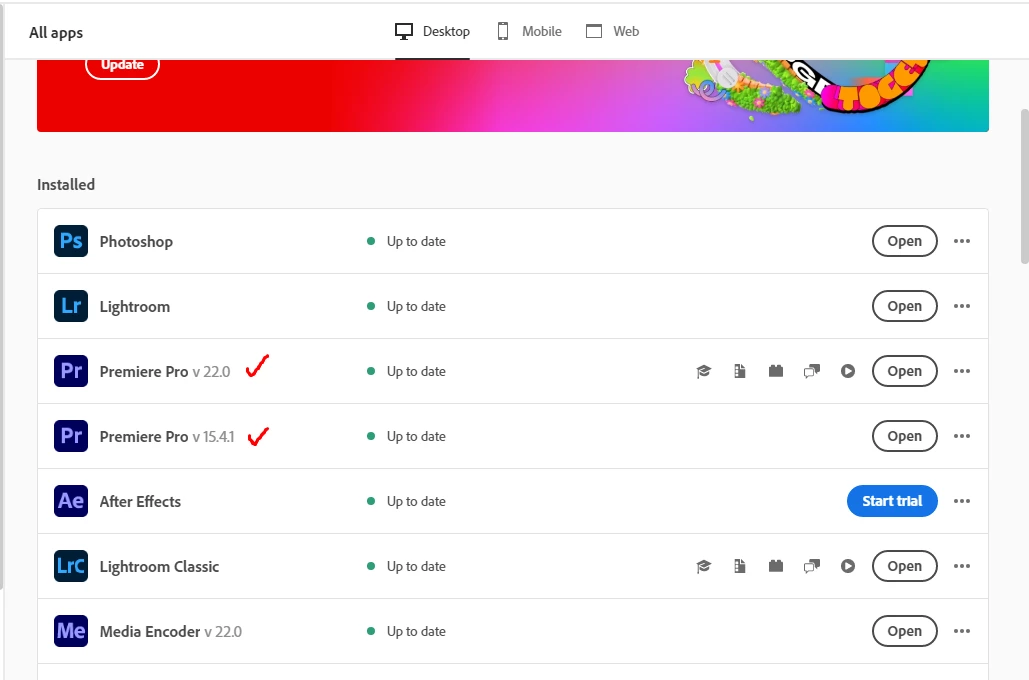


Hope this will help whoever having this iPhone HDR footoge blown out on Premiere Pro 2022 v22.0


This topic has been closed for replies.
Correct answer R Neil Haugen

This new version added quite a bit of user-settable color management options (CM) and that's confused a lot of people. There are several places to check & set CM.


  • Clip properties in the bin: Modify/Interpret Footage
  • Sequence settings dialog settings
  • Scopes panel settings.


For most users with HDR media right now, I'd suggest setting the sequence to the 2100/HLG option as a starting point. Match that in the scopes and clip settings if you can.


And report back how well it works. It will probably take us all a bit to sort this out.


And the reaction of some users to the engineers adding CM options, is why many of the engineering staff were reluctant: they knew for a lot of users it would be confusing and cause issues until they could figure it out.


Once you understand how it's supposed to work, you'll have more options than you did before. Yea, it's painful to figure out at first.


Neil

23 replies

Participant
February 9, 2022

anyone know if this is fixed in the new release? 22.2

R Neil Haugen
Legend
February 9, 2022

No, there are no color system fixes in this release. We're still waiting for those to be dropped, hopefully ... soon-ish? Sigh.


Neil

Everyone's mileage always varies ...
Inspiring
February 8, 2022

thanks! saves some frustration.. 😉

talented_member1587
Known Participant
January 13, 2022

Just a little snafu I've just discovered: I purchased a Macbook Pro M1 pro chip last month to deal with the horrific lag I've been having on my older iMac. The machine is lightning fast - BUT, there are a lot of glitches that Adobe techs can't quite figure out with compatibility. And for those of us on certain silicon chip machines, we can open 15.4, but we can't actually open any projects or productions while running 15.4. It just sits there waiting as if no commands have been executed to open a project. So I'm afraid we can't all opt for going back to the earlier version and have to try to figure out how to make 22 work.

StarViewStudio
Participant
January 12, 2022

THANK YOU!   I have lost So Much Time & MONEY because of this STUPID update with NO NOTICE..  I havebeen using PREMIERE since version 1.0.     I never had these BIZARRE problems. I pay $55/month for 8 years now for Adobe CC,and there are RARLY ANY HUMANS at this company who will pick up a phone to answer any TECH questions!!!! That's close to $5,000 in monthly software leasing fees.  I lost probably $25,000 in production time because I often shoot with 2 or 3 different cameras simultaneously,  and never had a problem blending the iPhone 12 Pro Max 4K video clips in sessions BEFORE ADOBE made this change. Now any work I did this year (including sessions with a current Broadway Star) I can NOT mix 8 bit & 10 bit in the same session. Does anyone have a "fix" for this?

R Neil Haugen
Legend
January 12, 2022

It isn't the bits that are the issue here, it's the color space/tonality/gamuts that are the issue. You are mixing Rec.709/SDR clips with HDR clips probably in HLG format, and that's the problem. You can do this if you know how within their new setup.


First, they had to bring the program's color handling into the current time, and that includes the ability to work with both Rec.709 SDR media, and with the newer HDR types of media. Prior to this version, they had a total Rec.709/SDR basis to all color math, with a cadged on ability to work with "over-range values" for tonality (dynamic range) and wider chroma gamuts. It was rather a limited method of working.


So that's why they changed things, but yea ... it wasn't explained to us users nearly as clearly as it should have been.


The new color handling is completely different, from the testing I've done I think it is now totally color-space/gamut agnostic. It can work with either Rec.709/SDR or the HLG or PQ forms of HDR media.


But the changes mean there are now color management options the user has to take control of as it DOES NOT default to Rec.709 anymore. Plus certain default behaviors have changed, some seem the opposite of what they were before. Yea, between them, it's a massive change in the UI and user experience.


These two FAQs make it possible to work within the system at this time. Yea, the first one is pretty long, but it pretty much covers what changed, why, how, and how to work within the new setup.


With your mix of media, you need to select any HLG clips, and in the bin, right-click/Modify/Interpret Footage, and then use them on a sequence with the other media, with the sequence CM settings being set to Rec.709.


Neil


FAQ:PremierePro 2022 Color Management for Log/RAW Media


How to Set Monitors for HDR work in Premiere Pro 2022?

Everyone's mileage always varies ...
Participant
January 7, 2022

Thank you for saving my life

Participant
January 6, 2022


"There are actually similar disscussion here  that talks about this issue, but i thought i would make new discussion that spesifically talks about this issue on iPhone 12 Promax series and above. So whoever having similar issue hopefully could find this thread when they're googling


There are two solution to fix this issue

First Solution, go to project panel, select all of your HDR clips > Right Click (windows) > Interpret Footage > Color Space Override > Choose Rec 2020"


Thanks For Hightling The Issue . Many People Like Me Wondering About This . Hope So The Issue Will Resolved.

Participant
December 21, 2021

Thanks so much! Whew!!!!! 😮 

December 5, 2021

I wish there was an internet award to give you. Thank you so much!!!!

Show the Good
Participating Frequently
November 22, 2021

I'm just commenting here in the hopes that this boosts this post for someone else because it solved this problem for me! Thank you SO MUCH!

Participant
November 19, 2021

This was very very helpful!

Thank you very much.