

SK321
Inspiring
Jul 8, 2024 6:40 PM UTC
Answered

Is there a way to hide or remove the Fade In and Fade Out handles on audio clips?

I prefer to use keyframes for my audio fade ins and fade outs much of the time and with the new layout, the little boxes at the front and end of clips makes it difficult to add the keyframes because they get in the way. I looked through the preferences to see if there was a way to turn them off or hide them but didn't see anything. Does anyone know if that's an option?

MyerPj
MyerPjCorrect answer
Community Expert
Aug 31, 2026 9:12 PM UTC

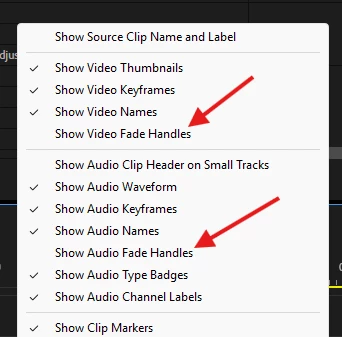
Adobe heard, and it’s coming / here. It’s in beta right now, I’m pretty certain it’s will be in the first 27.0 non-beta release. It’s available in the Wrench menu of the timeline. 


13 replies

MyerPj
Community Expert
MyerPjCommunity ExpertCorrect answer
Community Expert
Aug 31, 2026 9:12 PM UTC

Adobe heard, and it’s coming / here. It’s in beta right now, I’m pretty certain it’s will be in the first 27.0 non-beta release. It’s available in the Wrench menu of the timeline. 


Translate
Participant
Aug 31, 2026 9:02 PM UTC

Please give us a toggle in the timeline tools. 

Translate
MyerPj
Community Expert
Community Expert
Nov 19, 2024 9:25 PM UTC

Yes, upvote this thread (top left next to the thread title), but this is a newish thread, but the one linked below already has over 50 upvotes, which is what the Adobe team look for in considering updates, etc. So UPVOTE the one below (also).


https://community.adobe.com/t5/premiere-pro-ideas/when-shrinking-an-audio-clip-the-mistake-of-grabbing-the-small-rectangle-of-the-fade-handle-occurs/idi-p/14835177


Translate
Peru Bob
Community Expert
Community Expert
Nov 20, 2024 1:46 AM UTC

Upvoted.

Translate
Participant
Oct 3, 2024 8:57 PM UTC

Upvote This. Also please reply here if you found other threads to upvote this change. It's terrible!


https://community.adobe.com/t5/premiere-pro-ideas/when-shrinking-an-audio-clip-the-mistake-of-grabbing-the-small-rectangle-of-the-fade-handle-occurs/idi-p/14835177

Translate
Participating Frequently
Nov 19, 2024 9:04 PM UTC

Upvoted. This "feature" makes it incredibly difficult to work with manual keyframes at cut points. It should be an easy fix to add the ability to turn off the fade handles. 

Translate
Participant
Aug 7, 2024 10:35 PM UTC

PLEASE!!! Someone answer this question. This is annoying. I agree with OP. I edit using keyframes.

Translate
Community Expert
Aug 8, 2024 7:03 AM UTC

Currently you can't hide audio transition handles, post a request in the ideas section and I'll be happy to upvote.

Translate
Byers Video
Known Participant
Jul 25, 2024 10:17 PM UTC

they get in the way of the audio waveform when I am trying to cut the empty portion of the audio clip.

Translate
Ann Bens
Community Expert
Community Expert
Jul 8, 2024 7:20 PM UTC

The only way to get rid of the fade handels is to uncheck Show Audio Waveform but that is not ideal.

Translate
SK321
SK321Author
Inspiring
Jul 8, 2024 7:51 PM UTC

Even doing that doesn't get rid of them.

Translate
Ann Bens
Community Expert
Community Expert
Jul 26, 2024 1:34 PM UTC
quote

Even doing that doesn't get rid of them.


By @SK321

 Yes, you are correct.

Translate