
Inspiring
November 15, 2024
Answered

log footage blown out when transoded via project manager

  • November 15, 2024
  • 6 replies
  • 787 views

I just tried to consolidate and transcode my sequence with frame handles to send it over to another editor.

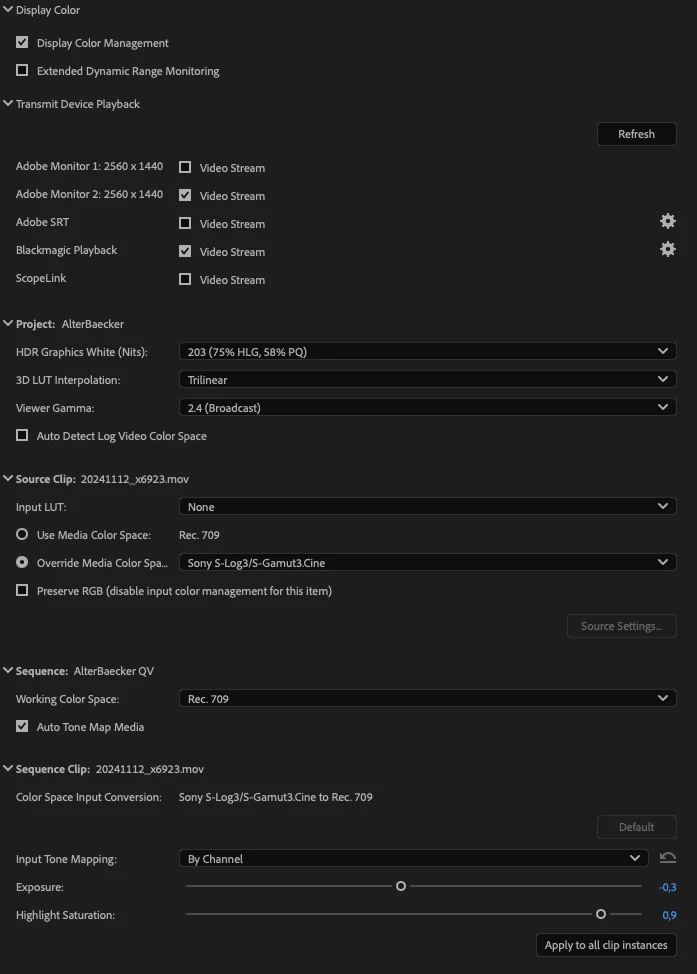
The clips were shot on the same day in UHD 50 Slog3 gamut3cine and are already transcoded to prores 422 HQ before import. I added the correct color space through modify->colour in the clip browser and graded them with lumetri - they all look good in the timeline. Now I transcoded the source clips via project manager with source: individual clips in Match Source - Apple ProRess 422 HQ and all of the exported source footage files look perfectly fine in slog3 exept one file - which is totally blown out. It looks like the colour transformation has been added twice.. I tried to replace the clip in the timeline again with the same source clip and export again.. still the same. The files have all been shot with the same Sony FX3 on the same day and the same camera setting. Does someone know the cause? 
This topic has been closed for replies.
Correct answer Peter Reef

Thanks for all your help!

Display Color management is enabled.

My workaround was to set the Color space to Rec709 manually, then export and then reactivate Slog3/SGamut3Cine in the new Project. As the Sony files have been converted to Prores before importing, the Media Color Space has been changed to Rec709 in Metadata by apple compressor.


6 replies

Community Manager
November 15, 2024

Fantastic.  Glad you have a solution.

Inspiring
November 18, 2024

Yes it kind of works, but is this really intended behavior? This way premiere always destroys my footage when I export and forget to change colour space..

R Neil Haugen
Legend
November 18, 2024

It isn't destroying anything. It simply does what you tell it to do.


if you don't set things up for what you want, you won't get there.


No more than throwing a bunch of clips in a bin, grabbing them and dumping them on a blank timeline, and expecting the program to do the editing for you.


Color is far more variable now than it was. 


Users are required to control their own Color Management going forward. As we have too many options these days for any other possibility.

Everyone's mileage always varies ...
Inspiring
November 15, 2024

..I am not using any LUTs.. only set the Color Space manually.

Peter ReefAuthorCorrect answer
Inspiring
November 15, 2024

Thanks for all your help!

Display Color management is enabled.

My workaround was to set the Color space to Rec709 manually, then export and then reactivate Slog3/SGamut3Cine in the new Project. As the Sony files have been converted to Prores before importing, the Media Color Space has been changed to Rec709 in Metadata by apple compressor.


Community Manager
November 15, 2024

Hi @Peter Reef ,


Welcome to the Premiere Pro forums! We are glad to see you here.  Can you tell me what version of Premiere you're working in?  Do you have color management enabled?  Are you using any LUTs?

We’ll need a few more details to help with this issue.  Please see How do I write a bug report?


I hope we can help you soon. Sorry for the frustration! 


Thanks,
Rach

R Neil Haugen
Legend
November 15, 2024

There are clean pass through processes available, by using the setting that turns off all CM stuff in the Lumetri Settings tab, where all CM settings now "live".


The best explanations of this I've seen have been on the Premiere Pro Public Beta forum, where color supervisor @Alexis Van Hurkman has posted some main threads on the new color management, and has offered additional comments down the thread.

Everyone's mileage always varies ...
Inspiring
November 15, 2024

I was wrong, all footage has been converted to rec709.. Any way to keep my footage as slog? Do I have to set it manually to rec709 before transcoding every time?