

Loud screeching - Volume In_,_ | out_,_ ?
Sometimeso a very loud (speaker-busting) screech starts, when playing a number of specific clips. I cannot reproduce the problem purposefully, and it comes and goes seemingly on its own. I've replaced those specific media files with new files, and have converted them to different formats (wav, mps, aif), all of which play normally in every other app, and 70% of the time, or so, play normally in Premiere. Once the screech comes, those clips will play it for the rest of my session until I restart. Sometimes they continue after the restart, sometimes they don't.
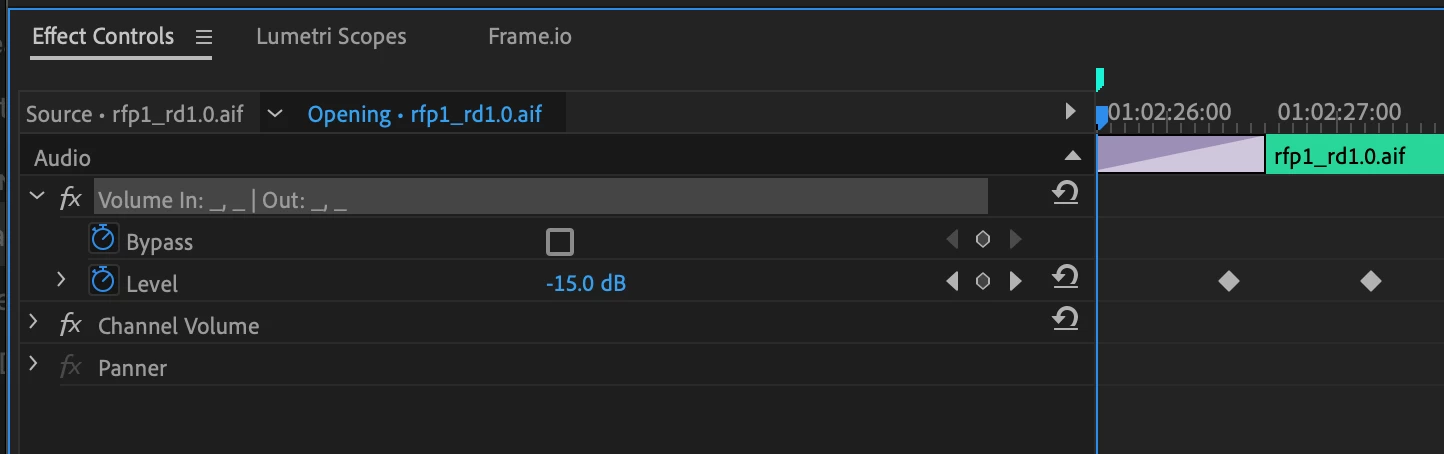
The only thing I've found with those clips that seems amiss: in the volume effect, rather than saying volume, it says this:
Volume In_,_ | out_,_
If I copy/paste the keyframes from that clip onto another clip, the volume effect changes to that. If I bring in a new clip from the same file, and manually apply the same volume keyframes, the volume displays normally. If I remove the attributes from the offending clip, and then set the keyframes again manually, that seems to fix the problem. This is a very large projects with hours of clips that have many keyframes, hence it being undesirable to copy and paste thousands of keyframes manually.
My question is simple: what is this change to the volume effect, why does that cause random screeches, and what can I do about it?
I've been dealing with this in one specific project for years now, and it's happened in PP 14, 22, and 23, each with all update versions, and through the last three Apple OS versions. This project is in Premere Teams.
Current setup:
Mac Studio Ultra
PP 2023.1 Teams and project files
Mac Ventura 13.0.1
 AdChoices