


amyh47879652
Participant
May 14, 2017
Question

Lumetri Effects Not Working at "Export Phase"

  • May 14, 2017
  • 3 replies
  • 1061 views

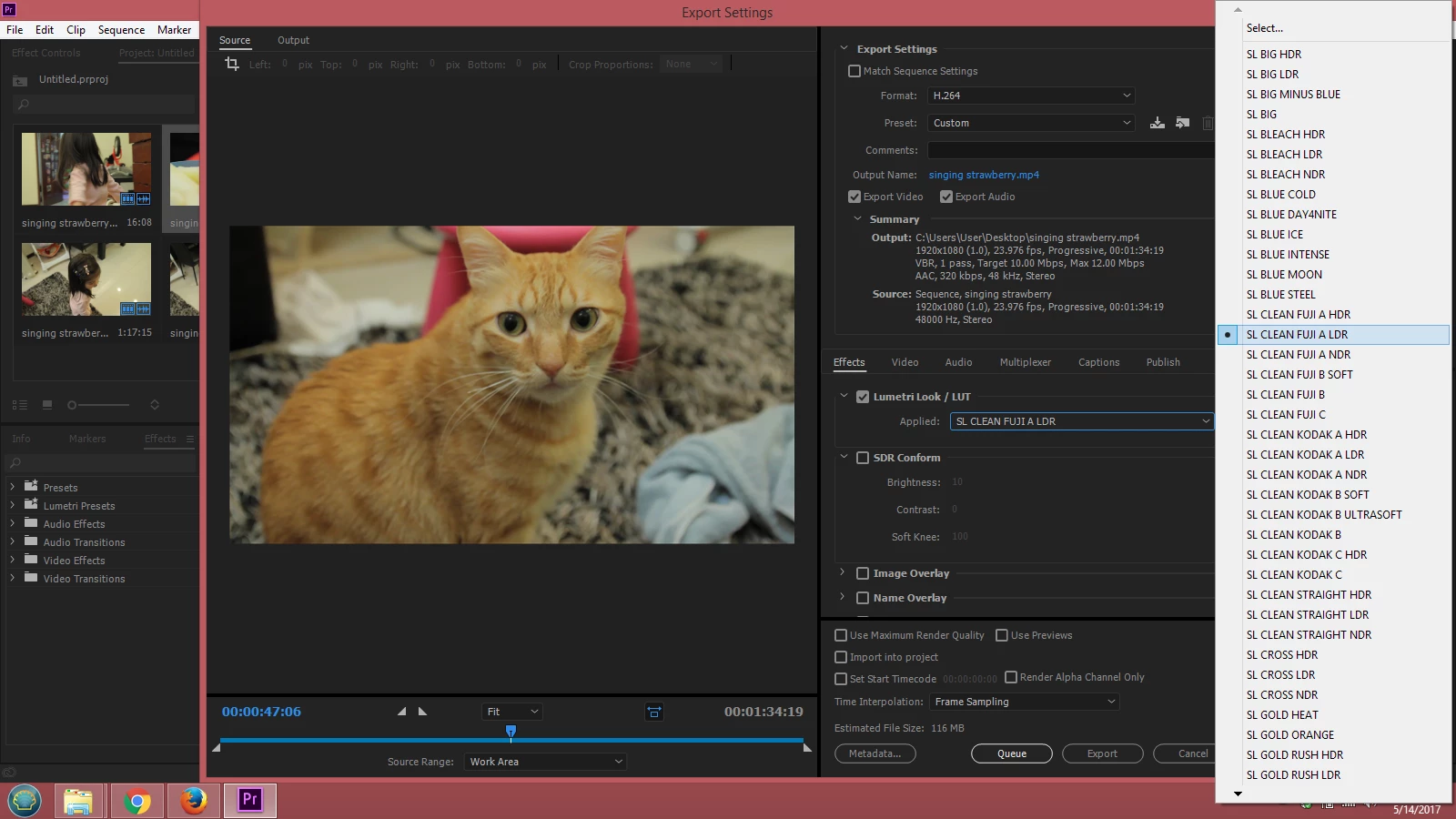
I used to be able to click export and add an additional look over the entire sequence by ticking Lumetri Look, and choosing. I'm not sure what has happened, but it doesn't change the footage in the preview window at all. I can't see the Lumetri Look applied to my footage BEFORE rendering. So I'd have to render it out, look, and if I don't like it, render it out again. What is going on?
This topic has been closed for replies.

3 replies

Participating Frequently
September 26, 2018

Hi

Installed old version Media Encoder 12.0.1 and the applied Luts in Lumetri Colour works on export.

andymees@aje
Legend
May 14, 2017

I've seen a similar issue amyh, with a custom export presets that includes a Lumetri  Effect (a strict broadcast legaliser) ... if I simply choose the export preset and export then the Lumetri Effect doesn't work, if I choose the export preset and then manually re-select the effect (even tho it's already selected) then it works just fine.

amyh47879652
Participant
May 15, 2017

What do you mean "re-select" ? Where are you selecting it the first time round?

Thanks

andymees@aje
Legend
May 15, 2017

Hi amyh, apologies for any confusion, what I'm noting here is not the exact same issue that you are reporting, I'm simply offering a similar experience (an issue with the application of a Lumetri effects in the Export Settings dialog/process) as support to the fact that such issues do exist ... and giving you the workaround for my issue, as it may be possible that it will work for you.

So to answer your question:

From the Lumetri Look/LUT >> Applied: popup menu in the Export Settings dialog

I set up all my required export settings in the Export Settings dialog, including selecting my Lumetri Effect (from the Lumetri>Applied popup menu), and then save those combined settings as an export preset so that I can reuse that settings combination quickly and easily whenever necessary.

But when I apply my export preset (with the Lumetri Effect applied as part of the preset) the effect does not get processed in the export, nor is it visible in the Export Settings >> Output tab.

My workaround is that whenever I apply that preset, I then also re-apply the desired Lumetri Effect in the export dialog (again from the Lumetri>Applied popup menu) before I press the Export/Queue button... and that seems to work. After reapplying the Look/LUT I can preview the effect in the Export Settings >> Output tab and the exported file does have the effect applied.  I have no idea why it doesn't work directly from the preset, it always used to, but at some point a couple of versions or so ago it stopped.

Hope it helps

Andy

Legend
May 14, 2017

What happens if you add the effect before export, in the Lumetri panel?

amyh47879652
Participant
May 14, 2017

If you mean just by adding the effect as a layer or on to a clip, it works fine. It used to work fine this way as well as a last step.  I'm not sure if it happened after an update or what, but it's a tad frustrating.

Legend
May 14, 2017

Well, if there is a method that works, don't let the one that doesn't hold you up.