


Participating Frequently
June 24, 2026
Question

Masking Data Offline When Opening a Project

  • June 24, 2026
  • 3 replies
  • 39 views

My work relies heavily on collaborative project file sharing, we are constantly passing project files back and forth. When I open a project that used the masking tool, I can see all of the keyframe data points for a tracked mask, but the mask is not showing in the Program window. It’s like Premiere is recognizing the mask but not displaying it. I downloaded the “masks” data folder, and Premiere is clearly reading the files since they are not flagged as offline masks.

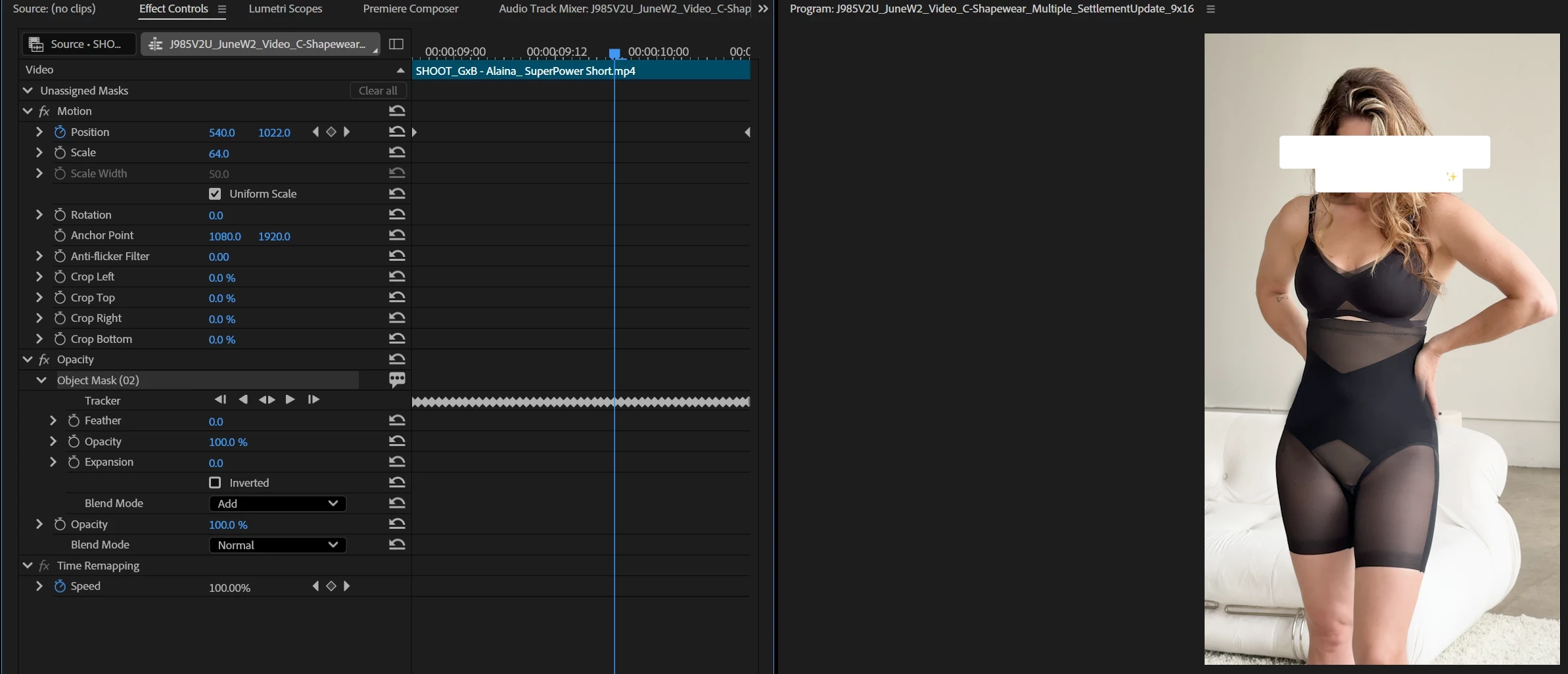
Attached a screenshot of the mask data, showing how the data is there but when I click on the mask it does not appear in Program window, and there is no active mask working on the output. For reference, the mask should be isolating the woman from the background.


EDIT: I just isolated the layer and realized it is actually displaying completely black on the Program monitor. When I move the mask back to Unassigned Masks I can see the image again, but moving the mask to Opacity makes the Program completely blank.
 

    3 replies

    Participating Frequently
    June 24, 2026

    This is where I got working through my problem with ChatGPT, if this helps at all:


    Since:

    • New Object Masks you create work normally.
    • The transferred Object Masks turn the image black.
    • The mask is still identified as an Object Mask.
    • Track Forward/Backward hangs indefinitely.
    • Premiere versions match.

    This strongly suggests the Object Mask analysis data embedded in the project is corrupted or not portable between your systems, even though the mask metadata itself came across.

    What's likely happening is:

    1. Premiere loads the Object Mask record.
    2. It sees the keyframes and Object Mask metadata.
    3. The underlying segmentation/tracking data cannot be resolved on your machine.
    4. The mask evaluates to an empty selection, making the Opacity mask hide the entire image.
    5. Re-tracking hangs because Premiere is trying to access invalid Object Mask data.

    This may be a broader Premiere bug with Object Mask portability.

    Participating Frequently
    June 24, 2026

    I just isolated the layer and realized it is actually displaying completely black on the Program monitor. When I move the mask back to Unassigned Masks I can see the image again, but moving the mask to Opacity makes the Program completely blank.

    KatieToo
    Community Manager
    Community Manager
    June 24, 2026

    @Camille29896571dr1z Thanks for that additional detail. Our team tested sharing object mask/project files with the mask folder from Win11 to Win11, Mac to Win11, and Mac to Mac and so far, was not able to recreate this issue. Each time the mask was present and interactable as expected, whether Unassigned or moved to Opacity and back.

    However, it appears there was an issue with Object Mask outlines not appearing correctly involving Win10 primarily earlier in the year, but the addition of it behaving properly in Unassigned vs. Opacity is new.

    And since you said you’re having this issue across many computers (are they all Win11? Mixed pc/Mac environment?) I’m wondering if it would be best if we request the project file and sample clip with the Object Mask/mask data to further test. If you’re able to get any screen recording of this happening, that would also be quite helpful!

    You can either DM me a link to that or I can send an upload link from Dropbox, whichever is easiest. Let me know!

    Thanks,
    Katie

    Participating Frequently
    June 24, 2026

    @KatieToo Solved! Turns out I was NOT on v26.3, my app update failed and I didn’t realize I was still on a previous version. I updated my Premiere and now the masks are transferring just fine. We can close this one out, thank you for your help :)

    KatieToo
    Community Manager
    Community Manager
    June 24, 2026

    Hi ​@Camille29896571dr1z 

    Welcome to the Premiere forums! We are glad to see you here. We need a few more details to try to help with the issue. Please see, How do I write a bug report?

    Thanks for including that screenshot, and I can see it’s an Object Mask and that it retained the keyframes. I don’t see any indicator that it’s offline however, which is curious. Please see this for further information with Object Mask storage and offline masks, just scroll down with Mask Storage Data, Locating an Offline Mask, etc. 

    Let’s get some details first and go from there, sorry for any frustration!

    Hope to help,
    Katie

    Participating Frequently
    June 24, 2026

    Sorry I did not include that info initially! This is a consistent problem across every employee at my company so I did not think to include my machine info. Does this help?


    • Issue: Masks not displaying when opening project.
    • Steps to Reproduce: Coworker uploads a project file and Masks folder, I download files, open project, link mask folder
    • Expected Result: Masks display
    • Actual Result: Mask data displays, but actual mask is missing from Program window
    • Premiere Version: 26.3
    • Operating System: Windows 11
    • GPU Driver: NVIDIA GeForce RTX 3080 version 32.0.15.9595
    • Video Format: Problem happens on all formats

    Helpful Context

    Comparing when and where the issue occurs helps us narrow down the cause:

    • Does it affect all projects or only some? - All
    • Does it affect new, empty projects? - Shared, edited projects only. Shared through uploading/downloading from a cloud service
    • When did the problem first begin? - Constant since using Premiere 2026