
Participating Frequently
January 17, 2025
Question

Media Encoder ignoring color space

  • January 17, 2025
  • 15 replies
  • 2164 views

Working with footage from C70 camera shot today with C-LOG-3 and cine gamut. Shot with HEVC 10 bit 4:2:0 (Full Range). Interpreting the color space as such and everything looks fine.


Go to export it for review via Frame IO - notice that media encoder completely ignores the color space and reverts back to the CLOG3 footage.
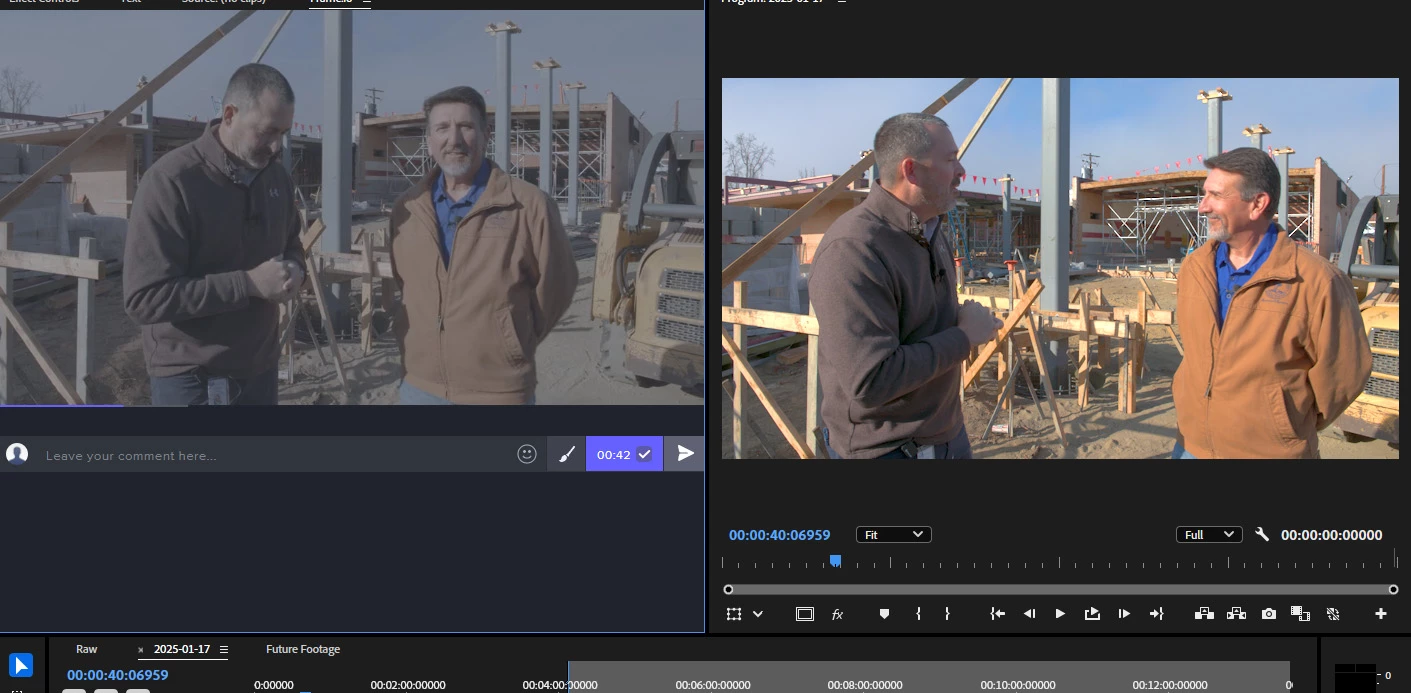
 

Only when I switch to Software Encoding does the render look right. Hardware encoding does not respect the color space change. I reinstalled the latest Nvidia driver - no change.


My sequence color space is Rec 709 - auto tone map is off. Using Tetrahedral as my 3d lut interpolation, viewer gamma 2.2 (web).

My computer

Premiere 25.1.0 (Build 73)

i9 13900K
128GB RAM
RTX 4070 12GB RAM 

NVIDIA Driver: 566.36

15 replies

Mark Morreau
Inspiring
March 11, 2025

I just encountered this issue, with over 100 clips queued up in Media Encoder sent from the timeline.
Even software encoding doesn't seem to fix this issue.
I really don't want to have to go back and do this work all over again.
Am I able to open a Media Encoder queue saved in 25.1 in 25.2.xxx?

Any other thoughts on how I can avoid doing all these 100+ selects over again?

Canon C-log 2 footage, cinema gamut. But when I add the Canon supplied LUT as input in Media Encoder the rendered file does not look like it does when rendered direct from the timeline: it's generally darker.

Thanks

Mark

Participating Frequently
March 2, 2025

When will the fix be in the productiv ME-Version? I reported this Bug already beginning of Decmber, 3 Month ago: Re: Kein HDR tone mapping mit dem Dezember Update ... - Adobe Community - 15026835

Inspiring
March 2, 2025

Thanks for getting back to me. That's good news - I hope 25.2 Stable will be made available soon. 🙂

jamieclarke
Community Manager
Community Manager
February 28, 2025

Hi @Agrarvolution - Thank you for all of the great screenshots and information.  I do see this issue in version 25.1 When sending a sequence to media encoder the result of the export does not match your timeline.  The good news is I do not see this issue in beta version 25.2.0.127


When you add an input LUT and send the project to Adobe Media Encoder, it automatically checks the “Preserve RGB (disable color management for this item)” box. This is a bug. As a workaround, export directly from Premiere Pro.

Thank you for your help troubleshooting.


Participant
November 2, 2025

This is still happening. I shoot sony s-log3. Is there any update?

Inspiring
February 27, 2025

I'm not sure how reproduceable it is, but every sequence I needed to render for a client today which contained tone mapped footage had this issue. I have another project where this happened as well ealier this year, but it was just a single video and not 20 - so the pain wasn't as big.


My reproduction was basically: 

  • Tonemap a clip in a sequence
  • export for sequence to media encoder
  • see that the preview is gray
  • restart the Export in Premiere.


First I assumed this is because I nested the sequence, but I tested more and this happens on the sequence where I tonemapped the footage to rec709 as well.

Here are the settings for I used to grade the footage.


Here are my render settings:


These were ment for short ads in Social Media, thus the high compression. But I tested exporting the same clip in ProRes 422 as well and Media Encoder didn't preserve the tonemapping settings either.


Changing the "auto detect log media" in Media Encoder setting doesn't change the output. It was renders correctly in Premiere Pro as long as the sequence was "activated". Since I sometimes had the issue, as mentioned in another thread, that after restarting Premiere that tone mapping isn't applied until you change anything on the clip which causes a repreview / rerender.

R Neil Haugen
Legend
February 27, 2025

And we need to see MediaEncoder's color management settings.

Everyone's mileage always varies ...
jamieclarke
Community Manager
Community Manager
February 27, 2025

Hi @Agrarvolution - Can you post reproducible steps and share screenshots of your Lumetri settings and export settings?

Inspiring
February 27, 2025

Hey Jamie, I'm having the same issue. The footage that makes problems is in D-log and set manually since Premiere Pro didn't detect the log format automatically. 


If it is rendered in Premiere Pro it just works, but Media Encoder ignores it.

jamieclarke
Community Manager
Community Manager
January 27, 2025

Hi @logand760 - can you post your screenshots like gospel John did and let us know your reproducible steps.  Can you also post your system specs

logand760
Participant
January 27, 2025

I am having the same issue. When I export out of Premiere the color looks great but when I use Media Encoder my footage looks like log footage. Same issue when I use Frame.io to use Media Encoder. This is all Canon Log3 with the Override Media Color Space to Canon Log3/Cinema Gamut.