


GotGame
Participant
October 26, 2017
Question

Media Encoder not recognizing synced fonts

  • October 26, 2017
  • 14 replies
  • 14051 views

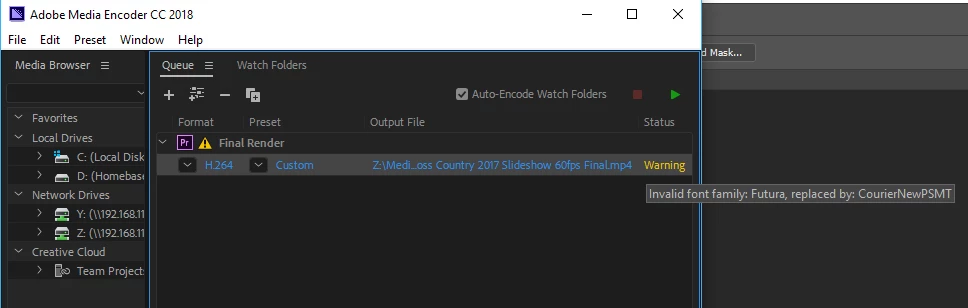
Updated to Premiere Pro CC and Media Encoder CC 2018. Trying to export a project that had worked fine with previous version. The project uses a synced font, Futura. I tried unsyncing the font and resyncing it. Warning is "Invalid font family: Future, replaced by: CourierNewPSMT". Obviously, I don't want to use courier new.

Any help on this would be greatly appreciated.
14 replies

Participant
December 22, 2024

What works for me everytime this happens:
I need to let creative cloud open and sync everything (wait 10-20s), then open Premiere pro and Media encoder.

Adam_the_explorer
Participating Frequently
March 7, 2023

I came looking here for answers

I appeared to have fixed it,

I went to the CC app and selected fonts

it showed a few with 'conflicts'

so I opened up the windows 11 fonts control panel (Search fonts using search bar on taskbar)

I then used the search to find and delete all the conflicting fonts show in adobe,

I then returned to the CC app and clicked the sync arrows next to the fonts

This appeared not to fix the issue so I then clicked the toggle to de-activate them 

then on the left you'll see "Previously active" select it then re-enable all the fonts you just de-activated

once complete I returned to Media Encoder and did the sync settings as mentioned by another poster, I then right clicked my project and 'duplicated' it the duplication had no font errors, I removed the faulty one in the list and closed ME down, I then re-opened and my project is still there with no errors,


If this fixes your issue do please let me know!

Participant
January 12, 2023

I have the same issue, and its january 2023. 

I changed the fon to myriad, and still have the warning of the font use is not available even when changed already.

Impakt Media
Inspiring
May 2, 2022

May 2022.... still an issue 😞 

The only "fix" that has worked for me is exporting in premiere which is no fix at all. If thats the fix, what is media encoder good for???

Participant
September 19, 2022

September 2022 and the issue persists

Participant
October 27, 2022

October 2022 and still struggling with the issue

Kevin J. Monahan Jr.
Legend
April 11, 2022

Hi,

Sorry about that. This font fussiness on export is a bug that affects some editors, as others have reported. Can you upvote this bug? https://adobe-video.uservoice.com/forums/911308-media-encoder/suggestions/36479989-get-media-encoder-to-respect-all-fonts-from-premie


I will let the Media Encoder devs know about this too.


Thanks,
Kevin

Kevin Monahan - Sr. Community and Engagement Strategist – Adobe Pro Video and Audio
Participant
April 11, 2022

2022. I'm having the same issue...

Samson_LE
Participant
March 18, 2022

I'm coming here for the same issue, tried everything in the forum here and nothing is resolving it. Windows 10 22.2.  it's quite sad that it is nearly mid 2022 and this is still an unsolvable issue for many. 

Participant
April 28, 2021

Same issue here. 😞

AME v15.1 (Build 42) on Windows 10.

Participant
March 25, 2021

I found that if I render a project in Premiere Pro itself, the fonts render correctly. If I render it in Media Encoder, it ignores all the fonts and substitutes Arial for everything. No warnings, the only way you know is by viewing the rendered video afterwards.


SO MANY BUGS, SO FRUSTRATING!

Department4
Known Participant
September 27, 2019

Dealing with this exact issue as well (2 years later). Working on Mac OS 10.14.5, Premiere Pro 13.1.4


Per GotGames suggestions, I tried syncing settings. I've tried Joshua's suggestion of swapping the video engine to render, but the problem persists. Pretty "interesting" that Adobe hasn't solved this issue after years of strife from its users 🙂 

athman
Participant
April 2, 2020

I can report that this still happens on my machine, with PP and ME 2020. No suggestions have worked yet, even tried opening Creative Cloud first, and trying differnt orders of launching the three. Font fine in PP, not in ME. Oh bother.


Update: ended up clearing ME queue, restarting, opened Creative Cloud first, PP, then re-exporting project to ME queue. Warning gone.

davids58395606
Inspiring
May 5, 2020

Same bug here, but of course I'm sure Adobe will say it isn't a bug and it's a user error.