
Inspiring
October 16, 2024
Answered

"Media offline" in multicam project after upgrade to Premiere Pro v25.0.0

  • October 16, 2024
  • 8 replies
  • 909 views

Windows 24H2:

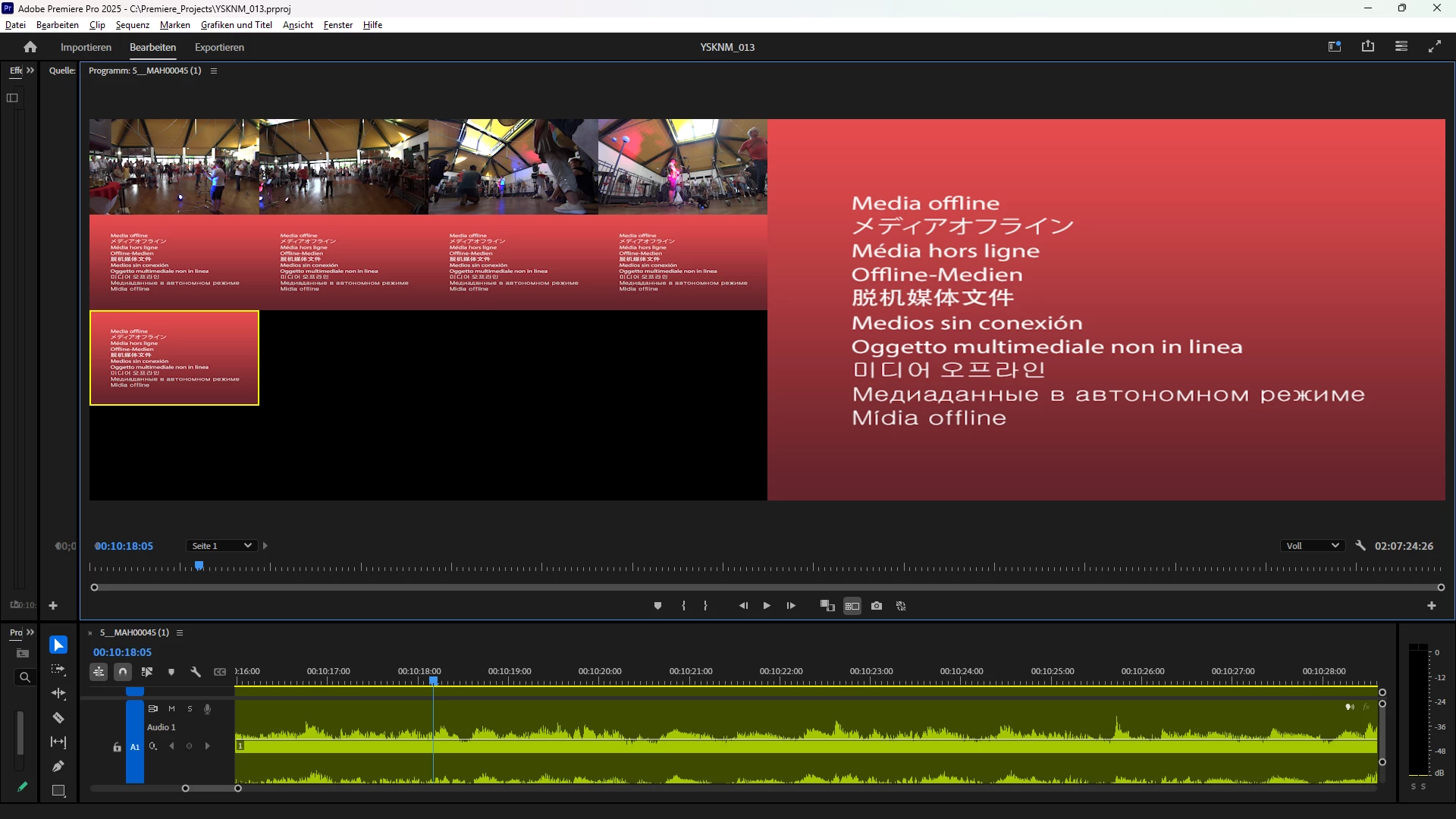
After upgrade to Premiere Pro v25.0.0 multicam project shows "Media offline"-indication in 5 of 9 clips. No footage files were removed, renamed or deleted. Behaviour correlates with the upgrade to v25.0.0 only.
Also a downgrade to v24.6.3 afterwards, did not recover the former, working multicam-view.
This topic has been closed for replies.
Correct answer Andreas23802052vbg1

@jamieclarke
This works! Thank you very much - I had to search for a while to find this relinking-entry in context-menu.
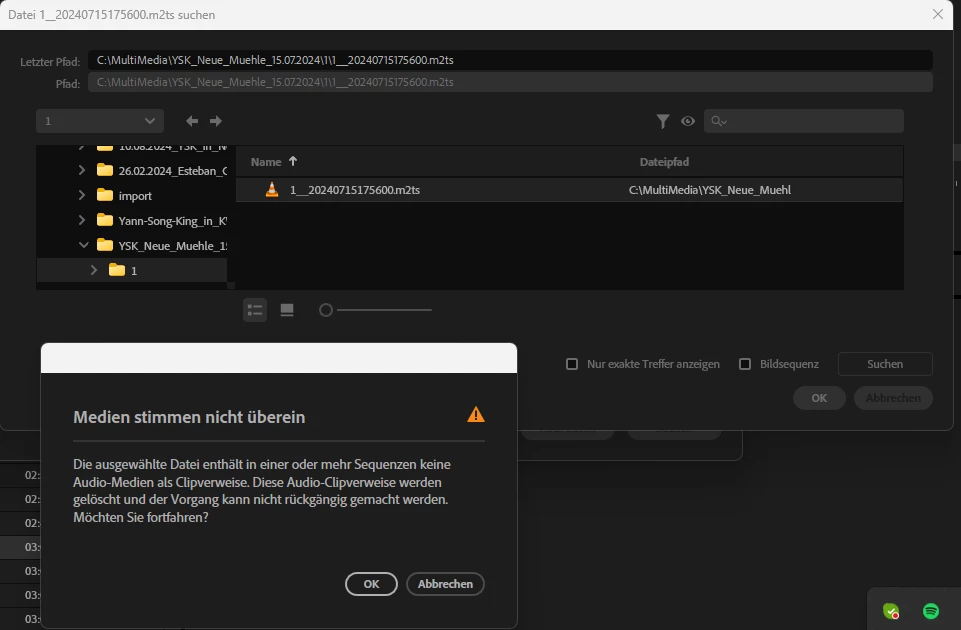
Premiere Pro states "Media doesn't match", which is obviously wrong. The rest of the text is very scary:
"Selected file contains in one or more sequences no audio-media as clipreference. These audio-clipreferences will be deleted and cannot be undo. Would you like to continue?"
But it works, thanks!
Warm regards, Andreas

8 replies

Andreas23802052vbg1AuthorCorrect answer
Inspiring
October 23, 2024

@jamieclarke
This works! Thank you very much - I had to search for a while to find this relinking-entry in context-menu.
Premiere Pro states "Media doesn't match", which is obviously wrong. The rest of the text is very scary:
"Selected file contains in one or more sequences no audio-media as clipreference. These audio-clipreferences will be deleted and cannot be undo. Would you like to continue?"
But it works, thanks!
Warm regards, Andreas

jamieclarke
Community Manager
Community Manager
October 22, 2024

What happens when you right click on your media files and select relink?

Inspiring
October 22, 2024

@jamieclarke

I did it the way you recommended (Shift during starting Premiere Pro)-1-, via "Voreinstellungen (english: Presettings) | Media-Cache | 'remove unused files from media-cache'-2- and 'remove all media-cache (restart requered)'-3-" and via script ("del /q %SYSTEMDRIVE%"\Users\"%USERNAME%"\AppData\Roaming\Adobe\Common\Media Cache Files\*")-4-.


In case of 1 and 3, after reopeneing the project-file (*.prproj), Premiere Pro created new peak-files for the *.wav- and for the *.mp4-files, but not for the *.m2ts-files. 
The initial issue remains unchanged: The *.mp4-footage is shown. The *.m2ts-footage shows "Media offline" as can be seen in the initial screenshots. 
Regards, Andreas


jamieclarke
Community Manager
Community Manager
October 22, 2024

Hi @Andreas23802052vbg1 - When you upgraded to version 25 did you try clearing the media cache?  You can hold down "Shift" while opening premiere and select the checkbox "clear media cache files".

Once you reconnect your media files do they stay connected or go offline again?

Inspiring
October 22, 2024

Issue: see above
Adobe Premiere Pro version number: 25.0.0 (Build 61)
Operating system: Windows 24H2
CPU: AMD Ryzen 7 1700 Eight-Core Processor, 3.00 GHz
GPU: NVIDIA GeForce GTX 1050 Ti
HD/SSD: Western Digital Blue SN570 2 TByte NVMe SSD
RAM: 16 GByte
2 video formats were used: *.mp4 (from Sony HDR-MV1) and *.m2ts (from Sony HDR-GW66). Seems *.mp4 are not effected.
See txt-files from MediaInfo-tool (v24.06) attached: "6__MAH00065 (1).MP4.MediaInfo.txt" and "2__20240715175320.m2ts.MediaInfo.txt"
Workflow details: multicam edit
Steps to reproduce: multicam edit
Expected result: no "Media offline"-screens appear
Actual result: "Media offline"-screens appear

txt-files can't be upload - *.mp4:
General
Complete name : C:\MultiMedia\YSK_Neue_Muehle_15.07.2024\6\6__MAH00065 (1).MP4
Format : MPEG-4
Format profile : Base Media / Version 2
Codec ID : mp42 (isom/mp42)
File size : 21.4 GiB
Duration : 2 h 54 min
Overall bit rate mode : Variable
Overall bit rate : 17.5 Mb/s
Frame rate : 29.970 FPS
Encoded date : 2024-07-18 06:35:05 UTC
Tagged date : 2024-07-18 06:35:05 UTC
Conformance errors : 1
mdat : Yes
0x09100000 : Yes
General compliance : Element size 22972892676 is more than maximal permitted size 22971424065 (offset 0xC4)

Video
ID : 1
Format : AVC
Format/Info : Advanced Video Codec
Format profile : Main@L4
Format settings : CABAC / 2 Ref Frames
Format settings, CABAC : Yes
Format settings, Reference frames : 2 frames
Codec ID : avc1
Codec ID/Info : Advanced Video Coding
Duration : 2 h 54 min
Bit rate mode : Variable
Bit rate : 16.0 Mb/s
Width : 1 920 pixels
Height : 1 080 pixels
Display aspect ratio : 16:9
Frame rate mode : Constant
Frame rate : 29.970 (30000/1001) FPS
Standard : NTSC
Color space : YUV
Chroma subsampling : 4:2:0
Bit depth : 8 bits
Scan type : Progressive
Bits/(Pixel*Frame) : 0.257
Stream size : 19.5 GiB (91%)
Language : German
Encoded date : 2024-07-18 06:35:05 UTC
Tagged date : 2024-07-18 06:35:05 UTC
Color range : Limited
Color primaries : BT.709
Transfer characteristics : xvYCC
Matrix coefficients : BT.709
Codec configuration box : avcC

Audio
ID : 2
Format : PCM
Format settings : Big / Signed
Codec ID : twos
Duration : 2 h 54 min
Bit rate mode : Constant
Bit rate : 1 536 kb/s
Channel(s) : 2 channels
Sampling rate : 48.0 kHz
Bit depth : 16 bits
Stream size : 1.88 GiB (9%)
Language : German
Encoded date : 2024-07-18 06:35:05 UTC
Tagged date : 2024-07-18 06:35:05 UTC


txt-files can't be upload - *.m2ts:
General
ID : 0 (0x0)
Complete name : C:\MultiMedia\YSK_Neue_Muehle_15.07.2024\2\2__20240715175320.m2ts
Format : BDAV
Format/Info : Blu-ray Video
File size : 35.0 GiB
Duration : 3 h 8 min
Overall bit rate mode : Variable
Overall bit rate : 26.6 Mb/s
Maximum Overall bit rate : 28.0 Mb/s
Frame rate : 50.000 FPS
Recorded date : 2024-07-15 17:53:20+01:00
Writing application : Sony HDR-GW66VE

Video
ID : 4113 (0x1011)
Menu ID : 1 (0x1)
Format : AVC
Format/Info : Advanced Video Codec
Format profile : High@L4.2
Format settings : CABAC / 2 Ref Frames
Format settings, CABAC : Yes
Format settings, Reference frames : 2 frames
Format settings, GOP : M=1, N=12
Format settings, Slice count : 4 slices per frame
Codec ID : 27
Duration : 3 h 8 min
Bit rate mode : Variable
Bit rate : 25.3 Mb/s
Maximum bit rate : 26.0 Mb/s
Width : 1 920 pixels
Height : 1 080 pixels
Display aspect ratio : 16:9
Frame rate : 50.000 FPS
Color space : YUV
Chroma subsampling : 4:2:0
Bit depth : 8 bits
Scan type : Progressive
Bits/(Pixel*Frame) : 0.244
Stream size : 33.3 GiB (95%)
IrisFNumber : 1.800000

Audio
ID : 4352 (0x1100)
Menu ID : 1 (0x1)
Format : AC-3
Format/Info : Audio Coding 3
Commercial name : Dolby Digital
Codec ID : 129
Duration : 3 h 8 min
Bit rate mode : Constant
Bit rate : 256 kb/s
Channel(s) : 2 channels
Channel layout : L R
Sampling rate : 48.0 kHz
Frame rate : 31.250 FPS (1536 SPF)
Compression mode : Lossy
Stream size : 346 MiB (1%)
Service kind : Complete Main
Dialog Normalization : -31 dB
compr : -0.28 dB
dialnorm_Average : -31 dB
dialnorm_Minimum : -31 dB
dialnorm_Maximum : -31 dB

Text
ID : 4608 (0x1200)
Menu ID : 1 (0x1)
Format : PGS
Codec ID : 144
Duration : 3 h 8 min

Inspiring
October 21, 2024

This is the 3rd attempt to answer Kevins post (answers disappeared from thread after posting?): 
There is no network drive at all. Everything (Premiere project files [*.prproj], footage and the Premiere app installation itself) is stored on a Western Digital Blue SN570 2 TByte NVMe SSD. 

Regards, hope you can help soon, Andreas

Kevin J. Monahan Jr.
Community Manager
Community Manager
October 16, 2024

Hi @Andreas23802052vbg1,

Thanks for the bug report. What kind of drives are you using for your storage? Are they network drives? Let the team know any other details. See, How do I write a bug report?


I hope the developers will respond to the report soon. Sorry for the frustration.


Thanks,
Kevin

Kevin Monahan - Sr. Community and Engagement Strategist – Adobe Pro Video and Audio
Inspiring
October 16, 2024

Same applies to 2 other multicam-projects, check screenshots.