Participating Frequently
November 15, 2017
Answered

"MME device internal error"

  • November 15, 2017
  • 17 replies
  • 247155 views

Hello

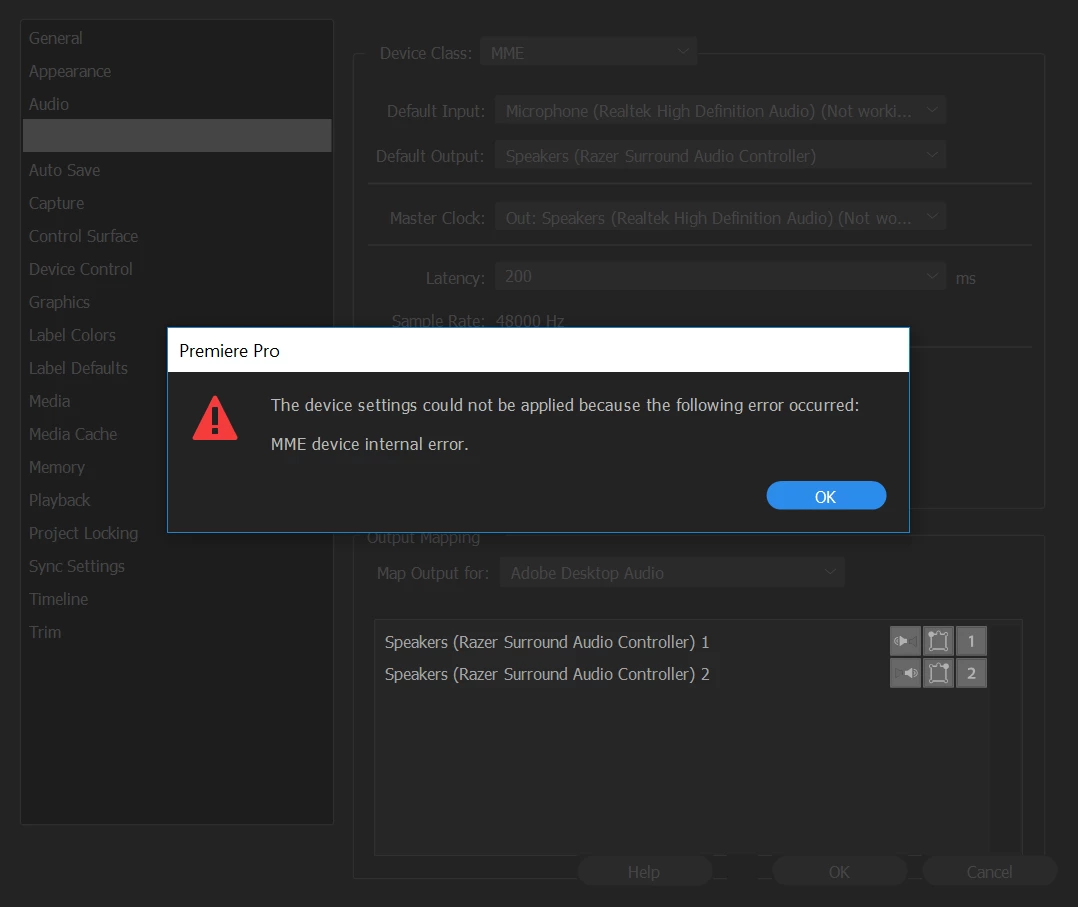
I was going about my own business and editing a video when a dialog box saying "MME device internal error" popped up. My audio was no longer playing during video previews, and when I went to the Audio Devices tab in Preferences to try to change the output device, I received the same error message.
If anyone could tell me the fix ASAP, it would be much appreciated.

Thank you!

Correct answer Ann Bens

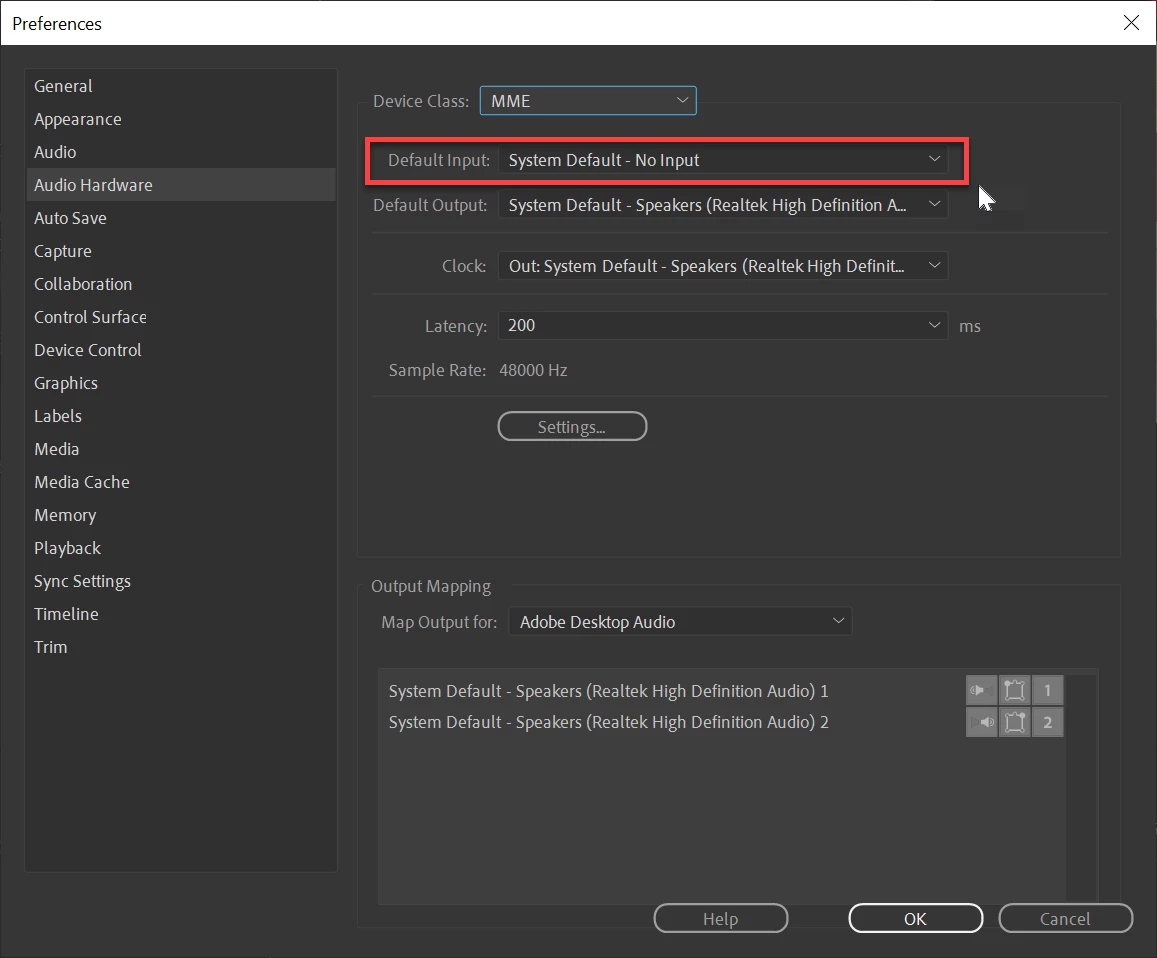
Set input to none: that might do the trick.

Edit: screenshot added.


17 replies

January 21, 2020

What worked for me was going into sound settings then click troubleshoot underneath the input. Something was not set to default somewhere and the troubleshooter fixed it.

Participant
January 19, 2020

Setting input to none is not an acceptable answer. This is a professional editing suite, turning a feature off should never be an acceptable answer.


I am getting the same MME error after updates on 1/17/20 and now none of my Adobe Programs are able to record or play back through my MIDI or MIC (internal MIDI). I don't know where this error is sneaking in as the logs are errily devoid of anything useful. In case someone from Adobe actually checks this my configuration is below. Everything was workng as normal one moment then restarting the machine a few hours later none of the USB or MIDI input mics are able to be recognized as working. They work in other non-Adobe programs and the updated drivers are installed. I have been using this particular setup for at least 6 months and it happened all of a sudden across all adobe apps.Windows security cauises an iisue with my Photoshop so Threat detection is off and the apps are allowed through our firewalls as well as allowed access to the microphone. I tested with a USB mic, a MIDI to USB input controller with mic, and the machine internal mic. None of them work now. The MME error displays after switching to the device. NOW Here is a note, I reinstalled the MIDI drivers and the mic worked in Premeire and AE but then 5 mins later just stopped working again and showed the MME error


Switching from MME to ASIO for the MIDI controller allowed me to record again however it is less than ideal for our use case since the MME drivers allow us more input flexibility. The first time i switched to the ASIO drivers they worked for about 5 mins then threw an error. Now i have reinstalled and will see if it happens again


HP Spectre 360 Laptop

i7-6500 / 16GB DDR3 / Windows 10 Pro

Microphones: USB Samson GTrack and US-122L MIDI with Tascam Tm-78 

All apps at latest versions as of 1/18/20


Adobe CC (Premeire, Audition, Rush, After Effects is my everyday stack)

frankv7270091
Participant
February 25, 2020

It is a windows 10 issue, go to Start > Settings > Privacy > App permissions (left column) > Microphone > Allow apps to access your microphone = On

Participant
December 27, 2019

I had the same problem - not being able to actually input audio to Premiere. I solved it by allowing access to microphone in Windows 10 settings. Search for "windows 10 allow microphone privacy".

Participant
October 4, 2019

Worked for me. Many thanks !

Angelic_life5EEF
Participating Frequently
December 7, 2020

https://www.youtube.com/watch?v=oC2eWJwNo-o

Here is a video made based on the solution provided by adobe professional

JOHNBHUMBA
Participant
July 23, 2018

None of this have helped me. I have tried everything resetting my Audio setting. But still, this keeps on happening.

Participant
August 13, 2018

This didn't work for me either.  However, what did work is a silly, simple thing.  I had to plug in a cord into the microphone jack on my SoundblasterX AE-5 soundcard.  (I didn't have an actual microphone so I just used an 1/8" stereo plug.)  Apparently, it won't work if there is nothing plugged in, even if you are not using the mic input.

Participant
July 21, 2018

I found a very simple solution which works for me. I had exactly the same problem.

My config: Windows10, AMD Ryzen 2700, EVGA GPU Gtx1060, and Adobe Audition CS6.

Go to Windows settings...Privacy...Microphone...and click on "Allow Apps to access your microphone".

That's all

Jazzborn
Participating Frequently
August 6, 2018

you just won 10.000.000 internets.

Participant
February 16, 2021

yep, turned it off and forgot where this dam option was.  Thanks


Ann Bens
Community Expert
Ann BensCommunity ExpertCorrect answer
Community Expert
November 15, 2017

Set input to none: that might do the trick.

Edit: screenshot added.


Participating Frequently
November 15, 2017

Thank you Ann. It started working again by itself after a few hours, but if ever comes up again, I'll do that.

Participant
July 1, 2018

Hello, I just installed premiere pro and got the same message...mme device internal error.. so I set input to none and still no audio?

who has an answer please