


HotWheelz420
Inspiring
October 1, 2018
Answered

Mouse Cursor Icon won't change accordingly to Tool set.

  • October 1, 2018
  • 16 replies
  • 45307 views

Hey forum,

Searched high and low for a solution for this - seems like Mac people had this problem but nothing in stone fixed.


After using Premiere for a few minutes the mouse cursor will "stick" to a cursor.
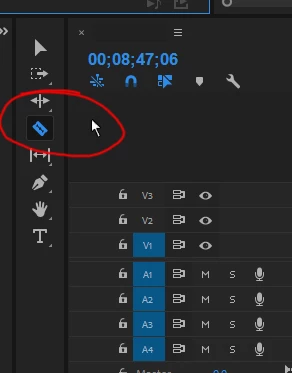
For example between switching the Arrow, Razor and Move tools the mouse cursor won't change.
Image below shows what I mean, since it should be showing the razor instead of the default mouse icon.

One thing that instantly fixes it for a minute is switching between workspaces - though it comes back very shortly.
It's not a program crashing bug, but extremely infuriating since I keep messing up edits since I don't know what tool I'm using.

What I've tried:
-Resetting cache and prefs while booting Premiere.
-Uninstalling and Reinstalling using the Adobe Uninstaller tool
-Create new workspaces
-Create new keyboard preferences
-Disable Import Workspaces

Using:
-Windows 10 64 Bit
-Premiere Pro CC 12.1 Kentos

All the best.

Example Pic:
Correct answer HotWheelz420

Update 2:

Found 2 temporary fixes.

1) Disconnect one of my extra monitors. This is counter intuitive though since I use it for editing.
2) Right clicking on the timeline (only with the newest up date) fixes the cursor temporarily.

I assume it's some sort of display issue, updated all display drivers and etc.

16 replies

Participant
July 8, 2025

Reporting from July 2025 that this is still an issue!

Participant
May 20, 2025

Still an issue in 2025. What the HELL! Adobe???? It's like editing blindfolded. I use shortcut keybinds on my mouse so I can edit fast, and this SLOWS me.

filmsproket
Known Participant
January 3, 2024

I just bought a brand new Mac Studio M2 and this is happening to me too! It's very disorienting not being able to see what tool is active on the cursor.  How can we get this solved?!!

Participant
December 19, 2023

Thank you, it really isn't a big problem but I don't know it just annoys me but thanks for the fix anyways.

Participant
January 26, 2023

Why is this still an issue two years later... @adobe many of us are just about ready to search for other software providers, the ridiculous bugs are everywhere.


Participant
April 10, 2023

I have a brand new Macbook Pro with Apple M2 Max chip and I am encountering the same issue mentioned above.  My cursor never changes to the selected tool.  It will do the action of the selected tool but it always appears as an arrow.  It is very frustrating to thinking you are dragging a clip and the tool cuts (blade tool).

Participant
June 9, 2023

Still happening for me intermittently for last few years. SMH 

Warren Heaton
Community Expert
Community Expert
January 13, 2023

This sounds like the remote software not refreshing the mouse cursor expected.  What is the remote software being used? 

jonathana30682064
Participant
January 13, 2023

Splashtop is what I'm using most of the time. When the problem occurs, I switch to VMWare, and it is magically fixed.

jonathana30682064
Participant
January 13, 2023

Happening to me on a daily basis now, and I've only found one temp fix. It happens on a PC I am connecting to remotely. I have two different methods of connecting. When the issue occurs and suddenly I can't see tool icons, I have to switch to the other remote connection software. Suddenly everything is fine, even if I then switch back to the original connection. Until it decides to happen again. ???

Participant
January 3, 2023

I have the same problem. All newest updates are done. The cursor icon is the same when changing the tool, is there anthing that can fix this annoying issue? 

brianthewatson
Participant
July 5, 2022

This is still a bug in 2022. I only use Premiere becuase it's what I know. Just switched over to Mac in hopes it would be less buggy, but after finding this one on my first project working on my new mac looks like I'll be switching to Final Cut Pro. Premiere really is the worst, it's a shame, it's fairly easy to work with but not with all these bugs. I'm out!

Participant
May 8, 2022

Still a bug. Don't understand what I'm paying for here. The one software I've bought from Adobe and it's riddled with these irritating bugs. 

I've tried everything in this thread and while some work for a span of 5 minutes, I always end up having to close my project or sequence and start again. 

Does adobe care that its customer base earns by the hour and doesn't have time for this pointless back and forth?

Participant
May 9, 2022

One potential workaround:

I just realised my issue kept happening while other software were open. If premiere is the only thing running on your PC then it might not zone out and disable the cursor. This seems to have nerfed the issue at my end.