


DJP2014
Inspiring
March 25, 2024
Answered

Multi-Cam Preview Monitor doesn't scale footage properly

  • March 25, 2024
  • 14 replies
  • 1796 views

Several people have posted about this problem, but for years nothing seems to have been done, so I'm adding it as a bug.


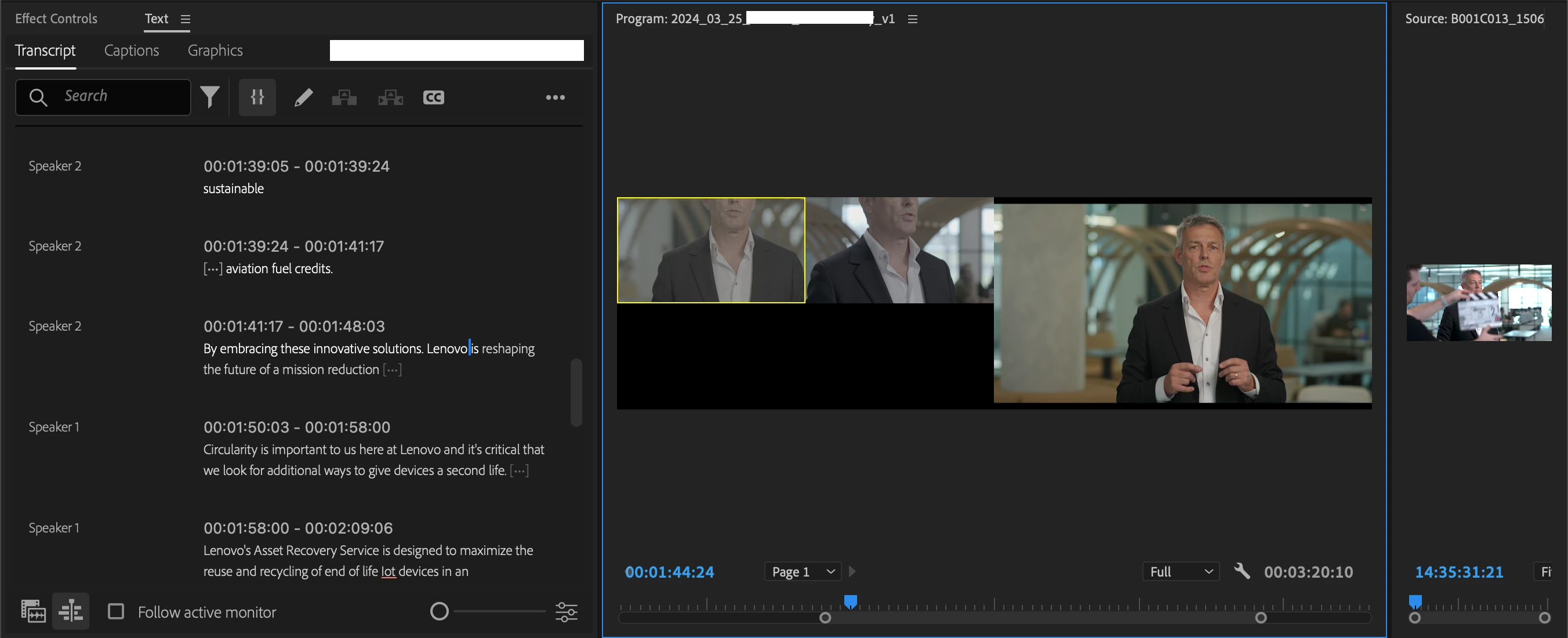
4K Multi-Cam clips appear zoomed in when working in a HD sequence. 4K>HD is a common workflow, not an edge case, and therefore this should be fixed. Resizing hundreds of multi-cam clips isn't a solution.



Correct answer R Neil Haugen

Thanks for the clarification ... I wasn't sure if you meant program monitor or source monitor. Like Resolve, for some things Premiere hath its own terminology.


And yes, the Source monitor is "pre" things applied in Sequences. But the "multicam" is sort of a clip in some ways in Premiere, sort of a sequence in others. Which can be durn confusing at times.


14 replies

Participant
March 11, 2025

Bumping this in 2025. I've been having this annoying issue for years. Any time I work in multicam view in the program monitor with a multicam clip of a larger frame size than my working timeline, the preview is scaled way up so that you're losing a ton of the actual frame. This is a problem if I'm working with clients and they want to see the full frame of each shot in the clip but can't because the scaling is cutting off most of the picture. We lose the ability to review the muticam contents simultaniously and have to fall back to reviewing each shot individually (which kind of defeats the purpose of multicam). 


I understand we can create all of our multicam sequences to match the frame size of our working timeline, but I don't find that to be an acceptable solve because then we lose the ability to punch in on higher resolution clips without losing quality (for example, scaling up a 1080 multicam clip 200% in a 1080 timeline will give you a different result than scaling up a 4k multicam clip in the same timeline). Yes, we get the quality back when picture is locked and we flatten the multicam in the timeline, but I prefer to see the quality difference in real time to gauge what is an acceptable level of scaling. I also want my client to be reviewing the highest resolution possible in edit. Furthermore, some projects require various sized deliverables which then makes that workaround moot because you'd still be working in secondary timeline with different sizing than your multicam clips.

Would love if Adobe would fix this to scale the clips within the multicam sequence to match the sizing of the multicam view so that we're seeing the full frame when reviewing footage with frame sizes larger than our working timeline.

DJP2014
DJP2014Author
Inspiring
March 11, 2025

Agreed. @Bruce Bullis any updates on whether this fix is on the roadmap?

While the current cropping behavior does have some utility (as noted by Ben Insler in this discussion: link), it would be extremely helpful for those of us working 4K>HD to have an option to disable it.

bbb_999
Community Manager
Community Manager
March 11, 2025

Sorry; specifically, a fix for which behavior?

When I read through this thread, it looks like Neil correctly identified my open question:

>So what is your Preferences set to ... None, Scale to, or Set to?

R Neil Haugen
Legend
March 26, 2024

Hey, no problem!


I work both in Premiere and Resolve. What an odd ... difference.


Adobe's documentation tends to be mainly a series of points as to the 'direct' function of something as seen when in "most common use", perhaps. But ... it doesn't give full details, and never gives the interactive issues when "this" is coupled with other effects in different workflows with other things.


BM's Resolve manual ... over four thousand pages of it! ... goes to the other extreme. It is loaded with tons of this when there but not here stuff. BUT ... there is no index, and BM uses a ton of specialied, BM-only nomenclature.


So ... for many, many things, if you don't know exactly the correctly approved BlackMagic word for a process or tool, well ... good luck finding that buried in that massive manual!


I keep hoping for a more practical middle ground ... sigh.

Everyone's mileage always varies ...
DJP2014
DJP2014Author
Inspiring
March 26, 2024

Ah, sorry Neil. Think i may have confused Bruce as well. Bug reporting is definately not my strong suit

R Neil Haugen
R Neil HaugenCorrect answer
Legend
March 26, 2024

Thanks for the clarification ... I wasn't sure if you meant program monitor or source monitor. Like Resolve, for some things Premiere hath its own terminology.


And yes, the Source monitor is "pre" things applied in Sequences. But the "multicam" is sort of a clip in some ways in Premiere, sort of a sequence in others. Which can be durn confusing at times.


Everyone's mileage always varies ...
DJP2014
DJP2014Author
Inspiring
March 26, 2024

Thanks for your help Neil but as far as I can tell Framesize has no effect on the Preview Monitor. Just did a quick test, set prefs to Set to Framesize, imported media, created Multi-Cam, same issue.


Great tip for dealing with the mismatch in the Program Montior though.

R Neil Haugen
Legend
March 26, 2024

Which is exactly what the Framesize choice handles ... so have you tried setting that to Set To framesize, then creating a multicam? As changing a pref only affects things created after you change the pref.

Everyone's mileage always varies ...
DJP2014
DJP2014Author
Inspiring
March 26, 2024

Hi Neil. My preferences are set to none.


My issue though is with the Multi-Cam Preview Monitor, the way it displays clips when there's a size mismatch between the Multi-Cam clip and the Timeline. i.e. 4K vs HD.

R Neil Haugen
Legend
March 25, 2024

I think Bruce asked whether you had your Preferences option set to either Set to framesize or Scale to framesize, and your response seems like you were thinking of that as a timeline-applied option.


So what is your Preferences set to ... None, Scale to, or Set to?

Everyone's mileage always varies ...
DJP2014
DJP2014Author
Inspiring
March 25, 2024

Likewise, monitoring a HD Multi-Cam clip, inside a 4K timeline shouldn't look like this either.

DJP2014
DJP2014Author
Inspiring
March 25, 2024

Monitoring a 4K Multi-Cam clip inside a HD timeline should look like this 

Not this