
Participant
April 14, 2025
Question

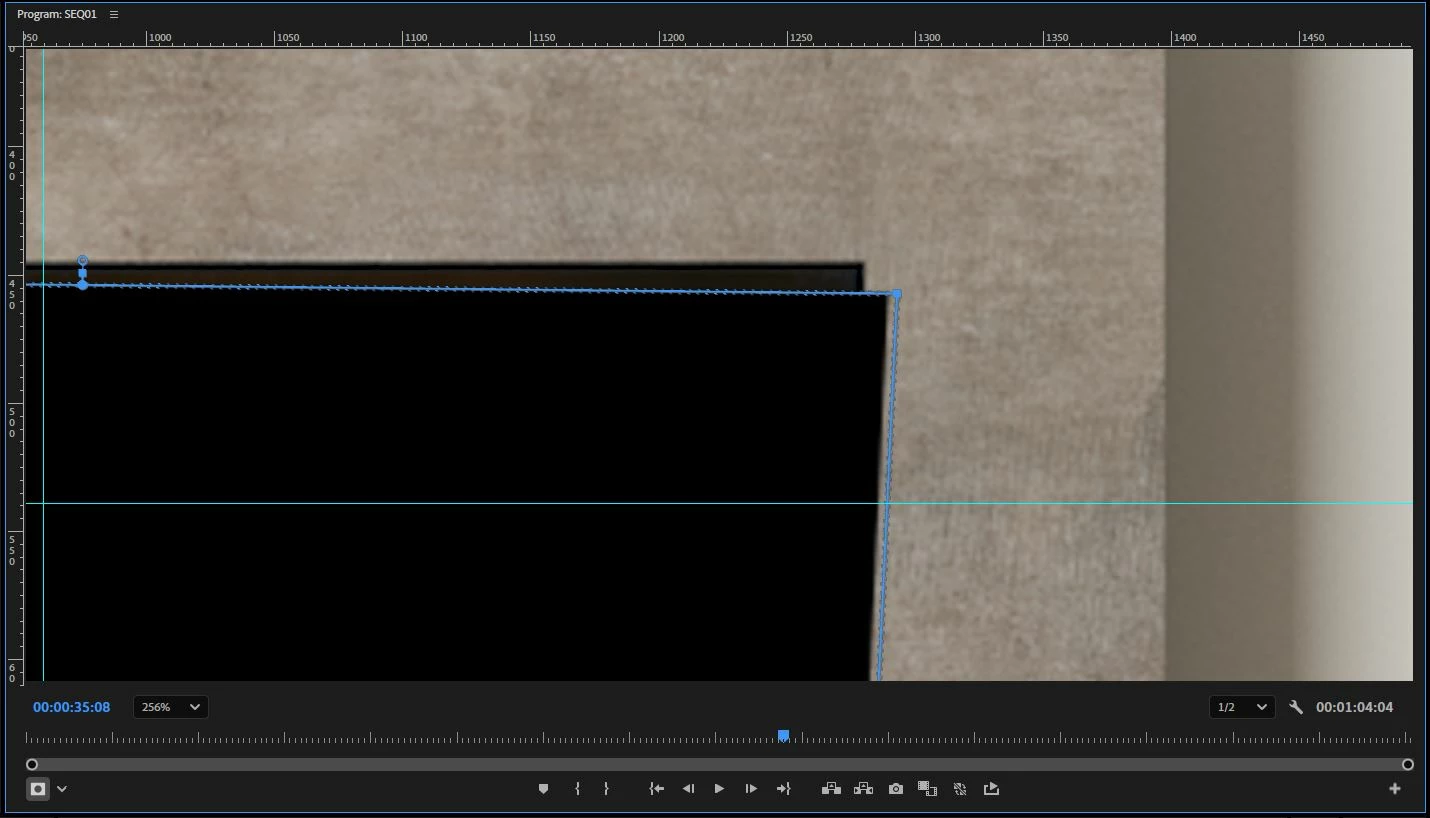
My opacity mask is not aligning correctly.

  • April 14, 2025
  • 5 replies
  • 263 views

When I use the opacity mask, the points I create do not align with what the software actually masks. Everything seems to be shifted slightly to the left. 

I found another post identifying the issue to be with pixel aspect ratio, but the instructions in that post to fix did not work. 

I have attached an image showing the problem. Any ideas would be appreciated as I work with these masks every day 
 

5 replies

Participant
April 16, 2025

Missed your question about playback etc - yes this still happens when high quality playback is enabled. 

Participant
April 16, 2025

Hi Jamie,


I have attached a screenshot of my effects panel and one of my sequence settings. 


My current driver version is 31.0.15.3815 which I realise now is quite old. I have put a request in to our IT dept to update the drivers on my PC and will let you know if there's any improvements.

jamieclarke
Community Manager
Community Manager
April 15, 2025

Hi @Connor54245 - What gpu driver version do you have installed? 

What happens when you change your paused resolution?

Does this still happen when high quality playback is enabled?

Can you share a screenshot of your Effect Control settings and your sequence settings.

Participant
April 15, 2025

Hi Dani,


Thanks for your response. 


I am on Premiere Pro Version 25.2.1 (Build 2)

Operating System is Windows 10

Machine is Dell Precision 3660 16GB
12th Gen I7 - 12700

GPU is Nvidia T1000


This is repeatable as I have been fighting against the issue for a week or two now. 

The shift remains when I zoom in, and is consistent across multiple days with multiple restarts etc. 

On this clip in question, there was some scaling done as well as some lens distortion effects if I remember correctly. I can reproduce the issue on a normal clip with no effects present however. 


Let me know if there's anything else I can provide! 🙂

Community Manager
April 14, 2025

Hi @Connor54245,


Sorry you've been experiencing issues. We need a few more details to try to help with the issue like hardware specs and operating system. Please see: How do I write a bug report?


Does this stay shifted if you change the Program monitor zoom level or if you restart Premiere Pro? Do you have any other effects or scaling done on this clip and could you share a screenshot of your Effect Controls panel?

As a workaround, you could try nesting your clip first and then applying the opacity mask.

Sorry for the frustration, hope we can help you soon.

Dani