
OUS
Participant
October 24, 2024
Question

P: Audio Kanäle ändern nicht möglich (Unable to change audio channels)

  • October 24, 2024
  • 5 replies
  • 1533 views

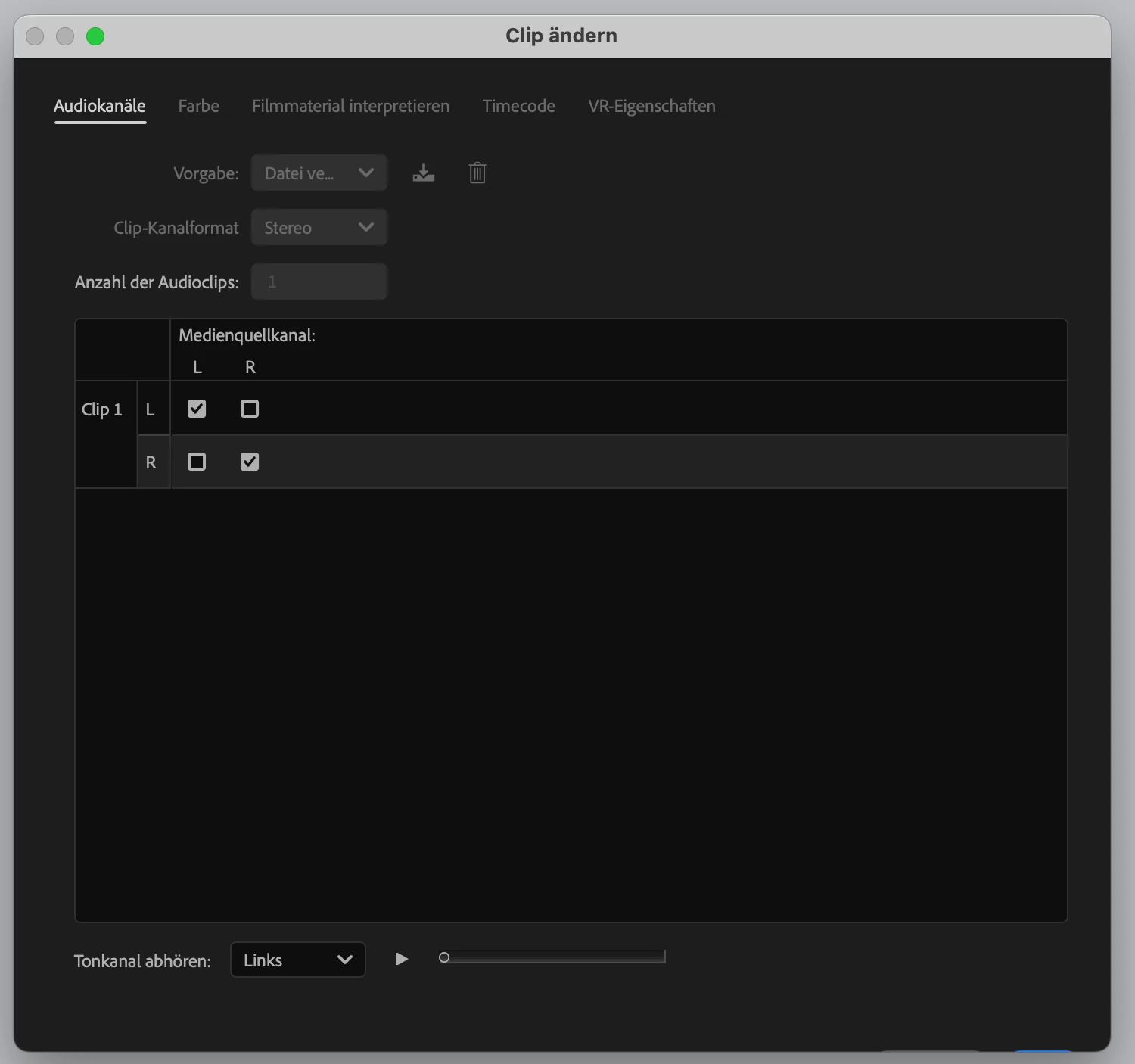
Hallo, nach Update auf PP25 lassen sich die Audio-Kanäle nicht mehr ändern. Siehe Schaltfläche: Rechts unten ist von "OK" nur noch eine sehr feine blaue Linie zu sehen. Neuinstallation hat leider nichts gebracht.
5 replies

Participant
November 1, 2024
  • Issue - After right-clicking an audio clip and selecting "audio channels", I am unable to exit out of the audio channels interface page. As outlined by others, the blue "save" button in the bottom right corner is barely visible, and is not clickable. 
  • Adobe Premiere Pro version number:  PP version 25.0
  • Operating system - macOS
  • System Info: CPU, GPU, RAM, HD:
    • CPU: Apple M1

    • GPU: N/A

    • GPU driver: N/A
    • RAM: 16GB

    • Hard Drive: 250GB

  • Video format: Either REC709 or SLOG-3. I have the problem no matter what format. 
  • Workflow details: I have the issue no matter what workflow I'm using. Sometimes multi-cam, sometimes nested, sometimes normal. 
  • Steps to reproduce - (Very important!): 1) Right-click any audio clip. 2) select "audio channels" from the available menu. 3) The "save" button is not clickable.
  • Expected result - The "save" button should be fully visible and able to be clicked. 
  • Actual result -  The "save" button is not clickable and is barely visible.
Participant
October 31, 2024

Ever since updating to Premier Pro 2025, I have had issues saving changes to my audio channels (see attached image). No matter what I try, I can't click the "save" button in the bottom right corner. Scrolling and enlarging won't work. Any help would be amazing. 

markust36131909
Participant
October 29, 2024

When I right click an audio file in my timeline & select "Audio Channels" to switch from L/R, I'm unable to close out of the window, save the file, or even close the file. This forces me to force quit the program through finder & hope that everything saves.

IanB_360
Community Manager
Community Manager
October 29, 2024

Hi @markust36131909 

Welcome to the Premiere Pro forums! We are glad to see you here. We need a few more details to try to help with the issue. Please see, How do I write a bug report ?

Thanks for submitting your bug report. I hope we can help you soon. Sorry for the frustration!

Thanks,

Ian

Participant
October 28, 2024

I just downloaded Premiere Pro 25 and have noticed that all of a sudden my audio tracks will not work properly. A1 and A2 work just fine, but as soon as an audio track goes into A3, it does not work. If the audio clip goes into A2 it works just fine, so something is wrong with every track after A2?


Never experienced this issue in my 6 years of using Premiere Pro so any advice is much appreciated. Thank you.

Ann Bens
Community Expert
Community Expert
October 28, 2024

Seen this once.

Drop audio on track 4 and delete track 3.

IanB_360
Community Manager
Community Manager
October 24, 2024

Hi @OUS 

Welcome to the Premiere Pro forums! We are glad to see you here. We need a few more details to try to help with the issue. Please see, How do I write a bug report ?

Is the sequnce being selected when you atempt to pull down the menu for modify Audio Channels? I have attached a screenshot of what I can see on a Mac based system fo selecting audio channels. I do see your options are greyed out.

Thanks for submitting your bug report. I hope we can help you soon. Sorry for the frustration!

Thanks,

Ian