


Participant
April 9, 2025
Answered

P: System Compatibility Report Intel Arc Graphics Crashing

  • April 9, 2025
  • 25 replies
  • 14673 views

I recently updated Premiere to 25.2.1. After the update, this warning appears.
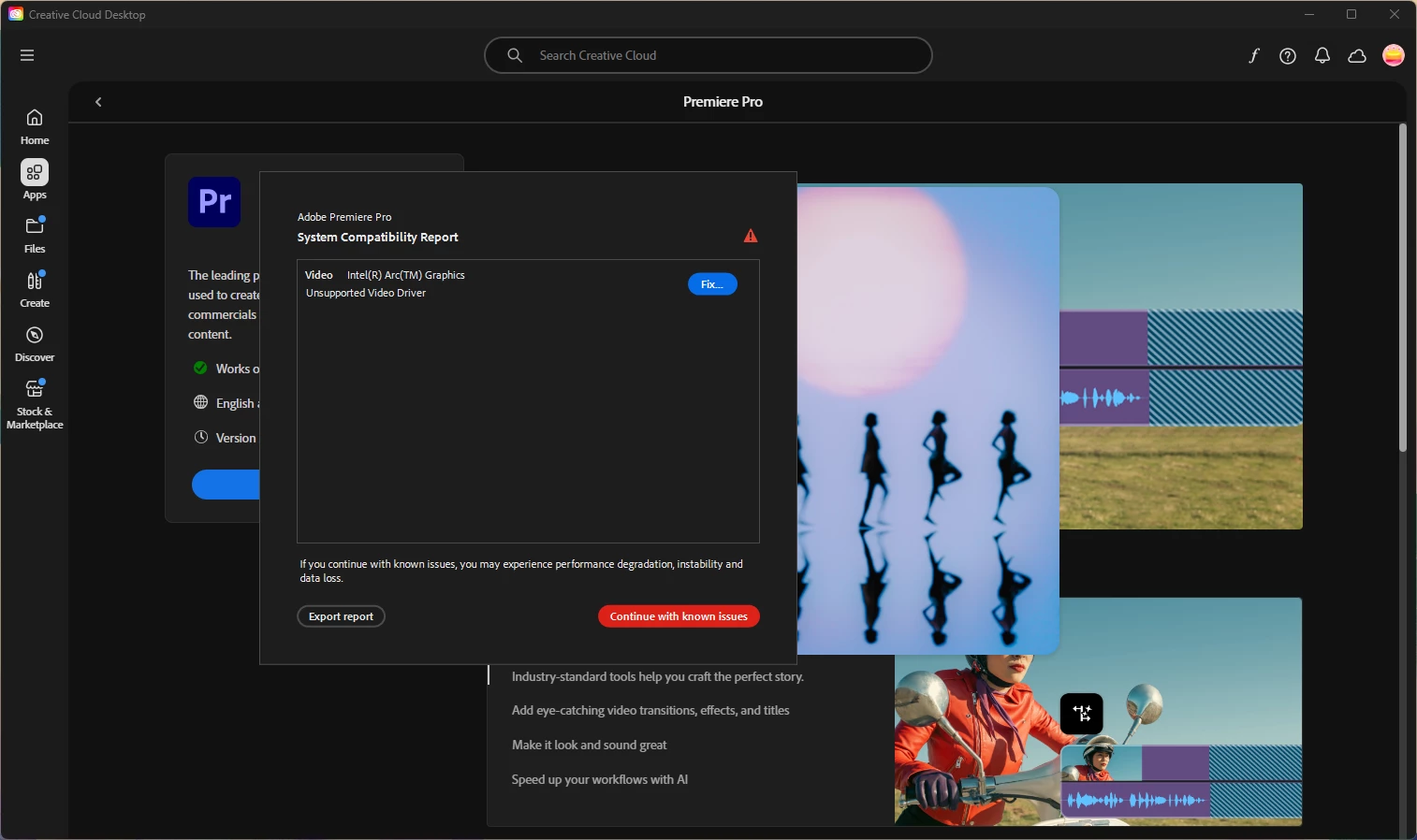
I followed the steps to fix this, and it worked for about a day. My computer had some more updates and now every time I try to work in Premiere, it not only crashes, but freezes my system. I can't even save a project before it crashes.


I've tried uninstalling and reinstalling Premiere, going back to an older 25 update, and updating my drivers, to no avail. There's probably more I'm missing but I was just curious if anyone had any suggestions to help out. Here are my specs as well: 


Lenovo ThinkPad

Intel(R) Core(TM) Ultra 7 165H 1.40 GHz

64 GB RAM

64-bit operating system, x64-based processor

Windows 11 Pro


Correct answer motivated_warmth7825

Jamie and Mayjain,


Thank you for your assistance today! I am back running normally now. No more incompatibility error or crashes. 


Solution:

 I used the DDU utility and completely removed both my NVIDIA and INTEL gpu drivers.  I then reinstalled the latest versions of both and that seemed to do the trick. Between Premiere, Windows 11 and Intel all pushing updates out this past week, perhaps something was leftover, causing issues.  Once again, thank you!

25 replies

Participating Frequently
April 11, 2025

Thanks Mayjain,

Are you stating that you are not getting the incompatible driver warning window on your Intel Arc systems when launching Premiere?


I was asked to disable my Nvidia GPU.  Should I also do this in addition to uninstalling using the DDU utility and updating to the latest Intel Drivers?

Thanks!


Community Manager
April 11, 2025

Hi @motivated_warmth7825,

Could you please try doing a clean install using the DDU (Display Driver Uninstaller) tool as well? Intel Guide – Clean Driver Installation using DDU

I just checked on two of my Intel Arc systems, and both are running the latest drivers without any issues.

Thanks,
Mayjain

Participating Frequently
April 11, 2025

ps.  The problems began after updating to the newest intel driver.  Something has broken this week.

Participating Frequently
April 11, 2025

Hello,


I need to wait for an administrator to allow me to disable the NVidia gpu (in fairness, I do not think this is a suiable solution, since I want to utilize the power of the NVidia GPU in Premiere.  Also, I already cleared the media cache. The crashing has stopped, but the performance is laggy and I still get the initial error incompatibility warning box upon launch.  Thank you for trying to help.

Community Manager
April 11, 2025

Hi @motivated_warmth7825,

Sorry for the inconvenience. Have you tried performing a clean installation of the latest Intel driver ? Intel Arc A770 Graphics - Latest Driver

Also, try clearing the media cache in Premiere Pro: How to Clear Cache in Premiere Pro

Let us know if that helps!

Thanks,
Mayjain

jamieclarke
Community Manager
Community Manager
April 11, 2025

HI @motivated_warmth7825 - Can you try and disable your Nvidia GPU in device manager then update to the latest intel drivers and let us know if that helps your issue?

Participating Frequently
April 11, 2025

Nvidia GPU: NVIDIA RTX 2000 ADA Generation Laptop GPU: 32.0.15.7283


INTEL ARC Graphics: 31.0.101.5382 (I tried rolling back from the latest version (32.0.101.6734 (WHQL Certified) for Intel® Arc™ B-Series Graphics, Intel® Arc™ A-Series Graphics, Intel® Iris® Xe Graphics, and Intel® Core™ Ultra Processors with Intel® Arc™ Graphics., but issue and warning box still persists)


Abobe Premiere Version: 25.2.1 build 2

jamieclarke
Community Manager
Community Manager
April 11, 2025

Hi @motivated_warmth7825 - Can you confirm which gpu and drivers you are using?

jamieclarke
Community Manager
Community Manager
April 11, 2025

Hi @rachel_3132 - We have not seen issues with this driver.  However, the last driver version that we saw working was 32.0.101.6559


Can you confirm each GPU and the driver versions for each?

Participating Frequently
April 11, 2025

Hello, 


Problem still persists. This is happening on the latest intel driver:  Graphics Driver 32.0.101.6734 (WHQL Certified) for Intel® Arc™ B-Series Graphics, Intel® Arc™ A-Series Graphics, Intel® Iris® Xe Graphics, and Intel® Core™ Ultra Processors with Intel® Arc™ Graphics.


Is there a specific driver version that has been tested and will not cause known issues in Premiere?  Thanks in advance.