
Participant
June 9, 2023
Question

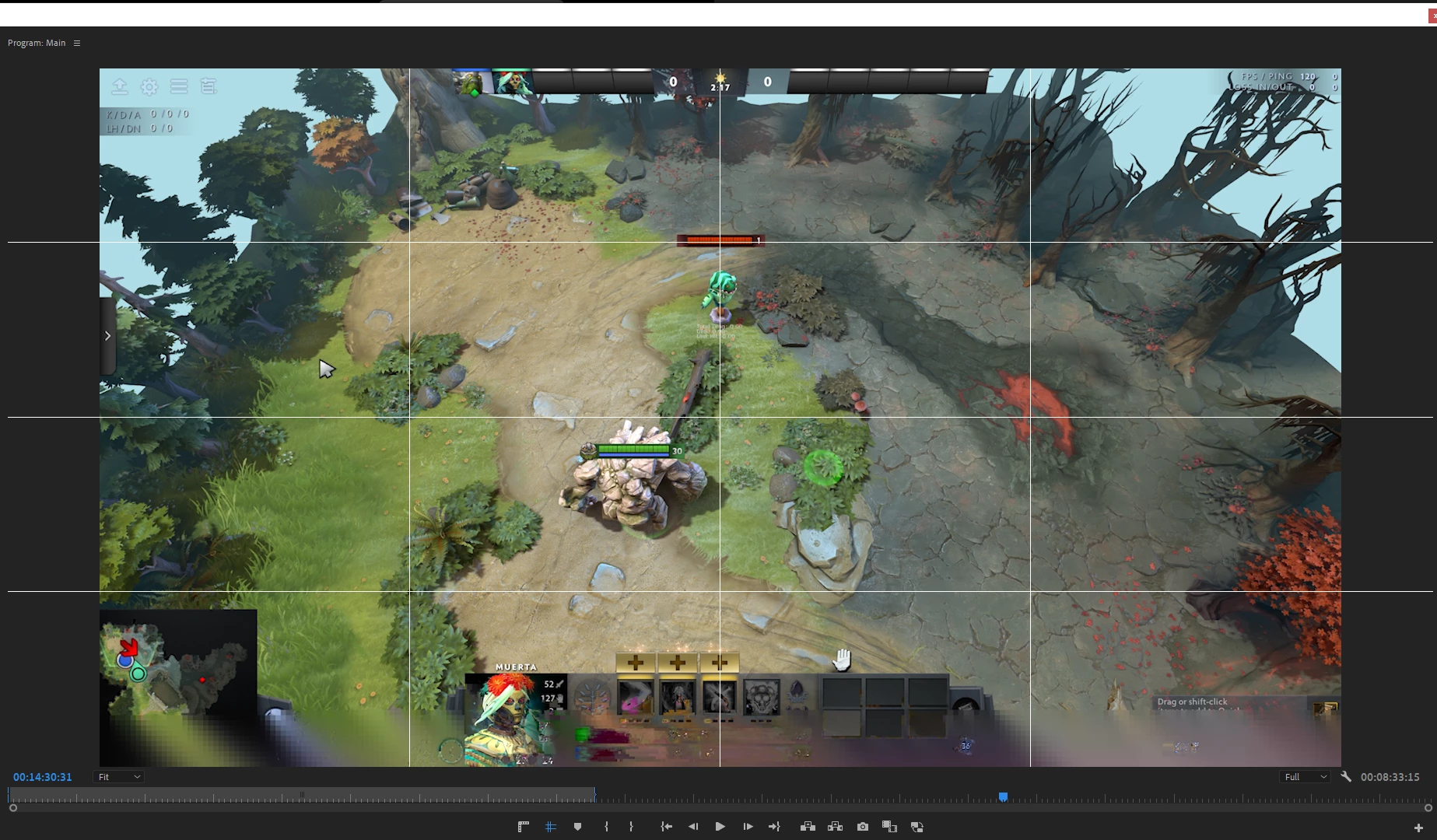
Pixilated Footage IN PREVIEW and after rendering

  • June 9, 2023
  • 2 replies
  • 247 views

Hey,
I have a problem with my Premiere Pro. I attached a Screenshot of my Premiere Pro Preview Screen and my footage gets pixilated on the bottom. I had this problem before and thought that I always had corrupted footage but after hiring an editor for my videos I noticed after sending him the exact same footage like in the Screenshot that he doesn't have these pixilated edges. And my actual footage is completely free of that as well. My guess is that something is wrong with my Premiere Pro and it is encoding my footage wrong or it gets misinterpreted. This problem occurs mainly if I import 4k footage with high bitrate, low birate and 1080p stuff was completely fine so far. And if I export this footage the pixels occur as well... I appreciate any help you guys can give me, thansk in advance!


This topic has been closed for replies.

2 replies

Participant
June 11, 2023

Hey Kevin, thanks for answering! Here is the full devs info and I updated all the GPU drivers but still didn't fix the problem.

Issue: Pixilated Video while in preview and after exporting.

Premiere Pro Version: 23.4.0

Operating System: Windows 10 Pro Version 22h2 (Build 19045.2965)
System Info:

CPU: 12th Gen Intel(R) Core(TM) i7-12700K 3.60 GHz

GPU: NVIDIA GeFOrce RTX 3080; Driver Version: 31.0.15.3598

RAM: 32GB (G.Skill RipJaws V DIMM Kit 32GB, DDR4-3200, CL16-18-18-38)

Hard Drive: HDSA 4TB Seagate IronWolf connected through SATA cable

Video Format: 

Footage Format: 

(I usually record in 4k and scale it down to 1080p for higher quality and with these OBS settings):

I noticed that it happens when I record with high bitrate and when I record longer than 10 minutes, less long footage usually doesn't have this problem AND it is only on my device like I mentioned before, after sending this footage to my editor the exact same footage looked completely fine for him...

Workflow: I just open a new Premiere Pro File and drag the footage in, scale the sequence down to 1080p and then half the footage scale so it fits the screen. I do that so I have higher quality when I zoom into the footage and don't want to actually upload in 4k to Youtube but still in 1080p.

Expected Result: It should not have the pixelation anywhere.

Actaul Result: Pixilation for a some farmes (around  for 5-25+ seconds) throughout the video

I added a video of the problem as well.

Hope somebody can help me... 😕😕

Kevin J. Monahan Jr.
Community Manager
Community Manager
June 10, 2023

Hello @Was macht GbR,

I saw your issue. Thanks for the screenshot. Anomalies like that are usually GPU related. Can you give the devs full info about your system and media? How do I write a bug report?


You might start by updating any GPU drivers. Game ready drivers aren't as good as studio drivers for video editing, FWIW. I hope the advice helps.


Thanks,
Kevin

Kevin Monahan - Sr. Community and Engagement Strategist – Adobe Pro Video and Audio