Participant
December 20, 2024
Question

PP crash after opening a sequence

  • December 20, 2024
  • 6 replies
  • 872 views

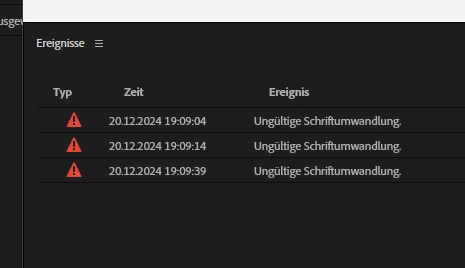
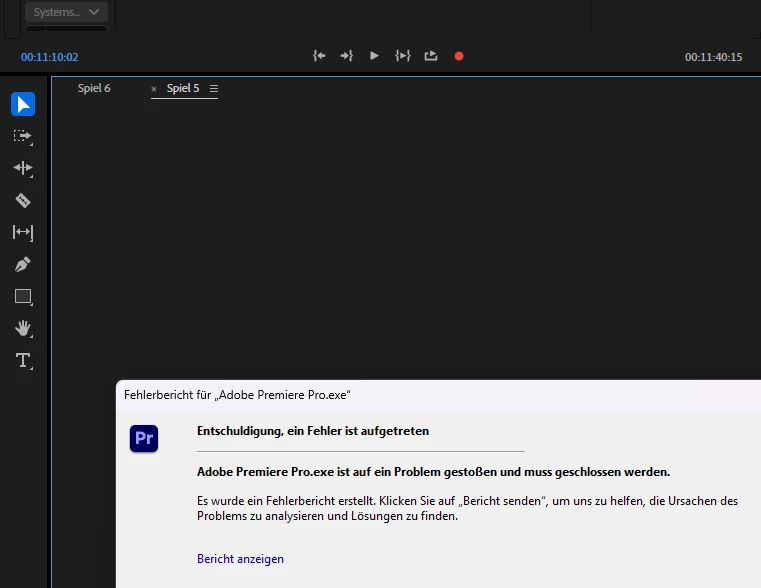
When editing in a project, at some point it was no longer possible to open or edit a certain sequence. Instead of the timeline, I only see the background of the program. It is possible to switch to other sequences when you are fast enough. In between, the error message “Invalid font conversion” appears. However, as soon as I try to do something or access it after a restart, Premiere Pro crashes.


Version: 25.1.0 (Build 73)

System: Windows 11 Pro (Build 22631)


What I already tried:
 - import the project, then only the sequence into a new project - same result

 - change sequence settings to the wildest settings - same result

 - start PP and reset preferences - same result

 - start PP without any third party software - same result

 - delete every audio and video preview and clear the complete media cache - same result

 - install the newest graphic card driver - same result


Screenshots:
 

I already searched the web and did not found a fix or a workaround to continue working on the sequence. Hope you can help!

6 replies

IanB_360
Community Manager
Community Manager
December 26, 2024

Hi @Levent5FC3 

Have you tried to open up an old auto save project one that would have been auto saved before you noticed the strange behavior? And what happens if you remove the - Essential Graphics - overlay? Do you have the - Essential Graphics - overlay on other sequences and they work fine?

Thank you

Ian

Participant
December 24, 2024

Edit:
What I tried in the meantime:
- Downgrade from 25.1 to 25.0
- deleted all fonts I used in the entire project from the Windows system - no improvement
- set media offline to find out if one of the files is responsible for this
- exported the faulty sequence as XML to import it again - the edited audio of the multicamera clips are displayed, all multicamera video clips are missing
- when I try to export the faulty sequence, I get an error message that there are offline files in the sequence, which is not the case. I can navigate through the preview of the sequence via the export window and cannot find any offline media.

Participant
December 24, 2024

When I insert the audio and video data and my Essential Graphics template into a new sequence, everything works fine

.

The original sequence has the following elements:
- After Effects sequence
- Essential Graphics - overlay
- Multi-camera sequence
- Two audio tracks for music and commentary


However, if the faulty sequence is still open at the same time, I cannot edit the new sequence as it automatically jumps to the faulty sequence after each click:


Community Manager
December 23, 2024

Rather than importing the sequence what happens if you copy the media/ seq contents onto a new sequence?  Does that make any difference?

Participant
December 20, 2024

Hey @Rach McIntire ,

thank you for your answer! I didn't know which font causing the issue because over all other sequences I use the same fonts.

I reproduced the crash and send the crash report to Adobe. I have inserted the link to this article in the field for further information.


My bug report:

  • Issue - see first message above
  • Adobe Premiere Pro version number: 25.1.0 (Build 73)
  • Operating system - Windows 11 Pro (Build 22631)
  • System Info: CPU, GPU, RAM, HD:
    • CPU: AMD Ryzen 5 3600X 6-Core Processor

    • GPU: NVIDIA GeForce RTX 2060

    • GPU driver: NVIDIA studio driver Version 566.36
    • RAM: 32GB 

    • HDD: Samsung SSD 980 1TB (CC installed here), Silicon Power PCIe M.2 NVMe SSD 500GB, Seagate Expansion HDD 8TB (external, connected via USB 3.0, Location of the project)

  • Video format (different camera angles):
    • Camera 1: XAVC, 100MBit/s, 25fps, 3840x2160, 4:2:0 8 bit
    • Camera 2: QuickTime MOV (H264 Codec), 150MBit/s, 25fps,  3840x2160, 4:2:2 10 bit
    • Camera 3: Insta360 - converted videos, QuickTime MOV (MPEG-4), 250MBit/s, 3840x2160, 4:2:2
  • Workflow details: Multicam sequence with own build essential graphics and audio commentary, which I used in another sequences too.
  • Steps to reproduce: open sequence "Spiel 5", the timeline don't show up and shows only the background of the program (see pictures above). When I switch to another sequence everything works well. When I open the sequence "Spiel 5" in my source window or export window it can be played. When I open the audio channel mixer or another window PP crashed!
  • Expected result - everything in the sequence I guess 
  • Actual result -  tried different ways to find a solution (import sequence in new project, deleted every audio/video preview and preferences, installed the new GPU driver)


Community Manager
December 20, 2024

Hi @Levent5FC3,


Welcome to the Premiere Pro forums! We are glad to see you here.  Do you know which font might be causing the issue?  When it crashes did you send the crash report to Adobe?  If so, I can take a look and see whats going on.


We need a few more details to help with this issue. Please see: How do I write a bug report?


I hope we can help you soon. Sorry for the frustration!