panchsheeel
Participant
October 22, 2018
Answered

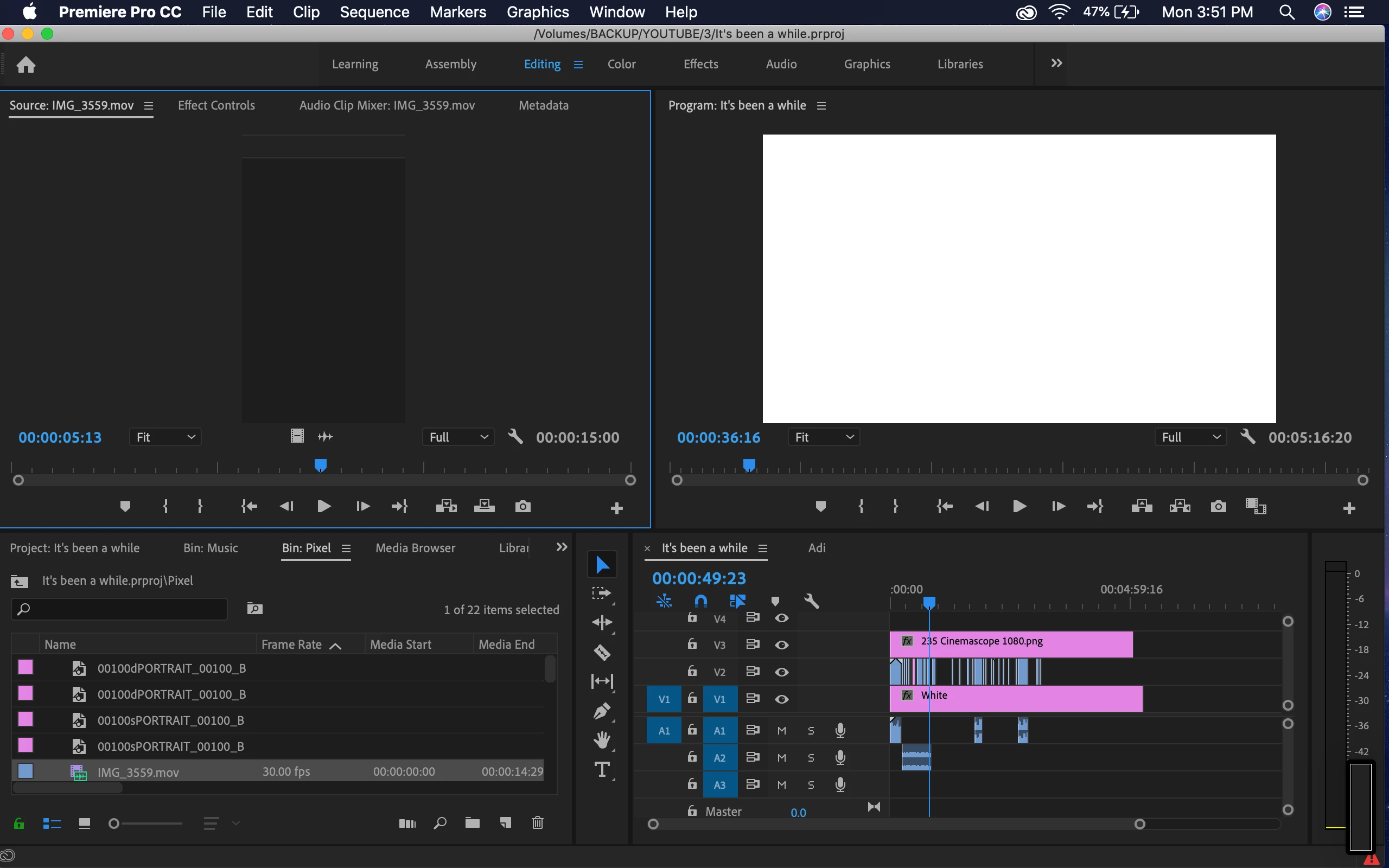
Premiere 2019 showing white screen only

  • October 22, 2018
  • 13 replies
  • 53579 views

Hey,
Having a problem with this.
Anytime I open a project, it shows this white screen in the preview monitor. Tried with multiple projects. Not working.
Premiere also doesn't quit normally. Have to force quit it.
The error shown is "A low level exception occurred in Adobe Scopes (Transmit::CreateInstance).
Any help would be appreciated!

This topic has been closed for replies.
Correct answer Shivangi_Gupta

Updated :/
No difference


Thank you for sharing the information, panchsheeel.

Try resetting preferences and let us know if that helps.

FAQ: How to reset (trash) preferences in Premiere Pro?


Thanks,
Shivangi

13 replies

Participant
January 28, 2019

Had the same issue. Tech support helped me with this solution.

For Mac users.

First, close Premiere Pro

In Finder, option select Go from drop down menu to open Library

Open  Application Support / Adobe

Find the folder "Premiere Pro" and rename it "Premiere Pro_old"

Close folders and now open Premiere Pro application. Should work fine. This also fixed an issue I had with title tool where none of the operational windows automatically opened.

Note - you may need to first uninstall / reinstall Premiere Pro.  I had done this before seeking tech phone support so that may have been a factor.

BTW regarding Adobe tech support.  It's annoying that there isn't a direct phone #.  Actually need to contact billing and request re-direction for tech. Absurd.

Averdahl
Community Expert
Community Expert
October 22, 2018

Long shot here, but what happens if you click on the wrench in the Program panel and change it from Alpha to Composite Video?

panchsheeel
Participant
October 22, 2018

Doesn't do anything

Averdahl
Community Expert
Community Expert
October 22, 2018

What happens if you update the graphic driver: Intel® Graphics Drivers for Mac*

Community Manager
October 22, 2018

Hi panchsheeel,

Sorry for your issue. Please answer the following questions to understand the issue better.

1. Which Operating System are you using?

2. Please share your system specification (RAM, GPU, processor)

3. Are you getting the same issue if you create a new project/sequence with a single clip?

Additionally, you can try changing the Video Renderer.

FAQ: How to change the Video Renderer in Premiere Pro?

Let us know if it helps.

Thanks,

Shivangi

panchsheeel
Participant
October 22, 2018

Hi Shivangi,
I'm using MacOS Mojave
Processor: 2.7 GHz Intel Core i5
Memory: 8 GB 1867 MHz DDR3
Graphics: Intel Iris Graphics 6100 1536 MB

And yes, problem persists even in a new project and sequence with a single clip.
After dragging it on the timeline, can't view anything in the preview monitor and the same message shows up:
"A low level exception occurred in Adobe Scopes (Transmit::CreateInstance)"