

FXA33
Participant
March 8, 2026
Question

premiere 26.0.1 : menu EFFET partiellement en français et en anglais

  • March 8, 2026
  • 4 replies
  • 71 views

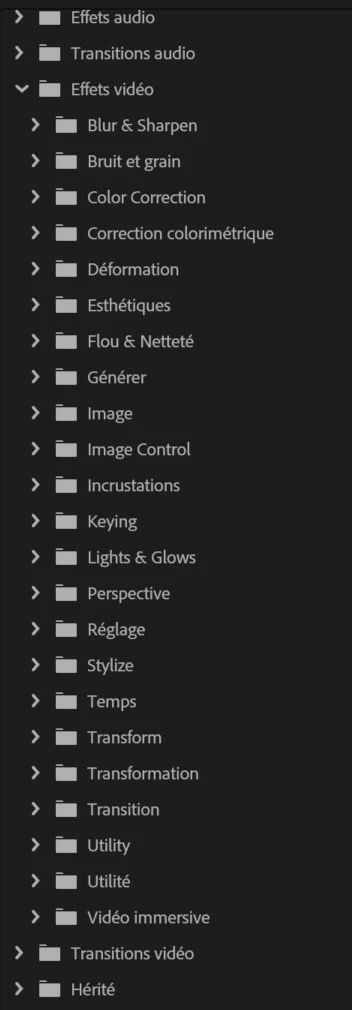
Premiere 26.0.1 : le menu “Effets video” est partiellement en français (certaines fonctionnalités sont en anglais).

 

    4 replies

    jamieclarke
    Community Manager
    Community Manager
    April 3, 2026

    Hi ​@FXA33 ​@louis_0035 - This was a known issue in Premiere version 26, please see this article: Premiere installs in English despite Creative Cloud language setting

    It was fixed in version 26.0.1 To resolve the issue, uninstall Premiere, select the correct language in Creative Cloud, and reinstall the latest version. On the second launch, Premiere will display the correct language.

    MarianaP
    Participant
    April 3, 2026

    >>On the second launch, Premiere will display the correct language.


    Yes, that is exactly what I said in my comment yesterday. On the second launch the interface is indeed in French; but the Effects folders are still a mixture of EN and FR.

    MarianaP
    Participant
    April 2, 2026

    J’ai le même problème depuis la mise à jour vers Premiere 2026.

    J’ai essayé:

    1. La remise à zéro (reset) des préférences.
    2. Suppression et réinstallation de Creative Cloud et Premiere sur mon propre compte.
    3. Utilisation d’un autre compte (connu d’Adobe) sur le même ordinateur.
    4. Utilisation d’un compte (local, sur l’ordinateur) sans aucune connexion à Adobe.

    Dans le cas 1, aucun impact sur ce menu-là.

    Dans le cas 2, l’interface est en français, mais les effets vidéo sont un mélange d’anglais et de français, comme c’est le cas pour FXA33.

    Dans les cas 3 et 4, à la première ouverture de Premiere, l’interface est en anglais. On ferme, et on rouvre, et l’interface est en français, mais les effets sont «bilingues». On dirait que ce menu a été contaminé par l’affichage anglophone lors du premier lancement.

    Jusqu’ici, depuis 2018, les mises à jour n’ont jamais eu une incidence sur la langue.

    MarianaP
    Participant
    April 3, 2026

    Follow-up: I’m working around it by reinstalling Premiere Pro 2025, which doesn’t have the same issue. Might work for you also, ​@FXA33.

    But it has to be seen as a short-term solution.

    This is not satisfactory. I’ve spent half a working day trying various solutions. Finally, my work-around leaves me with an out-of-date installation, yet I’m still paying for Premiere 2026 each month.

    @jamieclarke says blandly “This was a known issue in Premiere version 26”. So the software was released with a blatant fault, and clearly not tested in real-life conditions. Is this why “Pro” has been dropped from the name?

    jamieclarke
    Community Manager
    Community Manager
    March 9, 2026

    Hi ​@FXA33 -   Thanks for submitting your bug report. We need a few more details to try to help with the issue.  Please see, How do I write a bug report?


    Can you try what Peru Bob is suggesting and let us know if that helps

    Peru Bob
    Community Expert
    Community Expert
    March 8, 2026
    louis_0035
    Participant
    April 3, 2026

    J’ai le même problème et la solution proposée n’a rien changé. De plus non seulement le français et l’anglais sont mélangés, mais encore certains effets ne sont plus présents. Les effets “Transitions video/Fondu” ne proposent plus que l’option “Morphose”.

    MarianaP
    Participant
    April 3, 2026

    J’ai remarqué la même chose. «Flou gaussien» n’existe plus, mais «Gaussian Blur» est la dans le dossier anglais.