Participant
Nov 19, 2026 9:57 AM UTC
Answered

Premiere 27 Color Mode
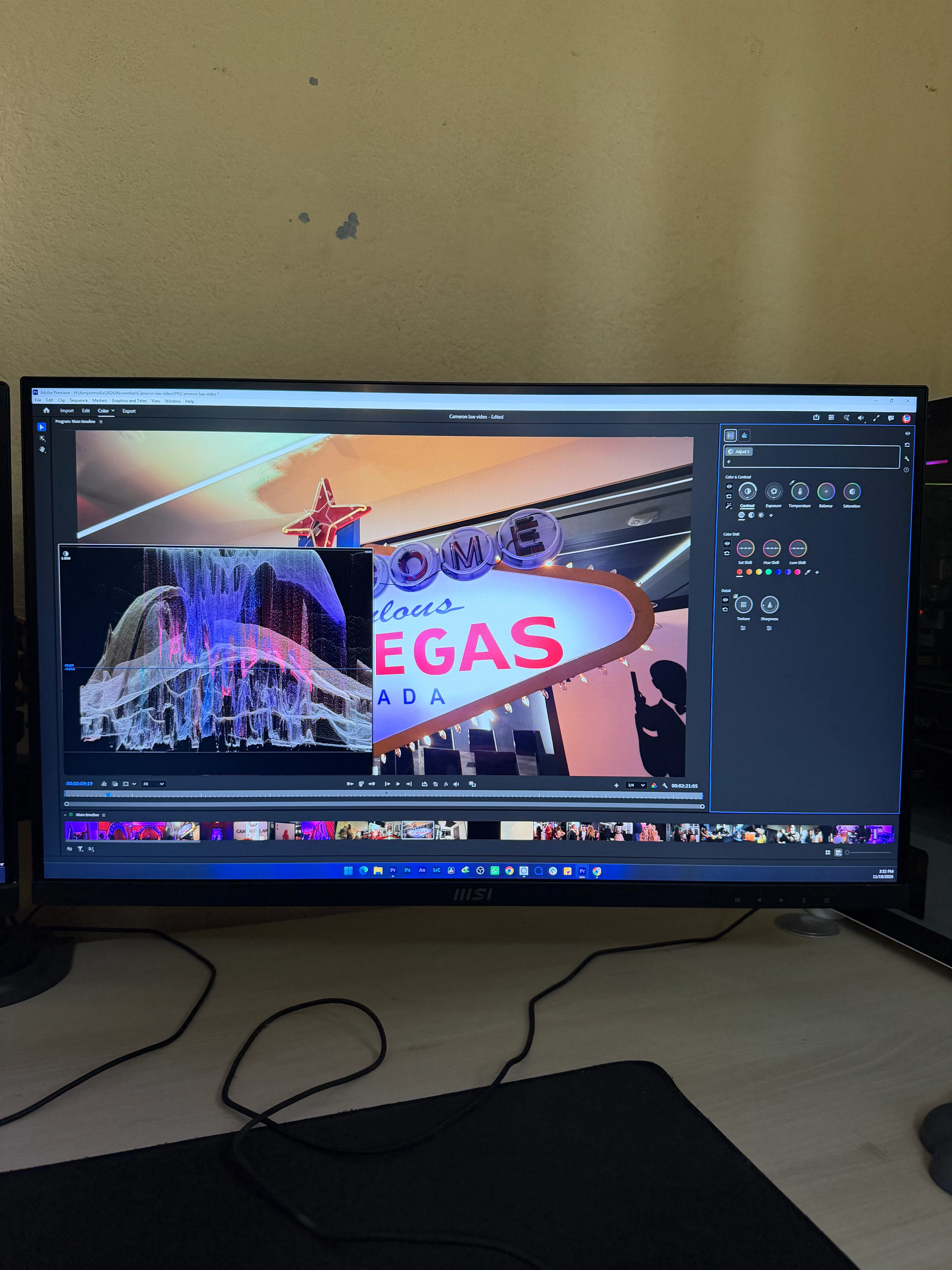
 

I don’t know why they thought this new Color Mode in Premiere 2027 was a great idea. Firstly, this is the worst update, and I’m sure many Adobe users are complaining about it.

But my question is, since they’ve already introduced this in Premiere 27, why does this graph keep popping up out of nowhere and blocking almost half of the video screen? How am I supposed to color grade when this graph is covering the footage?

I even tried keeping my video preview on a separate monitor, but the issue remains the same.

Is this a bug or something??
    MyerPj
    MyerPjCorrect answer
    Community Expert
    Nov 19, 2026 10:55 PM UTC

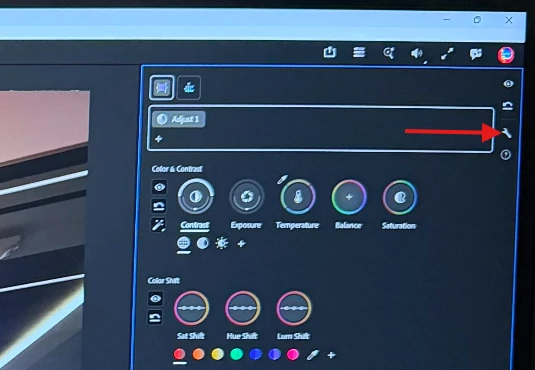
    Check Kevin’ video link, in the meantime, you can use the wrench menu to adjust the size of the scopes.


    12 replies

    lambodeb
    Participant
    Nov 20, 2026 7:39 PM UTC

    It’s so bad. I don’t do in depth color stuff. Just quick stuff and i need the old layout back.

    Translate
    MyerPj
    Community Expert
    Community Expert
    Nov 20, 2026 7:37 PM UTC

    BTW: Helpful feedback is has been requested on the beta forum.


    Translate
    Participant
    Nov 20, 2026 5:52 AM UTC

    this is the dumbest update, i might as well learn DaVinci Resolve at this point

    Translate
    Participant
    Nov 20, 2026 6:29 AM UTC

    I always color grade my personal travel and cinematic videos in DaVinci Resolve. However, I don't really like its UI and layout, the limited flexibility to remove elements I don't want on screen, and the overall editing experience. That's the main reason I've never fully switched to DaVinci Resolve.

    I've mastered Premiere Pro, After Effects, and Photoshop, so my workflow is much faster in Adobe software than in DaVinci Resolve. However, I'm comfortable editing in both. I believe learning and working with both software simultaneously could be a smart choice in an ever-evolving video editing industry.

    That being said, Adobe really needs to rethink and improve its color grading tools and workflow if it wants to compete with DaVinci Resolve in the professional color grading space.

    Translate
    R Neil Haugen
    Legend
    Nov 19, 2026 11:06 PM UTC

    Color mode is absolutely and puzzlingly different and nearly unfathomable until you understand why it was designed as it is, and how to use it. No question.


    Alexis Van Hurkman … famous colorist … is the brains behind this. Look for his Adobe vids on how it’s designed to work and be used, and for Karl Soule’s vids on how to do specific things.


    It is the first color modding system designed to work as colorists have been trying to for several years, to avoid shot-to-shot shot-matching wherever and whenever possible.

    So this is built on correcting groups of clips at the same time … subgroups, and then individual clips. After you get used to working the grid and making and using groups it’s fast and easy.

    And things like the Contrast/Pivot control … most people probably need to set the control sensitivity way down especially at first, as while you’re learning it’s odd.

    BUT … get used to Contrast/Pivot use, and you won’t need to touch Exposure/Blacks most of the time, as you set the contrast range, and the extensions up/down and the relationships of the mids to shadows and highlights while doing the Contrast/Pivot adjustment. Which under the hood, applies a very curves-like change to the image.

    The new scopes that pop up are actually very useful as you get used to them. But odd at first. Watch the image, watch the scopes, and learn how to expect what image change from changes in the scope.

    Translate
    Everyone's mileage always varies ...
    Participant
    Nov 20, 2026 6:37 AM UTC

    Bro replied with a whole paragraph about new Color Mode except the actual answer to my question.🤦🏻

    Translate
    R Neil Haugen
    Legend
    Nov 20, 2026 7:37 PM UTC

    Until you get color mode’s basis, you’re going to hit problem after problem with it, guaranteed. My post wasn’t just to you, but for all who’ll be reading this over the next couple years.

    And your top posted question had specifically been answered.

    Translate
    Everyone's mileage always varies ...
    MyerPj
    Community Expert
    MyerPjCommunity ExpertCorrect answer
    Community Expert
    Nov 19, 2026 10:55 PM UTC

    Check Kevin’ video link, in the meantime, you can use the wrench menu to adjust the size of the scopes.


    Translate
    Participant
    Nov 20, 2026 6:19 AM UTC

    This is the best and spot on solution. Thankyou. One more question; is there any way we can make the size of color wheels bigger?? 

    Translate
    MyerPj
    Community Expert
    Community Expert
    Nov 20, 2026 7:26 PM UTC

    Not currently. I did see this asked for in the Beta forum. You might check that forum on occasion or even download the beta, which runs separately from the shipping version. You’ll see tweaks and new features sooner, and the new things will be, ah, less surprising! 😗

    Cheers.

    Premiere Beta

    Translate
    Community Manager
    Nov 19, 2026 9:35 PM UTC

    Hi ​@Ravi221261294dcl,

    Thanks for the post. I do understand your point, though. See if this helps you use the HUD the way it was intended.


    Let us know!
    Thanks,
    Kevin

    Translate
    Participant
    Nov 20, 2026 6:39 AM UTC

    Thankyou, this one is also really helpful. 

    Translate