


Inspiring
Feb 22, 2024 3:53 PM UTC
Question

Premiere does not save my Mask Path Keyframes

Hi,


I have a simple zoom in, zoom out effect:
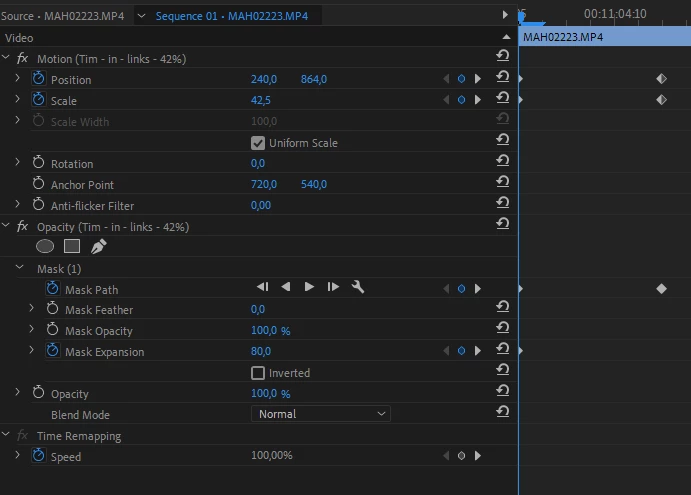
 

and it works completely normal... until I save and close Premiere Pro. Then all my Mask Path keyframes are deleted.
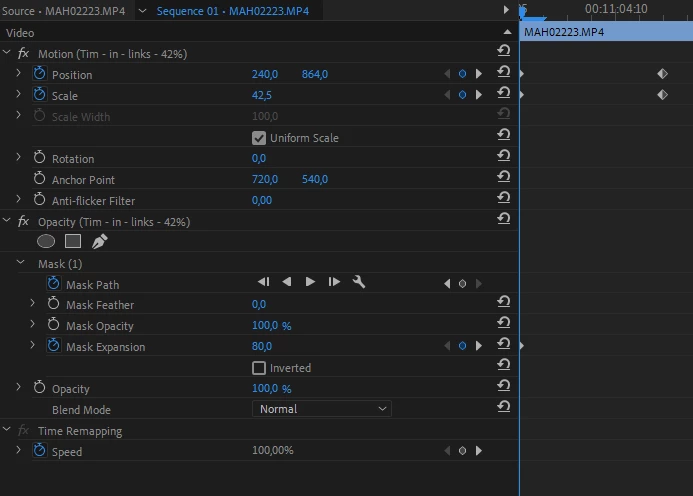
 

and I have to create them again... until I close Premiere Pro again. I can't finish my work like this.


Has anyone a solution for it?

I have opened older files, encountering the same problem: all Mask Path keyframes are deleted. Additionally, I increased the clip size to see if the keyframes had moved to another location, but they haven't.


Update:

I've discovered that the issue arises only when I use my custom-saved effects. Specifically, these are zoom effects that I created months ago, which until now, worked perfectly.

But, I tried the following:

  • Use my Preset Effect -> Save -> Mask disappears
  • Delete Mask and create new -> Save -> it works fine
  • Save new creation as new Preset -> Save -> Mask disappears but! The keyframes are available; only the Mask disappears, making the clip in the layer below now visible (see next information below).


The problem isn't just the disappearance of keyframes; it's more complex. The mask effectively becomes invisible - it's not that the keyframes simply need to be re-applied. Instead, the entire clip gets obscured by this invisible mask, making it impossible to adjust its size since the anchor points are not visible. It's as though a mask has been applied over the entire scene, rendering only the content in the layer beneath visible. I hope this clarifies the issue I'm facing.


Sven

This topic is closed to new replies. Start a new post to keep the conversation going.

11 replies

svens82Author
Inspiring
Aug 7, 2024 6:45 PM UTC

@Kevin-MonahanI deleted all my files and formatted my PC. Installed Premiere again and now it works. Maybe until the next big project? I don't know.


Windows 10

AMD Ryzen 9 5900X 12-Core

NVIDIA GeForce RTX 3060

32 GB 

Last Version of Premiere Pro

Translate
Kevin J. Monahan Jr.
Legend
Aug 7, 2024 9:09 PM UTC

Thanks for the feedback, @svens82. I hope this bug never bites you again. Take care.


Thanks,
Kevin

Translate
Kevin Monahan - Sr. Community and Engagement Strategist – Adobe Pro Video and Audio
Kevin J. Monahan Jr.
Legend
Aug 7, 2024 5:03 PM UTC

Thank you for the added info, @Killsbury. I will escalate this issue to the team directly.


Thanks,
Kevin

Translate
Kevin Monahan - Sr. Community and Engagement Strategist – Adobe Pro Video and Audio
Killsbury
Participant
Aug 7, 2024 4:35 PM UTC

This problem seems to have changed and only happens when presets are imported that have mask keyframes. Like op stated, the mask still exists somewhere but it's invisible.

Windows 10 Pro
i7 13700k
128 GB
RTX 3080
Latest version of Premiere (24.5 Build 57)

This is limited to the current version of Premiere, this has been an issue for 1.5 years worth of updates. This happens on footage, images, adjustment layers, and black video.

Translate
Kevin J. Monahan Jr.
Legend
Aug 7, 2024 4:13 PM UTC

Hello @svens82, @Krew39039827155c, @Killsbury, @phillipc10365289,

Information about your system and media is missing (Mac or PC, RAM, or GPU details, for example). Please provide more information so the team can easily reproduce the issue. See, How do I write a bug report?


I hope we can help you with this issue soon. Sorry for the hold-up.


Cheers,

Kevin

Translate
Kevin Monahan - Sr. Community and Engagement Strategist – Adobe Pro Video and Audio
Participant
Aug 7, 2024 7:11 AM UTC

anybody found a solution for this?

Translate
svens82Author
Inspiring
Mar 28, 2024 6:32 PM UTC

Unfortunately not... 😞

I edited my entire clip, and finally, I added the presets, hoping that my client won't request any changes.

Translate
Killsbury
Participant
Mar 28, 2024 6:10 PM UTC

I've had this exact issue for the past 3-4 months now and this is the first time I've seen someone with the same issue. Did you ever find a solution?

Translate
phillipc10365289
Participant
Mar 5, 2024 3:57 PM UTC

I have the same problem. It is a simple opacity mask.

I created motion-tracked keyframes and saved the project. The mask and keyframes are gone after reopening the progect.

It seemes that this happens on not all but particular sequences that are just slightly long(about a 1 minute) or more keyfreames.


Anyway, it is a major disruption to my workflow...  

Translate
svens82Author
Inspiring
Feb 22, 2024 6:38 PM UTC

Unfortunatelly this this does not work. Same problem.

Translate
Ann Bens
Community Expert
Community Expert
Feb 22, 2024 6:18 PM UTC

You have to make two presets: one for Motion and one for Opacity (as in mask).

Translate